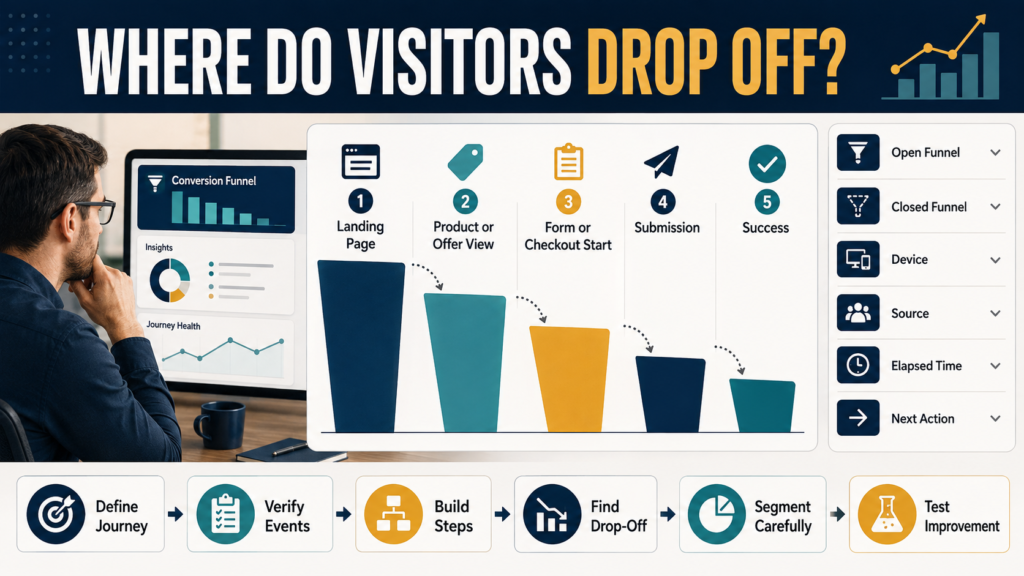
Knowing that a website received 1,000 visitors does not tell you whether those visitors completed the process you hoped they would complete.
Some may have:
- Read one article and left.
- Reached a landing page but never started the form.
- Started checkout but never purchased.
- Viewed a product but never moved to the next step.
- Completed the process successfully.
Google Analytics 4 Funnel exploration helps you analyze a defined sequence instead of viewing every website action separately.
Google describes Funnel exploration as a way to visualize the steps users take to complete a task and identify where they succeed or fail along the journey.
You can review Google’s current GA4 Funnel exploration documentation.
The key is to build a funnel that represents a real business journey.
Do not begin by adding every available event.
Begin with the question:
What process am I trying to understand?
What a Funnel Exploration Does
Suppose your lead-generation journey is:
Landing Page → Form Viewed → Form Started → Form Submitted → Thank-You Page
A funnel allows you to see how many users meet each defined step in sequence.
If 500 users reach the landing page but only 80 reach the form-start step, the largest opportunity may be before the form interaction.
If 80 start but only 20 submit, the form itself deserves investigation.
The funnel does not automatically tell you why people dropped out.
It tells you where the measurable drop-off occurred.
That gives you a better place to investigate.
Verify Your Measurement Before Building the Funnel
A funnel is only as accurate as the events and dimensions feeding it.
Before analyzing abandonment, verify that the important actions are actually being recorded.
For example:
If the form-submission event is broken, your funnel may show a huge final-step drop even when people successfully submit the form.
That is a tracking problem, not necessarily a marketing problem.
My guide to GA4 Events vs Key Events can help you decide which website actions deserve special measurement attention.
Where to Start
In GA4:
Explore → Start a New Exploration → Funnel exploration
Google provides a funnel-exploration template that you can configure with your own steps.
Before editing anything, write your desired journey on paper.
For example:
Article → Lead Magnet Page → Signup → Thank-You Page
or:
Product Page → Checkout → Purchase
or:
Homepage → Services Page → Contact Form → Submission
A four-step funnel you understand is usually more useful than a ten-step funnel you do not.
GA4 Supports Up to 10 Funnel Steps
Google currently allows up to ten defined steps in a Funnel exploration.
That does not mean you should automatically use ten.
Add a step when it represents a meaningful transition.
Avoid turning every page view into a separate stage unless that sequence truly matters.
For a simple lead magnet, five steps may be enough.
Funnel Conditions Can Use Events and Dimensions
Funnel steps can be defined using events or dimension values.
For example, a step might be:
- A specific page path.
- A particular event.
- A campaign dimension.
- Another qualifying condition.
Google notes that funnel-step conditions are not defined directly from metrics.
This distinction matters.
A funnel is asking:
Did the user meet this condition?
not:
Was this metric above 50?
Directly Followed vs Indirectly Followed
One of the most useful settings is whether the next step must occur directly after the previous step.
Directly Followed
The next defined step must happen immediately.
Indirectly Followed
Other actions may occur between the two defined steps.
Imagine your funnel is:
Landing Page → Checkout → Purchase
A user might visit an FAQ before checkout.
If you require steps to be directly followed, that additional action may affect how the sequence is counted.
If indirect progression is acceptable in the real customer journey, configure the funnel accordingly.
Your funnel settings should represent real behavior, not an imaginary perfectly linear visitor.
Open vs Closed Funnels
Google provides two important funnel structures.
Closed Funnel
A user must enter through the first defined step to be counted through the funnel.
This is useful when the first step is essential to your question.
Example:
You specifically want to study people who began on a campaign landing page.
Open Funnel
Users can enter at later steps.
This can reveal people who joined the journey somewhere in the middle.
For example, some visitors may reach a product page directly from search instead of entering through your homepage.
Neither type is universally better.
Choose the one that matches the business question.
Example: Lead Magnet Funnel
Suppose you want to measure a free checklist.
You might build:
Step 1: Landing Page Viewed
Visitors reach the lead magnet page.
Step 2: Signup Interaction
Visitors begin interacting with the signup process, assuming your tracking records this reliably.
Step 3: Signup Completed
The intended completion event occurs.
Step 4: Thank-You Page
Visitors reach the post-signup page.
Now you can identify the largest measurable loss.
If the biggest loss occurs between Step 1 and Step 2, investigate:
- Message clarity.
- Offer relevance.
- Form visibility.
- Page speed.
- Mobile design.
- Trust.
- Traffic quality.
If the biggest loss occurs after form interaction begins, investigate:
- Form length.
- Technical errors.
- Button behavior.
- Required fields.
- Mobile usability.
Use Breakdown Dimensions Carefully
Funnel exploration can break results down by a selected dimension.
For example:
Device category
could reveal whether mobile users progress differently from desktop users.
You might also analyze relevant audience or acquisition dimensions where appropriate.
But do not add a breakdown merely because GA4 makes it available.
Use one that could change a decision.
Ask:
“Would I investigate differently if this drop-off is mostly mobile?”
If yes, device is useful.
Remember How Breakdown Attribution Works
Google’s current documentation notes that when you use a breakdown dimension, users are attributed to the first applicable breakdown value when they enter the funnel.
That can matter when someone changes devices or otherwise changes relevant attributes during the journey.
Do not assume every dimension represents the user’s condition at every later funnel step.
Understanding the report’s counting rules prevents false conclusions.
Use Elapsed Time to Find Friction
Funnel exploration includes an option to show the average elapsed time between steps.
That can help reveal:
- Unexpected hesitation.
- A lengthy checkout process.
- A confusing registration flow.
- A journey that takes longer than expected.
Suppose:
Product Page → Checkout
happens quickly.
But:
Checkout → Purchase
takes an unusually long time.
That does not prove the checkout is bad, but it gives you a reason to investigate.
Look at Next Actions
GA4 can also display common next actions after funnel steps.
This is valuable when users do not follow your expected path.
Suppose people land on a sales page and then frequently move to:
FAQ
That may indicate they need more information before buying.
Suppose they move to:
Pricing Details
That may reveal where their attention is going.
The next-action information should generate hypotheses.
It should not become proof of motivation.
Analytics shows behavior.
It does not read the visitor’s mind.
Compare Funnel Segments
Google allows segment comparisons in Funnel exploration.
Potential comparisons include:
- New vs returning users.
- Mobile vs desktop audiences.
- Organic vs paid visitors.
- Campaign A vs Campaign B.
Use comparisons when they answer a useful question.
Do not create dozens of small segments and hunt for dramatic-looking percentages.
Small samples can produce unstable results.
Connect Funnel Analysis With Landing-Page Analysis
A funnel tells you how visitors move through a sequence.
The landing-page report tells you which pages begin sessions.
These tools answer different questions.
If you are deciding where a customer journey begins, your GA4 Pages and Screens reporting can also help you avoid confusing general page activity with true entry pages.
Do Not Treat Every Drop-Off as a Problem
Every funnel has drop-off.
Not everyone who reads an article should subscribe.
Not everyone who views a product should purchase immediately.
Not every visitor belongs in the target audience.
Your job is not:
“Eliminate all abandonment.”
Your job is:
“Identify unusual or costly friction.”
That is a much more realistic optimization goal.
Prioritize the Largest Meaningful Problem
Suppose your funnel shows:
Landing Page: 1,000 users
Form Start: 400
Form Submit: 360
Thank-You Page: 350
The biggest drop is before form start.
Do not spend the week changing the thank-you page.
Concentrate on the first transition.
This is where funnel analysis becomes useful: it focuses your testing.
Test One Meaningful Improvement
Once you identify a likely problem, make a controlled improvement.
For a landing-page issue, that might be:
- Clearer headline.
- Stronger benefit explanation.
- Better mobile layout.
- More obvious signup form.
Then measure the next comparable period.
My guide to improving landing-page conversion rate with a simple testing process provides a practical framework for making one meaningful change instead of redesigning everything at once.
Use Funnel Reports for Repeat Monitoring
Google also supports creating a custom funnel report from a Funnel exploration for users with the appropriate permissions.
That can be useful when the same funnel deserves regular monitoring.
You can review Google’s custom funnel report documentation for current requirements.
For a one-time investigation, the exploration may be enough.
For a core customer journey you review repeatedly, saving the funnel can reduce future setup work.
A Simple Funnel Review Worksheet
Record:
Business Goal: What successful action matters?
Starting Point: Where does the journey begin?
Step 1:
Step 2:
Step 3:
Step 4:
Open or Closed: Why?
Largest Drop: Between which steps?
Segment Checked: Device, source, etc.
Possible Explanation: Hypothesis only.
Tracking Verified: Yes / No.
Improvement to Test: One action.
Review Date: When will you compare again?
This keeps the analysis tied to action.
Conclusion
GA4 Funnel exploration is useful because it turns a complicated website journey into a defined sequence you can inspect.
Start with a real business process.
Verify the underlying tracking.
Define only the steps that matter.
Choose open or closed funnel logic deliberately.
Then look for the largest meaningful drop-off and investigate it with additional evidence.
Do not rebuild your website because one funnel percentage looks disappointing.
Use the funnel to answer:
Where should I look next?
For your first funnel, choose one simple journey—such as a lead magnet signup or product purchase—and map four or five steps from entry to success.
That will usually teach you more than another week of watching total page views.