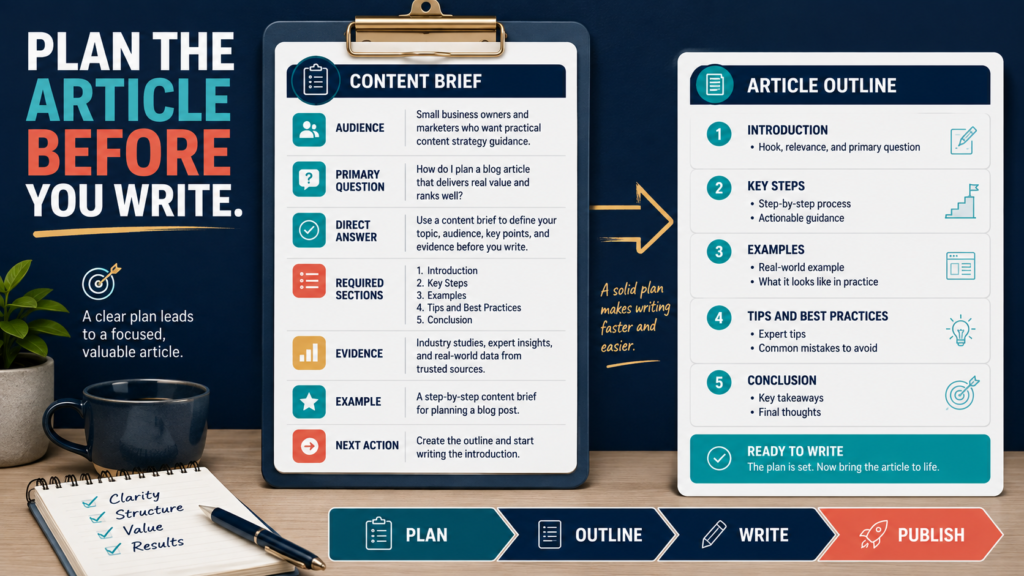
A content brief is a planning document that defines what an article must accomplish before the writing begins.
It identifies:
- The intended reader
- The reader’s question
- The direct answer
- The article’s purpose
- Required information
- Sources that need verification
- The example to include
- The action the reader should take
A content brief is especially useful when working with AI, freelance writers, team members, or a large publishing schedule.
Without a brief, the article may sound polished while answering the wrong question.
Key Takeaways
- Define one primary reader question.
- Write the central answer before creating the outline.
- Identify required evidence and changing facts.
- Plan one original example.
- Set a clear next action for the reader.
- Use the finished brief as the article’s review standard.
Affiliate Disclosure: This article contains affiliate links. If you purchase through one of these links, I may earn a commission at no additional cost to you. Affiliate compensation does not determine the conclusions or recommendations presented in this article.
Why Articles Become Weak Before Writing Begins
Many article problems begin during planning.
A writer may receive only:
Write a 1,500-word article about email marketing.
That instruction does not explain:
- Who the article serves
- What the reader wants to know
- Whether the article is educational or commercial
- Which part of email marketing matters
- What information needs verification
- What makes the article different
- What the reader should do afterward
The result may be a broad article containing definitions, generic benefits, and repeated advice.
A content brief replaces the broad subject with a specific assignment.
Need help with writing articles? Click here to find an abundance of content to make into articles
Section 1: Website and Business Purpose
Record where the article will be published.
Website:
[Website name]
Website purpose:
[What the website helps readers do]
Relevant product or business goal:
[Optional]
The same topic may require different treatment on different websites.
For example:
Educational AI Website
How beginners can use an email tool.
Marketing Website
How email supports lead generation.
Review Website
Whether the email tool is worth purchasing.
The subject overlaps, but the purpose changes.
Section 2: Intended Reader
Describe the primary reader.
Use:
- Experience level
- Business type
- Current problem
- Available resources
- Desired result
Example:
The reader is a beginner online-business owner with a small email list who wants a simple three-message welcome sequence.
This description is more useful than:
The audience is entrepreneurs.
A specific reader makes it easier to choose language and examples.
Section 3: Primary Question
Write the question the reader wants answered.
Example:
What should I include in the first three emails sent to a new subscriber?
The article should answer this question directly.
Avoid combining several large questions.
A single article should not attempt to explain:
- Choosing an email service
- Creating a lead magnet
- Building a landing page
- Writing a welcome sequence
- Running paid advertising
- Selling a course
Those topics may belong in a content hub.
Section 4: Search Intent
Identify what the reader is trying to accomplish.
Common purposes include:
Learn
The reader wants an explanation.
Complete
The reader wants instructions.
Compare
The reader wants to choose between options.
Evaluate
The reader wants a product review.
Solve
The reader has a specific problem.
Purchase
The reader is deciding whether to buy.
The article format should match the intent.
A person searching for “how to create a lead magnet” needs a process. A person searching for “LeadMagnet IQ review” needs evaluation and buying guidance.
Section 5: Direct Answer
Write the central answer in one to three sentences.
Example:
A beginner welcome sequence can contain three emails: immediate resource delivery, a helpful lesson addressing one obstacle, and a message inviting the subscriber to reply with a question.
This answer guides the outline.
The introduction should provide the same central recommendation early rather than delaying it.
Section 6: Supporting Questions
List the questions a complete article must answer.
For a welcome-sequence article:
- When should each message be sent?
- What should the delivery email include?
- How long should the emails be?
- Should a product be promoted?
- What common mistakes should be avoided?
- How should replies be handled?
- Which parts can be automated?
These questions become possible headings.
Section 7: Required Evidence
Identify statements that require verification.
Examples include:
- Product pricing
- Software features
- Search-engine guidance
- Legal requirements
- Platform policies
- Research statistics
- Licensing terms
- Refund policies
- Customer-support options
List the preferred sources.
Use:
- Official product pages
- Official documentation
- Government guidance
- Original research
- Recognized professional organizations
Do not instruct the writer to “add some statistics” without identifying why they are needed.
Section 8: Original Value
Plan what the article will provide beyond a basic summary.
Possible elements include:
- Original example
- Workflow
- Decision checklist
- Comparison criteria
- Practical warning
- Implementation schedule
- Beginner scenario
- Mistake-prevention process
- Personal perspective when approved
Google says its systems are designed to prioritize helpful, reliable content created primarily for people. Its guidance asks whether content demonstrates clear value and leaves readers feeling they learned enough to achieve their goal.
The brief should require useful value rather than additional word count.
Section 9: Original Example
Describe the example before drafting.
Example:
Show a retiree who creates a lead magnet for beginners and uses a three-email welcome sequence to deliver it, explain one common mistake, and ask subscribers what they need next.
A planned example is usually stronger than asking the writer to “include an example somewhere.”
Do not invent personal results or attribute the example to a real person without permission.
Section 10: Article Structure
List the sections in a logical order.
Example:
- Direct introduction
- What a welcome sequence does
- Email 1: Delivery
- Email 2: Helpful lesson
- Email 3: Reader question
- Timing options
- Practical example
- Common mistakes
- Setup checklist
- Conclusion
The outline should reflect the reader’s process rather than a generic article formula.
Section 11: Product or Affiliate Placement
Decide whether a recommendation belongs in the article.
Record:
- Product
- Reader problem it solves
- Appropriate section
- Important limitation
- Approved link
- Disclosure requirement
Do not include a product because the business has an affiliate link.
The recommendation should support the reader’s task.
Section 12: Visual Requirements
Plan the featured image and any supporting visuals.
Possible supporting visuals include:
- Workflow diagram
- Checklist
- Comparison chart
- Sample email
- Before-and-after example
- Decision tree
The image should represent the article rather than add unrelated decoration.
Section 13: Reader’s Next Action
Write one realistic action.
Examples:
- Draft the first email.
- Compare the current plans.
- Review one old article.
- Create an audience statement.
- Test the signup form.
- Complete the checklist.
Do not automatically use “buy now” as the conclusion.
The Complete Content Brief Template
Website:
[Website]
Website Purpose:
[Purpose]
Primary Reader:
[Reader]
Experience Level:
[Level]
Primary Question:
[Question]
Search Intent:
[Learn, complete, compare, evaluate, solve, or purchase]
Reader’s Current Problem:
[Problem]
Desired Result:
[Result]
Direct Answer:
[Answer]
Supporting Questions:
[Questions]
Required Sections:
[Sections]
Facts Requiring Verification:
[Facts]
Preferred Sources:
[Sources]
Original Example:
[Example]
Practical Value:
[Workflow, checklist, criteria, or process]
Relevant Product:
[Optional]
Product Limitation:
[Limitation]
Affiliate Disclosure Required:
[Yes or no]
Featured Image Concept:
[Concept]
Supporting Visual:
[Optional]
Reader’s Next Action:
[Action]
Claims to Avoid:
[Claims]
Final Review Standard:
[What must be true before publication]
A Practical Content Brief Example
Website:
Digital-marketing education website
Primary Reader:
A small-business owner publishing one article per week
Primary Question:
How should a newly published article be promoted?
Search Intent:
Complete a practical process
Direct Answer:
Test the article, send it to subscribers, adapt it for social platforms, create one supporting asset, and review the traffic sources.
Supporting Questions:
- What should be checked first?
- Which channels should be used?
- Should the same caption appear everywhere?
- How should links be tracked?
- When should the article be promoted again?
Original Example:
Show a seven-day promotion schedule.
Next Action:
Create the email and first social post before publishing the next article.
This brief gives the writer a clear assignment.
How to Use the Brief With AI
Paste the completed brief before asking AI to draft.
Use an instruction such as:
Create the article using the attached content brief. Follow the direct answer and required structure. Do not invent statistics, product experience, links, pricing, or personal stories. Mark any fact that needs verification rather than guessing.
OpenAI’s current guidance recommends placing clear instructions and context in the prompt and improving the request after reviewing the output.
AI should not be asked to replace missing business decisions.
How to Review the Draft Against the Brief
After drafting, compare the article with each field.
Ask:
- Does it address the intended reader?
- Is the main question answered?
- Is the direct answer provided early?
- Are all supporting questions covered?
- Is the evidence accurate?
- Is the example useful?
- Is the product relevant?
- Is the next action clear?
- Were prohibited claims avoided?
The brief becomes a quality-control checklist.
Common Content-Brief Mistakes
Choosing a Broad Topic Instead of a Question
“Artificial intelligence” is a topic.
“How can a beginner verify an AI-generated answer?” is a question.
Writing the Outline Before the Answer
Decide what the article recommends first.
Adding Keywords Without Reader Purpose
Search phrases should support the article, not control every sentence.
Requesting More Words Instead of More Value
Require examples, evidence, and action steps.
Leaving Research Undefined
Identify which facts need official verification.
Using the Same Brief for Every Website
Audience and purpose should change.
Conclusion
A content brief prevents weak blog posts by defining the audience, question, answer, evidence, original value, structure, and next action before drafting begins.
Use the brief as both a writing instruction and a final review standard.
Complete the direct-answer section of the template before outlining your next article.