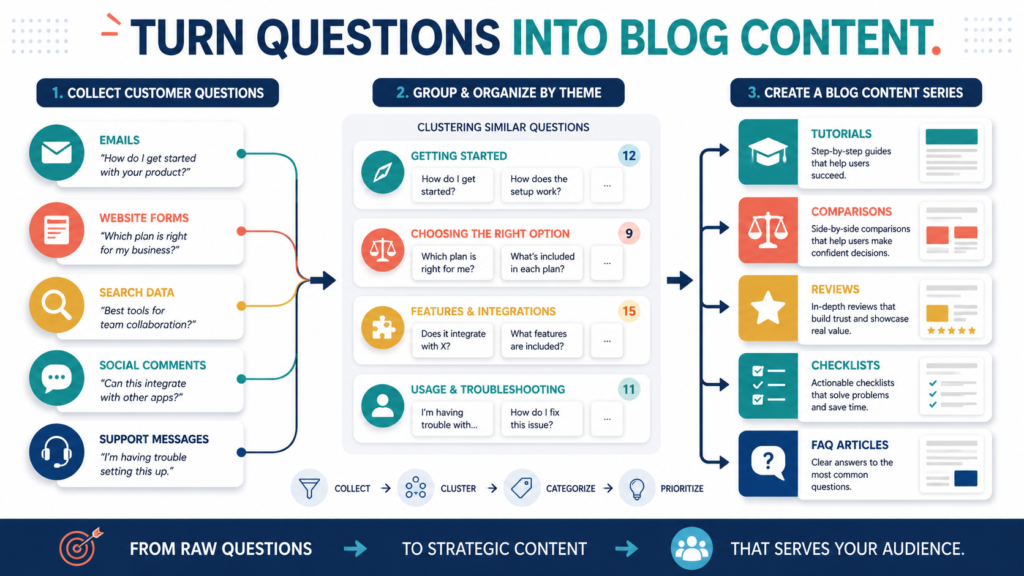
Customer questions can provide some of the strongest topics for a small-business blog because they reveal what people do not understand, what prevents them from acting, and what information they need before making a decision.
The process is straightforward:
- Collect questions from several sources.
- Record the customer’s original wording.
- Group questions by problem.
- Assign a distinct article purpose to each group.
- Create a logical publishing sequence.
- connect related articles when they exist.
- Review which questions continue to appear.
A useful content series should answer the questions completely rather than turning every short question into a thin article.
Key Takeaways
- Collect questions from email, support, comments, forms, and search data.
- Preserve the customer’s language.
- Group overlapping questions before selecting article topics.
- Choose the best format for each search intent.
- Combine narrow questions when one complete article can answer them.
- Use new questions to update the series.
Affiliate Disclosure: This article contains affiliate links. If you purchase through one of these links, I may earn a commission at no additional cost to you. Affiliate compensation does not determine the conclusions or recommendations presented in this article.
Why Customer Questions Are Valuable
A topic tool may show that a phrase is popular.
A customer question reveals something more specific:
- The person’s experience level
- The language used
- The decision being considered
- The point of confusion
- The desired result
- The obstacle preventing action
For example:
What email service should I use?
This question might involve several deeper concerns:
- Is there a free option?
- Which platform is easiest?
- Do I need automation?
- Can it build landing pages?
- Will the price increase?
- Can I move my contacts later?
A useful article should address the decision behind the words.
Step 1: Create a Question Collection System
Use one document or spreadsheet.
Include these fields:
- Date
- Question
- Source
- Audience
- Related product
- Theme
- Frequency
- Content status
- Notes
Sources may include:
- Email replies
- Contact forms
- Support messages
- Product comments
- Social-media comments
- Video comments
- Webinar questions
- Search Console
- Website search
- Customer reviews
- Sales questions
Do not scatter questions across several notebooks and inboxes.
Step 2: Preserve the Original Wording
Record the question before rewriting it.
A marketer may use:
What is the best digital content-delivery platform?
A beginner may ask:
How do I give the ebook to someone after they pay me?
The second version reveals what the customer actually needs explained.
Use the customer’s language in:
- Introductions
- Headings
- Examples
- FAQ sections
- Email subject lines
- Lead-magnet titles
Do not repeat awkward wording merely for keywords. Use it to understand the reader.
Step 3: Review Search Console Questions
Google Search Console’s Performance report shows data about Google Search traffic, including queries and pages, with metrics such as impressions and clicks. This can help identify search phrases connected to existing content.
Look for:
- Queries with impressions but few clicks
- Questions related to existing articles
- Unexpected wording
- Topics attracting the wrong audience
- Pages appearing for several related questions
- Questions that deserve clearer answers
Search data does not automatically tell you which article to create.
Combine it with customer messages and business relevance.
Step 4: Group Questions by Problem
Suppose you collect these questions:
- How do I start an email list?
- Do I need a product first?
- What should I give subscribers?
- Which email service should I use?
- What do I send after they join?
- How do I get people to the signup page?
These belong to the larger theme:
Beginner Email-List Building
Possible article groups include:
Setup
- How to start an email list
- Which tools are necessary
Lead Magnet
- What to offer
- How to create it
Welcome Sequence
- What to send
- When to send it
Promotion
- How to attract subscribers
- Where to place the signup page
Grouping prevents random publishing.
Step 5: Decide Whether a Question Deserves Its Own Article
Create a separate article when the question:
- Has a distinct intent
- Requires substantial explanation
- Supports a useful example
- Can be answered completely
- Fits the website
- Does not duplicate an existing page
Combine questions when they:
- Are minor variations
- Require only a few sentences
- Depend on the same central answer
- Would create thin pages separately
- Belong naturally in an FAQ section
For example:
Can I read the ebook on my phone?
This may belong inside a product FAQ rather than a complete article.
Step 6: Match the Question to a Content Format
How-To Guide
Use when the reader needs steps.
Example:
How to Build a Three-Email Welcome Sequence
Comparison
Use when the reader must choose.
Example:
GetResponse vs. AWeber for Beginners
Product Review
Use when the reader is evaluating one product.
Example:
Is ProductDyno Appropriate for a First Digital Product?
Checklist
Use when the reader must verify completion.
Example:
The Digital-Product Delivery Checklist
Mistakes Article
Use when the reader wants to avoid problems.
Example:
Seven Lead-Magnet Mistakes That Confuse Subscribers
FAQ Article
Use when several narrow questions belong together.
Example:
Beginner Email-List Questions Answered
The format should follow the reader’s need.
Step 7: Build a 12-Article Series
A customer-question series about creating digital products might include:
- How to choose one product idea
- How to identify the intended customer
- Ebook, checklist, or course: which format fits?
- How to outline the product
- How to use AI responsibly during creation
- How to review the completed content
- How to create a product cover
- How to write the product description
- How to choose a checkout
- How to deliver the product
- How to onboard new customers
- How to collect customer feedback
The articles follow the customer’s journey.
Step 8: Create One Central Guide
A larger series may benefit from a central article.
The central guide provides:
- Overview
- Major stages
- Basic recommendation
- Links to detailed articles
- Implementation sequence
Do not invent internal links before the supporting pages exist.
Add them as the series grows.
Step 9: Use Email Replies for Research
Ask subscribers one focused question.
Examples:
- What is the most confusing part of creating your first digital product?
- Which step of building an email list feels hardest?
- What prevents you from publishing consistently?
- Which online-business tool are you struggling to choose?
GetResponse can be used for newsletters, autoresponders, landing pages, and subscriber communication, allowing businesses to ask questions and collect replies through email campaigns.
You can explore GetResponse’s email-marketing features.
Do not send a long survey when one question will provide useful information.
Step 10: Turn Question Groups Into Lead Magnets
Several connected questions may become:
- Checklist
- Workbook
- Planning guide
- Resource list
- Decision chart
- Short email course
For example, repeated questions about choosing a digital-product format could become:
The Ebook, Checklist, or Course Decision Worksheet
LeadMagnet IQ is marketed as a cloud-based tool containing opt-in, bridge, thank-you-page, tracking, and member-area functions, although its public promotional materials include strong traffic claims that should be evaluated carefully.
You can review the current LeadMagnet IQ Commercial offer.
A tool can help create or deliver a subscriber resource, but the customer questions should determine what the resource teaches.
A Practical Question-to-Series Example
Imagine an affiliate-marketing website receives these questions:
- Do I need to buy the product before reviewing it?
- Can I write a review without testing it?
- Where should the affiliate disclosure go?
- Should every review recommend the product?
- How many links should be included?
- Can I review products without affiliate programs?
The website could create:
Article 1
How to Write a Product Review Without Inventing Firsthand Experience
Article 2
Where to Place an Affiliate Disclosure
Article 3
How to Decide Whether a Product Deserves a Recommendation
Article 4
How Many Affiliate Links Should a Review Include?
Article 5
Why Non-Affiliate Product Reviews Build Trust
Each article answers a distinct question.
Step 11: Prioritize the Questions
Use four criteria:
Frequency
How often is it asked?
Importance
Does it affect a purchase, refund, or customer result?
Relevance
Does it fit the website?
Usefulness
Can the article provide a meaningful answer?
Do not prioritize a question only because it contains a high-volume keyword.
Step 12: Track the Finished Series
Record:
- Question
- Article title
- Publication date
- Primary search phrase
- Related article
- Email sent
- Video created
- Lead magnet
- Update needed
This allows one question to support several assets without repeating identical content.
Common Question-Based Content Mistakes
Creating One Article for Every Sentence
Combine narrow questions.
Rewriting Questions Into Marketing Language
Preserve the reader’s meaning.
Answering Only the Keyword
Address the decision or problem behind it.
Ignoring Questions That Reveal Product Problems
Sometimes the product page or delivery system needs improvement.
Publishing Repetitive Articles
Give each page a distinct intent.
Using Questions Without Permission
Remove personal details and confidential information.
A Customer-Question Content Template
Original Question:
[Question]
Source:
[Email, support, search, comment]
Underlying Problem:
[Problem]
Audience:
[Reader]
Desired Result:
[Result]
Best Content Format:
[Guide, comparison, review, checklist, FAQ]
Direct Answer:
[Answer]
Supporting Questions:
[Questions]
Original Example:
[Example]
Related Product or Resource:
[Optional]
Next Action:
[Action]
Conclusion
Customer questions can become a useful blog content series when they are collected, grouped, and matched to distinct reader needs.
Preserve the customer’s language, combine overlapping questions, choose the right format, and organize the articles around the audience’s journey.
Create one question-tracking document and add the last ten questions you received before choosing the next blog topic.