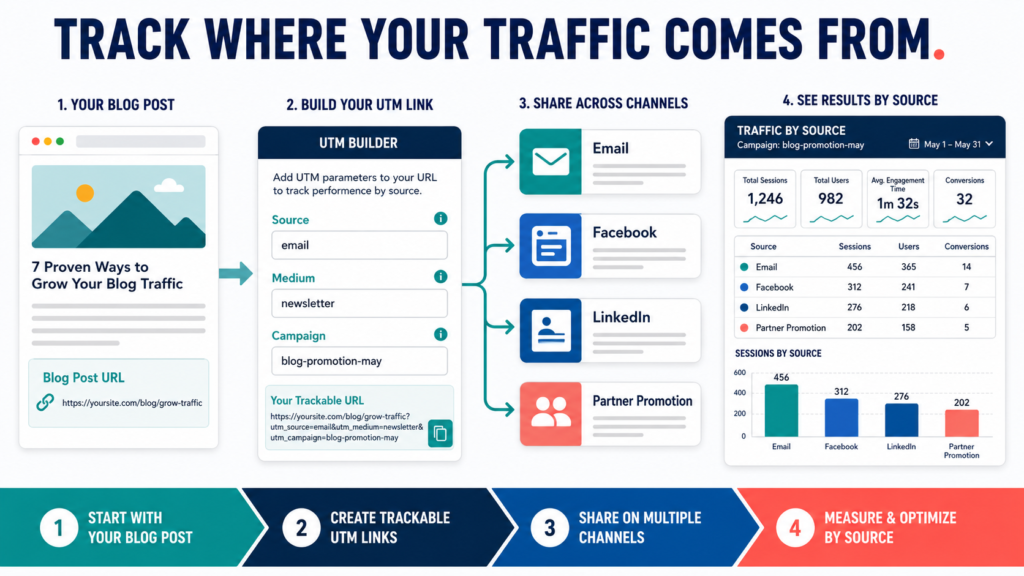
UTM links help you identify which email, social-media post, advertisement, or partner campaign sent visitors to a webpage.
A UTM link is a normal website address with campaign information added to the end.
For example, a regular article URL may be:
https://example.com/blog-promotion-checklist
A campaign version might identify that the visitor came from a newsletter:
The page remains the same. The additional information helps analytics software categorize the visit.
Key Takeaways
- Use UTM links for promotional campaigns you control.
- Keep source, medium, and campaign names consistent.
- Do not add UTM parameters to ordinary internal website links.
- Record every campaign link in a spreadsheet.
- Review the results to improve future distribution decisions.
What Does UTM Mean?
UTM is commonly associated with campaign-tracking parameters used in analytics systems.
Google’s official campaign documentation describes custom URLs that use parameters such as utm_source, utm_medium, and utm_campaign to capture information about referral campaigns. Google also provides a Campaign URL Builder that creates tagged URLs.
The commonly used parameters include:
utm_sourceutm_mediumutm_campaignutm_termutm_content
A beginner usually needs the first three.
Understanding the Three Main Parameters
UTM Source
Source identifies where the traffic originated.
Examples:
- newsletter
- youtube
- affiliate_partner
- guest_post
Use a consistent label for the same source.
Do not alternate among:
- fb
- facebook.com
- facebook_social
Those variations may appear as separate entries.
UTM Medium
Medium identifies the type of communication.
Examples:
- social
- paid_social
- referral
- cpc
- video
Source might be facebook, while medium is social.
UTM Campaign
Campaign identifies the promotion or initiative.
Examples:
- july_blog_batch
- ai_starter_kit
- product_launch
- welcome_sequence
- summer_content_refresh
Use a descriptive name that makes sense months later.
Optional Parameters
UTM Content
Content helps distinguish links inside the same campaign.
Examples:
- header_button
- text_link
- first_comment
- image_ad
- email_ps
This is useful when one email contains two links to the same page.
UTM Term
Term is often associated with paid-search keywords, although businesses may use it in other controlled tracking structures.
Do not add optional fields unless they answer a real reporting question.
When to Use UTM Links
Use them for links placed in:
- Email newsletters
- Welcome sequences
- Facebook posts
- LinkedIn posts
- YouTube descriptions
- Paid advertising
- Affiliate partner emails
- Guest articles
- Downloadable PDFs
- Online presentations
- QR-code campaigns
The link should represent a promotional source you control or intentionally track.
When Not to Use UTM Links
Do not normally use UTM parameters on internal links between pages of your own website.
For example, do not tag a link from your homepage to your blog article as a Facebook or email campaign.
Internal UTM links can interfere with attribution by creating a new campaign when a visitor is already on the website.
Use normal internal links for website navigation.
Step 1: Start With the Correct Destination URL
Copy the complete webpage address.
Open it in a private browser window to confirm that:
- The page loads.
- The connection is secure.
- The address is correct.
- The article is published.
- There are no typing errors.
Do not create campaign links for an unpublished draft.
Step 2: Define the Source
Ask:
Where will this link appear?
For a GetResponse newsletter, you might use:
utm_source=getresponse
or:
utm_source=newsletter
Choose one system and use it consistently.
For Facebook:
utm_source=facebook
For LinkedIn:
utm_source=linkedin
Step 3: Define the Medium
Ask:
What type of communication is sending the visitor?
Examples:
- Email newsletter:
utm_medium=email - Organic Facebook post:
utm_medium=social - Paid Facebook campaign:
utm_medium=paid_social - Affiliate partner:
utm_medium=affiliate - Guest article:
utm_medium=referral
Do not label every source as social when the communication types differ.
Step 4: Define the Campaign
Create a campaign name connected to the business purpose.
Example:
utm_campaign=july_31_blog_promotion
Better long-term names may avoid dates when the campaign is ongoing:
utm_campaign=ai_beginner_content_series
Do not use vague campaign names such as:
- campaign1
- new
- test
- marketing
- promo
Step 5: Use Google’s Campaign URL Builder
Google’s Campaign URL Builder allows you to enter the destination URL and campaign parameter values, then generates the tagged address.
Basic process:
- Enter the website URL.
- Enter campaign source.
- Enter campaign medium.
- Enter campaign name.
- Add optional term or content when needed.
- Copy the generated URL.
- Test it.
The tool reduces formatting errors, but it does not create your naming system.
Step 6: Test the Link
Paste the finished UTM link into a private browser.
Confirm that:
- The correct page opens.
- The parameters remain in the address.
- No spaces or broken characters appear.
- The page works on mobile.
- The link does not redirect to an unrelated page.
Do not distribute an untested campaign link.
Step 7: Record the Link
Use a spreadsheet with these columns:
| Date | Destination | Source | Medium | Campaign | Content | Final URL |
|---|---|---|---|---|---|---|
| July 31 | Blog article | newsletter | july_blog | main_button | Tagged URL | |
| July 31 | Blog article | social | july_blog | first_comment | Tagged URL | |
| July 31 | Blog article | social | july_blog | post_link | Tagged URL |
This prevents inconsistent naming and duplicated links.
A Practical Blog-Promotion Example
Suppose LeeOneMedia.com publishes an article titled:
The Blog Post Promotion Checklist for Small Websites
Create separate links.
- Source: newsletter
- Medium: email
- Campaign: blog_promotion_checklist
- Source: facebook
- Medium: social
- Campaign: blog_promotion_checklist
- Source: linkedin
- Medium: social
- Campaign: blog_promotion_checklist
Partner Email
- Source: partner_name
- Medium: referral
- Campaign: blog_promotion_checklist
The destination remains the same, but the source information differs.
Create a Naming Convention
A naming convention is a set of rules used every time.
Example rules:
- Use lowercase letters.
- Use underscores instead of spaces.
- Spell platform names consistently.
- Use
emailfor all email campaigns. - Use
socialfor unpaid social posts. - Use
paid_socialfor paid social. - Use descriptive campaign names.
- Avoid dates unless useful.
- Do not use personal information.
Document the rules in the tracking spreadsheet.
How to Read the Results
In Google Analytics, campaign information can be used to evaluate traffic associated with the tagged URLs.
Review:
- Users or sessions
- Traffic source
- Medium
- Campaign
- Landing page
- Engagement
- Conversions or key events when configured
Do not assume that the source with the most visits is automatically the best.
One source may bring fewer visitors who:
- Join the email list
- Read longer
- Click product links
- Complete a purchase
- Visit several pages
Compare Analytics With Search Console
UTM links track promotional campaigns you control.
Google Search Console focuses on visibility and traffic from Google Search, including queries, pages, impressions, clicks, and position information.
Use the tools for different questions.
UTM and Analytics Question
Which newsletter or social campaign sent visitors?
Search Console Question
Which Google searches and pages produced search impressions or clicks?
Do not expect the tools to display identical data because they measure different activities.
New Search Console AI Visibility Reports
Google announced dedicated generative-AI performance reports in June 2026 for a subset of Search Console properties. The reports include impression information for supported generative-AI search features, along with page, country, device, and date dimensions. Access is being rolled out gradually, so not every property will see the report.
This report is separate from UTM tracking.
UTM parameters identify campaigns you created. The Search Console report concerns visibility within supported Google Search AI features.
Common UTM Mistakes
Inconsistent Capitalization
Facebook and facebook may be treated separately.
Use lowercase.
Using Spaces
Use underscores or hyphens.
Creating Links Without Recording Them
A spreadsheet prevents forgotten campaign names.
Tagging Internal Website Links
Keep internal navigation clean.
Using Personal Information
Campaign parameters can remain visible in URLs and analytics. Do not place sensitive information in them.
Making Every Link Unique Without Purpose
Use optional parameters only when the difference matters.
Forgetting to Test
A correctly named link is useless when the destination is wrong.
A Simple UTM Checklist
Before Creating
- Destination page published
- Naming convention selected
- Source identified
- Medium identified
- Campaign identified
During Creation
- Lowercase used
- Spaces removed
- Optional content field added only when useful
- Final URL generated
After Creation
- Link tested
- Spreadsheet updated
- Platform placement recorded
- Analytics reviewed later
Conclusion
UTM links provide a practical way to identify traffic from email, social media, partner promotions, and other controlled campaigns.
Use consistent source, medium, and campaign names, generate the link carefully, test it, and record it before distribution.
Create one naming convention and use it for every promotional link in your next blog campaign.