A sitemap is one of the simplest SEO concepts to misunderstand.
A website owner submits a sitemap in Google Search Console.
The report says:
Success
Then several URLs remain unindexed.
The owner thinks:
Search Console must be broken.
Not necessarily.
Google’s current Sitemaps documentation is explicit:
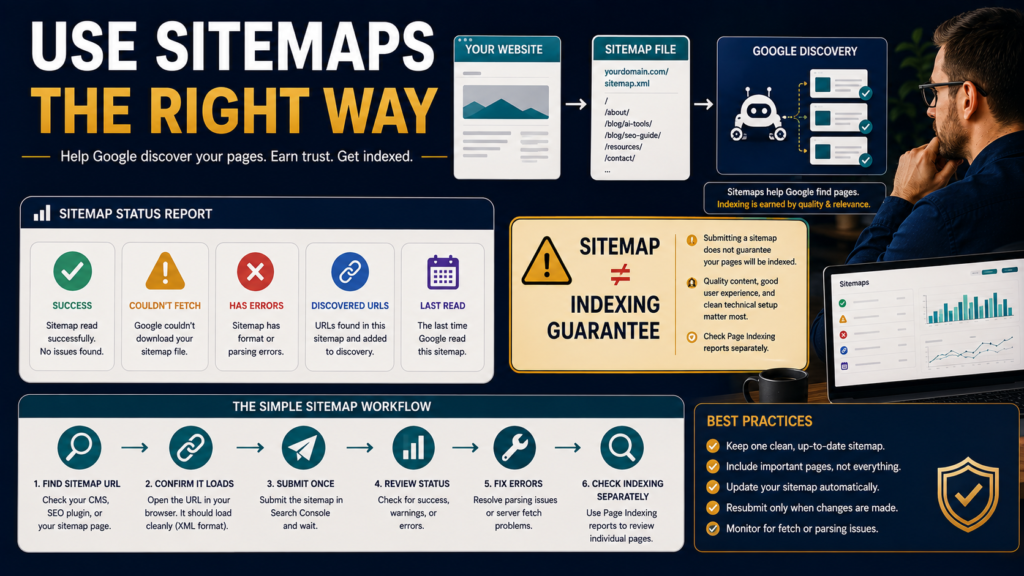
A sitemap tells Google which pages on your website you want it to know about, and the Sitemaps report lets you submit sitemap locations and review parsing or fetch errors. It does not guarantee that every URL will be indexed.
Think of a sitemap as:
Discovery information
not:
an indexing command.
What a Sitemap Does
A sitemap is a file that contains URLs you want search engines to know about.
A basic XML sitemap may list:
- Homepage.
- Articles.
- Pages.
- Categories.
- Products.
Depending on the implementation, sitemaps can also contain metadata relating to images, video, news, or alternate-language content.
The sitemap helps Google discover content more efficiently.
Many WordPress Sites Already Have One
Modern WordPress installations and SEO plugins commonly generate sitemap files automatically.
Before creating anything new, check whether your site already has one.
Common sitemap locations might resemble:
or
Your exact setup depends on WordPress, the theme, plugins, and hosting environment.
Do not create multiple overlapping sitemap systems without understanding what already exists.
Google Says Small Sites May Not Need a Sitemap
Google’s current Search Console documentation says that if a site has roughly 500 pages or fewer and every page can be reached through links starting from the homepage, a sitemap may not be strictly necessary for discovery.
That does not mean a sitemap is harmful.
It means you should not treat sitemap submission as a magical requirement that fixes every indexing issue.
What the Search Console Sitemaps Report Does
The current report allows property owners to:
- Submit a sitemap location.
- Review submitted sitemap history.
- See when Google read the file.
- See whether the sitemap was fetched successfully.
- Review parsing errors.
Important:
You are not uploading the XML file to Google.
Google says submitting means telling it where the file is located on your website.
Step 1: Open the Sitemap Yourself
Before submitting:
Open the sitemap URL in your browser.
Does it load?
If you get:
- Server error.
- Blank page.
- Redirect loop.
fix that first.
Search Console cannot successfully process a sitemap it cannot access.
Step 2: Submit the Correct Sitemap URL
Inside the property, submit the path requested by Search Console.
For example:
sitemap_index.xml
Make sure you are in the correct property:
- HTTPS.
- Domain.
wwwor non-www.
Google notes that sitemap reporting is property-specific.
Step 3: Read the Status
A successfully processed sitemap may show a successful status.
Problems can involve:
Could Not Fetch
Google could not retrieve it.
Sitemap Has Errors
Google read the file but detected a formatting or content issue.
Success
Google was able to process the submitted sitemap.
Again:
Success does not mean every URL was indexed.
Why “Success” and “Not Indexed” Can Both Be Correct
Suppose the sitemap contains:
100 URLs.
Google successfully reads all 100.
That means:
Google knows about those URLs.
Google may later decide:
- Some are duplicates.
- Some contain noindex.
- Some redirect.
- Some are crawled but not selected for indexing.
- Some are canonicalized elsewhere.
- Some have not been crawled yet.
Google explicitly says it does not guarantee indexing of all URLs in a sitemap.
Do Not Resubmit the Same Sitemap Every Day
Once Google knows the sitemap location, repeatedly submitting it does not force faster indexing.
Your sitemap should update when your website changes.
Google can return to it.
If there is no error, leave it alone.
Sitemaps Are Better for Many URLs Than Manual Requests
Google’s recrawl guidance distinguishes:
A Few URLs
URL Inspection.
Many URLs
Sitemap.
This is an important scaling principle.
If you publish a website with 300 useful pages, do not plan to manually request indexing 300 times.
Make your site discoverable and maintain the sitemap.
Only Include Canonical URLs You Want Google to Know About
A sitemap is a recommendation about important canonical URLs.
Avoid intentionally filling it with:
- Redirected URLs.
- 404 pages.
- Noindexed pages.
- Duplicate parameter URLs.
- Old staging pages.
That creates contradictory signals.
You are effectively telling Google:
Please discover this URL.
while the page says:
Do not index me.
Check Your Sitemap After a Site Migration
Sitemaps become particularly useful when:
- Launching a new site.
- Moving to a new domain.
- Changing URL structure.
- Publishing large new sections.
Google specifically identifies sitemap submission as useful for larger numbers of URLs and during situations such as site launches or moves.
Check Last Read
The Sitemaps report can show when Google last processed the sitemap.
That helps answer:
Is Google still able to access this file?
If a sitemap used to work and now repeatedly fails, investigate changes to:
- Server.
- Security plugin.
- Firewall.
- CDN.
- Sitemap plugin.
- WordPress configuration.
“Couldn’t Fetch” Does Not Always Mean the Sitemap Syntax Is Wrong
Possible causes include:
- Temporary server issue.
- Access restrictions.
- DNS problem.
- Wrong URL.
- Authentication.
- Security rules.
Open the file yourself and inspect server behavior.
Sitemap Errors Need Specific Fixes
If Search Console says the sitemap was read but contains errors, inspect the reported problem.
Examples might involve:
- Invalid URL formatting.
- Incorrect XML.
- Unsupported content.
- Wrong namespace.
- Malformed dates.
- URLs outside the property.
Do not rebuild the entire website because one sitemap row contains an error.
Fix the specific issue.
Sitemap Index Files
A sitemap index is a file that points to multiple child sitemaps.
Example:
sitemap_index.xml
contains:
- post-sitemap.xml
- page-sitemap.xml
- product-sitemap.xml
This is useful for larger or structured sites.
The index itself does not represent one webpage.
It organizes other sitemap files.
Check the Page Indexing Report Separately
If the sitemap is successful but important URLs are missing from Google:
Open the Page Indexing report.
Ask:
- Were they discovered?
- Were they crawled?
- Are they noindexed?
- Are they duplicates?
- Are there server errors?
Then use URL Inspection on representative pages.
This separates:
Sitemap problem
from
page indexing problem.
Internal Links Still Matter
A sitemap is not a substitute for site architecture.
Your pages should be connected through meaningful internal links.
Your existing guide on using internal links for SEO without stuffing links into every paragraph explains that layer.
If the only way to discover an article is through an XML file nobody sees, your site structure may deserve attention.
Do Not Add Every Utility URL
A sitemap should focus on meaningful URLs.
You generally do not need to intentionally promote:
- Thank-you pages.
- Internal search.
- Login pages.
- Temporary campaign pages.
- Duplicate tag/filter URLs.
The exact sitemap structure depends on your website.
Check Whether Old Content Still Belongs
If your sitemap contains hundreds of outdated pages, do not automatically delete them.
First audit their usefulness.
LeeOneMedia’s guide to auditing old blog content without deleting useful pages provides a more careful decision process.
A sitemap audit can reveal content-management problems, but it does not decide the solution for you.
A Simple Sitemap Review Checklist
Sitemap Location
Does it load publicly?
Search Console Status
Success or error?
Last Read
Is Google still accessing it?
URLs
Are the listed URLs canonical and useful?
Removed Pages
Are obsolete 404/redirect URLs still being included?
Noindex Pages
Are intentionally excluded pages being submitted unnecessarily?
Indexing
Are important sitemap URLs actually indexed?
Site Links
Can important pages also be reached naturally through the website?
How Often Should You Check?
For a small, stable WordPress site:
You do not need to stare at the Sitemaps report every day.
Check when:
- Setting up Search Console.
- Changing SEO plugins.
- Moving sites.
- Changing domains.
- Publishing major new sections.
- Investigating discovery/indexing issues.
If the sitemap remains successful, move on to more useful work.
What a Sitemap Cannot Fix
A sitemap cannot repair:
- Poor content.
- Duplicate pages.
- Noindex.
- Broken server.
- Incorrect canonical.
- Spam-policy violations.
- Weak internal linking.
- Irrelevant content.
It simply helps discovery.
Conclusion
The Search Console Sitemaps report is useful because it tells Google where your sitemap lives and shows whether Google can read it.
Use it to:
- Submit the correct sitemap.
- Monitor fetch status.
- Fix parsing errors.
- Confirm Google continues reading the file.
But remember the most important rule:
A submitted sitemap is not an indexing guarantee.
For a few individual URLs, use URL Inspection.
For sitewide indexing patterns, use Page Indexing.
For many URLs, maintain a clean sitemap.
Then allow each Search Console tool to do the job it was designed to do.