Links influence how people and search engines move through the web.
Your own internal links connect related pages.
External websites may link to your articles, tools, research, or other resources.
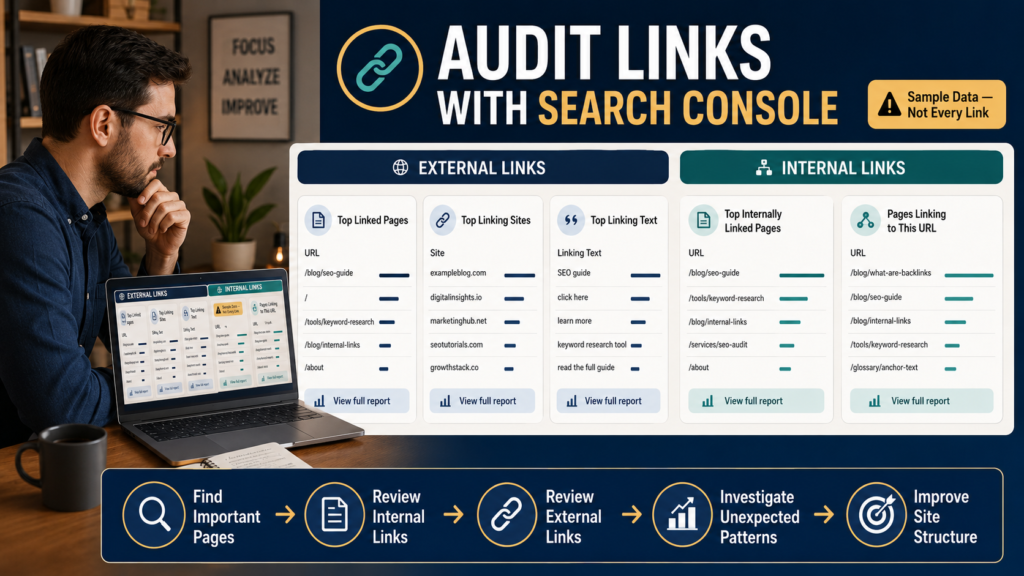
Google Search Console provides a Links report that helps you inspect both types.
Google’s current documentation says the report can show information such as:
- Top externally linked pages.
- Top linking sites.
- Top linking text.
- Top internally linked pages.
- Which pages internally link to a particular URL.
But there is an important limitation:
The Links report is a sample, not a complete database of every link Google knows about.
Google specifically states that some URLs can be omitted and that the report should be used to understand the site’s overall link profile rather than treated as an exhaustive inventory.
Google’s official Search Console Links report documentation
Where to Find It
Open Google Search Console.
Select the correct property.
Then open:
Links
The report is generally divided into:
External Links
Links from other websites to yours.
Internal Links
Links from your own pages to other pages on the same site.
These answer different questions.
Start With Internal Links
For many small websites, the internal-links section produces the most immediately actionable information.
Open:
Internal Links → Top Linked Pages
Ask:
Are my important pages receiving internal links?
Google says this table can help confirm that important site pages are appropriately connected within the site.
Your Most Important Page Does Not Need the Highest Number
Do not turn internal-link counts into a contest.
The homepage may naturally receive many links because it appears in navigation.
A Contact page may also appear sitewide.
What matters is whether important content can be discovered through relevant pathways.
Identify Important Pages With Surprisingly Few Internal Links
Suppose you have a major guide:
Complete Beginner Guide to Google Analytics 4
But Search Console shows very few internal links pointing to it.
Ask:
- Are related articles linking to it?
- Is it part of the appropriate topic cluster?
- Can visitors discover it?
- Is it buried several clicks deep?
That may reveal a site-architecture opportunity.
Check Which Pages Link to a Specific URL
Search Console allows you to select an internally linked page and see which pages point to it.
This is useful when auditing one important URL.
For example:
Target: GA4 Blog Performance Guide
You may discover links from:
- Analytics article.
- UTM article.
- Traffic guide.
That is logical.
If the only internal link comes from an old archive page, the page may deserve better contextual connections.
Internal Links Should Help Readers
Do not respond to a low link count by inserting the URL into 50 unrelated articles.
A good internal link should answer:
Would someone reading this section genuinely benefit from the destination?
LeeOneMedia already has a detailed guide on this:
How to Use Internal Links for SEO Without Stuffing Links Into Every Paragraph
Search Console Groups URLs by Canonical
This is an important reporting detail.
Google says pages are grouped by canonical URL in the Links report. Parameters and duplicate variations can therefore be consolidated rather than appearing exactly as you might expect.
If a link appears associated with a canonical destination rather than the exact URL you remember, that may explain the discrepancy.
The Main Interface Is Limited
Google’s current documentation says many Links report tables are limited to 1,000 rows in the Search Console interface.
Large sites should therefore not assume:
The report shows 1,000 rows, so Google knows exactly 1,000 links.
The table may simply have reached its display limit.
External Links: Top Linked Pages
Open:
External Links → Top Linked Pages
This shows which pages on your website have received the most external links in the sampled data.
Ask:
- Are these pages expected?
- Which content attracts links?
- Are old URLs receiving important backlinks?
- Do valuable resources receive recognition from other sites?
This can inform future content decisions.
Do Not Equate “Most Links” With “Best Page”
A page may attract many links because:
- It contains research.
- It was mentioned years ago.
- It is a free tool.
- It is controversial.
- It has been scraped.
Link count alone does not determine page quality.
Use it as context.
External Links: Top Linking Sites
This report identifies root domains that link to your site most frequently.
Google says you can click a linking site to inspect which of your pages it links to.
Possible legitimate sources include:
- Industry blogs.
- Partner websites.
- Directories.
- News sites.
- Educational resources.
You may also see unfamiliar domains.
Do Not Panic Over Every Strange Domain
The public web contains spam.
A strange backlink does not automatically mean:
My website is under attack.
Google’s documentation notes that known spammy links are typically handled by Google’s systems, and its manual-action guidance reserves disavowal-type actions for particular situations involving problematic link patterns.
Do not start disavowing random links simply because you do not recognize a domain.
External Links: Top Linking Text
The report can also show common external link text.
Examples:
- Brand name.
- Article title.
- “click here.”
- Product name.
Google says the report groups link text and can help you determine how other sites describe your content.
Again, this is sample data.
The Report May Include Old Links
Google states that the Links report can include links discovered over time that have subsequently been removed or whose original pages no longer exist.
This is important.
You may click a reported backlink and discover:
The link is gone.
That does not necessarily mean Search Console is malfunctioning.
The report is not real-time link monitoring.
The Report Does Not Tell You Nofollow Status
Google explicitly says the Links report does not indicate whether an individual link carries nofollow.
Do not use it as a detailed backlink-analysis replacement when you need attribute-level information.
Export the Data When You Need More Analysis
Search Console offers exports.
Google says external link exports can include significantly larger samples, including up to 100,000 rows in certain export views such as Latest Links or More Sample Links.
Exports can be useful when:
- Comparing data over time.
- Sorting by page.
- Keeping a historical snapshot.
- Auditing a large site.
Create an Internal-Link Audit
Export or review the internal section.
Create three groups.
Tier 1 — Important Pages
Core guides, service pages, major product/category pages.
Tier 2 — Supporting Content
Related blog posts and resources.
Tier 3 — Utility Pages
Contact, legal, thank-you, login, and other supporting pages.
Then ask:
Are Tier 1 pages receiving enough logical connections from Tier 2 content?
Do not chase a fixed number.
Look for Orphan-Like Content Carefully
Search Console’s report alone cannot prove a page is completely orphaned because the data is sampled.
But a valuable page with zero or very few reported internal links deserves investigation.
Check:
- Navigation.
- Related articles.
- HTML sitemap if applicable.
- Category pages.
- Manual site crawl.
Use Search Console as a clue.
Combine Links With URL Inspection
Suppose an important article has weak internal linking and indexing problems.
Inspect the exact URL.
Your newly verified guide explains the page-level workflow:
How to Use the Search Console URL Inspection Tool to Troubleshoot One Page
This helps separate:
Link structure problem
from:
page-level crawl or indexing problem.
Use Link Data During Content Audits
An old page may appear low traffic but still attract valuable external links.
Before deleting it, investigate.
Your existing audit guide provides the broader framework:
How to Audit Old Blog Content Without Deleting Useful Pages
Possible better choices might include:
- Update.
- Merge.
- Redirect.
- Preserve.
Do not delete solely because traffic is low.
Look for Patterns, Not Isolated Numbers
Useful questions:
- Which article types attract external links?
- Which major pages receive few internal links?
- Are several obsolete URLs still attracting backlinks?
- Which sites consistently reference you?
- Is the internal architecture concentrated on a few pages?
Patterns produce better decisions than individual link counts.
A Simple Monthly or Quarterly Review
For a small website:
Internal
- Review important pages.
- Find unexpectedly weak internal linking.
- Add useful contextual links where appropriate.
External
- Review top linked pages.
- Review major linking sites.
- Investigate unusual patterns if necessary.
Historical
- Export periodically if you want comparisons.
That is enough.
What the Links Report Cannot Tell You
It is not:
- A complete backlink database.
- A real-time link tracker.
- A domain-authority score.
- A guarantee of ranking value.
- A replacement for manual site architecture review.
Use it for what Google designed it to show.
Conclusion
The Search Console Links report gives you a useful Google-centered view of your site’s internal and external link patterns.
Use the internal section to ask:
Are important pages well connected?
Use the external section to ask:
Which pages and websites are linking to me?
Then remember the limitations.
The report is sampled.
It can contain historical links.
It groups canonical URLs.
And it does not show every link Google knows about.
Treat it as evidence—not a complete link database—and use it to improve the structure that real visitors navigate.