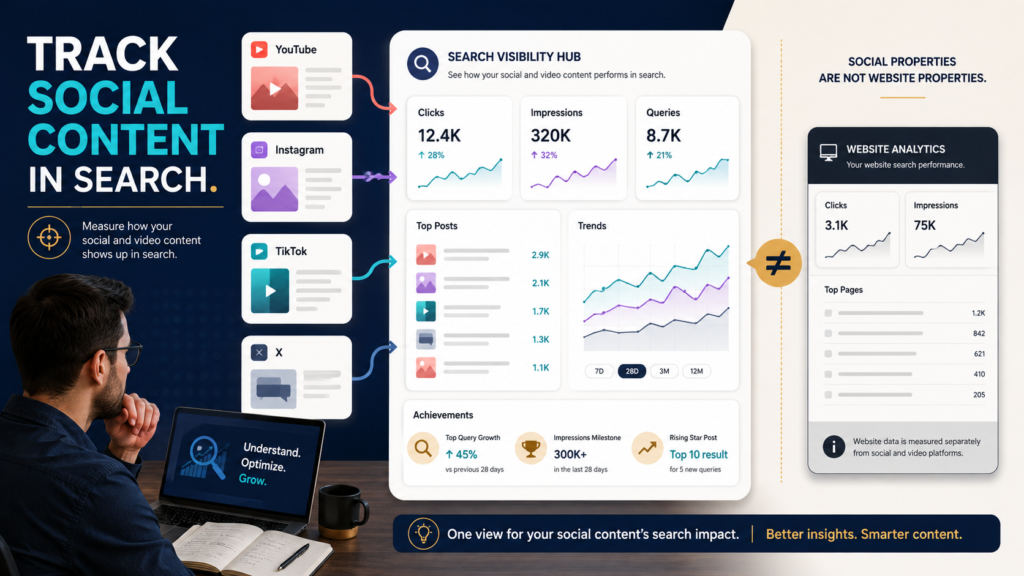
Google Search Console is no longer limited to websites.
In July 2026, Google introduced platform properties, allowing creators to measure how content from YouTube, Instagram, TikTok, and X performs in Google Search and related Google discovery surfaces.
Google’s initial announcement described Performance reports, Insights, and Achievements for these platform properties. Later in July, Google announced that platform properties had become globally available.
That is especially useful for creators who publish on several channels but have never known which social posts or videos Google Search is actually discovering.
You can now investigate questions such as:
- Which Google searches lead to my YouTube videos?
- Which older videos are gaining search visibility?
- Does a TikTok post receive Google impressions?
- Which social content is trending upward?
- Which platform performs best for a particular subject?
Which Platforms Are Supported?
Google currently lists four platform-property types:
- YouTube.
- Instagram.
- TikTok.
- X.
The original July announcement said users could select one of those four platforms during the property-creation process.
Google’s July 29 update then stated that platform properties were globally available.
That is different from adding your ordinary website domain as a Search Console property.
Each platform property represents your content on the supported external platform.
What Can You See?
Google’s initial announcement described three primary reporting areas.
Performance Report
This can show:
- Clicks.
- Impressions.
- Posts.
- Queries.
Google says the report can be filtered and sorted so creators can see which posts and search terms are driving performance.
Insights Report
The Insights view provides higher-level information about:
- Recent traffic trends.
- Top-performing posts.
- How people discover the account through Google.
Achievements
Google also provides milestones based on Google Search click growth.
Those reports give creators a search-oriented view that is different from the platform’s native analytics.
Why This Matters for YouTube Creators
YouTube Studio can tell you a great deal about performance inside YouTube.
Search Console platform properties answer a different question:
How does my YouTube content perform when people encounter it through Google Search?
Suppose you publish a video titled:
How to Build a Simple Evergreen Sales Funnel
Search Console might reveal Google queries related to:
- evergreen funnel for beginners
- digital product funnel
- simple sales funnel
- how to automate a product funnel
Those queries can show how Google searchers describe the problem.
That information can influence:
- Future video topics.
- Titles.
- Descriptions.
- Follow-up videos.
- Blog content.
- Playlist organization.
Create the Platform Property
Google’s setup instructions currently follow this basic process:
- Open Search Console.
- Choose Add Property.
- Select a supported platform.
- Choose YouTube, Instagram, TikTok, or X.
- Complete the secure authorization steps.
Google’s July announcement explains that the connection uses onscreen verification or authorization.
Use the current Search Console interface because exact labels can change.
Start With the Insights Report
Do not immediately export every data point.
Begin with:
- Top content.
- Trending content.
- Search themes.
- Changes over time.
Google’s July 29 guide specifically recommends looking at top, trending-up, and trending-down query groups to understand what search audiences care about.
That can give you a fast content-strategy view.
Example: YouTube Query Groups
Suppose you have a YouTube channel about online business.
Your query groups might show:
Topic A — AI Prompting
Trending up.
Topic B — Digital Product Pricing
Stable.
Topic C — Affiliate Marketing Basics
Trending down.
You could then investigate the actual videos within each group.
Do not immediately assume the trending-up subject deserves 20 new videos.
Ask:
- Which video is producing the visibility?
- Which specific query is growing?
- Is the content still accurate?
- Is there a logical follow-up?
- Does the subject fit your business goals?
Use the 24-Hour View for Sudden Spikes
Google’s July 29 guidance specifically points to the 24-hour filter as a way to identify traffic spikes affecting recent social or video posts.
That can be valuable when:
- A video suddenly receives search attention.
- A news event increases interest.
- An older post becomes timely again.
- A particular topic starts trending.
If something spikes, investigate why.
Then decide whether to:
- Cross-promote it.
- Create a related follow-up.
- Update the description.
- Add it to a playlist.
- Expand it into an article.
Older Content Can Become Valuable Again
One of Google’s suggested use cases is identifying older social or video content that begins gaining search traction again.
That matters because creators often focus only on the newest upload.
Search can revive older evergreen material.
Suppose a two-year-old tutorial starts gaining impressions.
Before replacing it, ask:
- Is the information current?
- Does the title still match the search need?
- Could it benefit from a sequel?
- Should it be featured more prominently?
- Is there a related website article?
Search visibility can help you find assets worth revisiting.
Compare Multiple Platforms
Google also suggests exporting data from multiple platform properties so performance can be compared across channels.
For example:
| Topic | YouTube | TikTok | X | |
|---|---|---|---|---|
| AI prompts | Strong | Moderate | Low | Moderate |
| Digital products | Strong | Low | Moderate | Low |
| Email marketing | Moderate | Low | Low | Moderate |
The goal is not to make every platform identical.
The purpose is to understand where different subjects gain Google visibility.
Do Not Replace Native Platform Analytics
Search Console does not replace YouTube Studio, Instagram Insights, or other native analytics.
Native analytics can answer questions such as:
- Watch time.
- Retention.
- Followers.
- Likes.
- Comments.
- Platform recommendations.
Search Console answers questions about Google discovery.
Use both.
Search Console and Website Analytics Are Also Different
If someone clicks from an AI assistant or other referral source to your website, GA4 can help identify that incoming traffic when the referral is available.
LeeOneMedia’s guide to tracking AI Assistant traffic in Google Analytics 4 covers that separate measurement problem.
Search Console platform properties instead show how external social and video content is surfaced through Google.
Different channel.
Different question.
Use Search Queries to Improve Titles Without Chasing Keywords
Suppose a YouTube video titled:
My Simple Email Setup
is receiving impressions for:
how to create an email welcome sequence
The search query may reveal that the video’s actual value is more specific than its title communicates.
That could justify a clearer title.
But do not stuff ten query variations into the title.
Use search data to improve clarity.
Track Important Changes
Google’s July 29 guidance also mentions using Search Console annotations to mark changes such as rewriting a YouTube title or TikTok caption and then evaluating what happens afterward.
That creates a cleaner experiment:
Aug. 17: Updated video title.
Aug. 24: Reviewed impressions and clicks.
Without a record, it becomes difficult to connect later changes with actions you made.
Turn Search Questions Into New Content
One of the strongest uses for platform-property data is discovering questions.
If searchers repeatedly find a YouTube video through:
how do I validate a digital product idea
you might create:
- Follow-up video.
- Checklist.
- FAQ.
- Blog article.
- Short-form series.
LeeOneMedia’s guide on turning customer questions into better blog content applies a similar principle: audience questions are more useful than random topic generation because they reveal what people are actively trying to understand.
A Monthly Platform Property Review
Once per month, record:
Platform:
YouTube
Total Google Clicks:
[Number]
Total Impressions:
[Number]
Top Posts:
[List]
Trending-Up Query Groups:
[List]
Trending-Down Query Groups:
[List]
Older Content Regaining Visibility:
[List]
One Content Opportunity:
[Topic]
One Optimization:
[Action]
Then repeat for the other platforms you actually use.
Do not collect data merely because the report exists.
Turn it into one or two decisions.
Conclusion
Search Console platform properties give creators something they did not previously have in one place: direct Google Search performance data for supported YouTube, Instagram, TikTok, and X content.
Use the feature to understand:
- Which posts Google surfaces.
- Which queries drive discovery.
- Which subjects are trending.
- Which older assets are returning.
- How performance differs across platforms.
The most useful first step is not creating more content.
Add your primary platform property, review the top queries and posts already receiving Google visibility, and identify one proven search theme you can expand intelligently.