Website owners have been asking a difficult question:
Is my site actually appearing inside Google’s AI-powered search experiences?
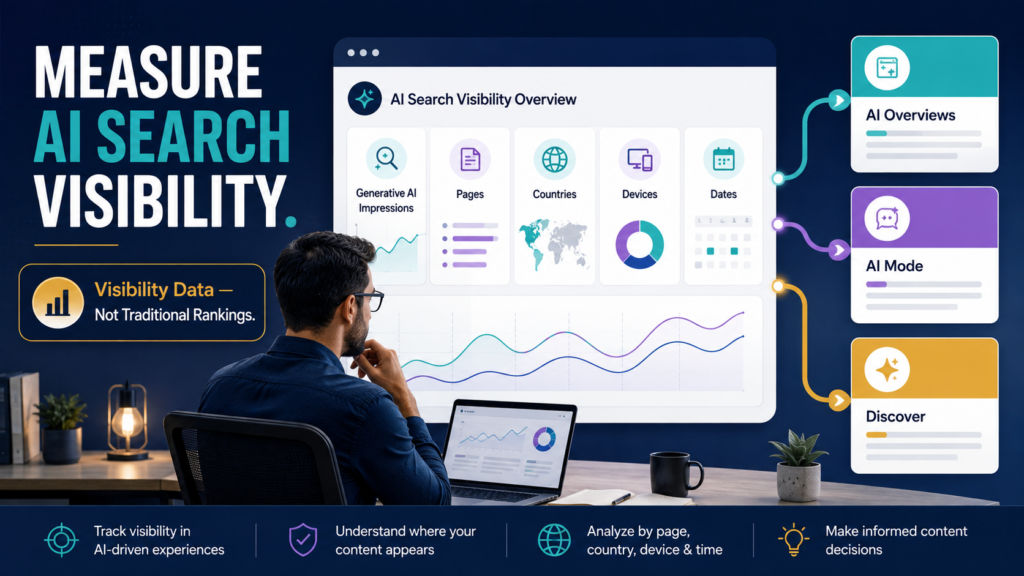
In June 2026, Google introduced dedicated Generative AI performance reports in Search Console to give eligible site owners a separate view of visibility inside generative AI experiences.
Google says the new reports can show impressions from generative AI features in Search—including AI Overviews and AI Mode—as well as generative AI features in Discover. The Search report includes dimensions such as pages, countries, devices, and dates. Google is still rolling the reports out to a subset of website owners rather than making them universally available.
That makes the report useful—but also easy to misunderstand.
It is not a traditional keyword-ranking report.
It is not proof that AI search visibility produced a sale.
And if you do not see the report, that does not automatically indicate a problem with your site.
What the Generative AI Report Measures
Google’s current announcement lists several important dimensions.
Impressions
The report can show how often URLs from your site appeared in applicable generative AI features.
Pages
You can investigate which URLs were shown within those AI experiences.
Countries
You can examine where the visibility originated geographically.
Devices
For the Search version of the report, Google includes device information.
Dates
Google says the data can be viewed with hourly, daily, weekly, and monthly granularity.
That gives website owners a new type of visibility data that was difficult to isolate previously.
Why This Is Different From the Normal Search Performance Report
Traditional Search Console analysis usually focuses on:
- Clicks.
- Impressions.
- Queries.
- Pages.
- CTR.
- Average position.
The generative AI report is more specifically about visibility within generative AI features.
Google says this data remains part of overall Search performance while the dedicated report provides a separate view of that AI-feature visibility.
That distinction matters.
If an article receives 20 generative AI impressions, that does not mean:
- It ranked #1.
- It received 20 clicks.
- It was the primary source of an AI response.
- The user read the page.
- The page generated revenue.
An impression is evidence that the content appeared in the relevant experience under Google’s reporting rules.
It is one data point.
What If You Do Not See the Report?
Do not assume something is wrong.
Google’s current documentation says the report remains limited to a subset of properties while testing continues. The Discover documentation also notes that insufficient generative AI impressions can be another reason a property does not show the report.
Therefore:
Report missing does not equal website invisible to AI search.
It may simply mean your property does not yet have access.
Start With a Baseline
If you have access, do not immediately begin rewriting articles.
Create a baseline.
Record:
Period:
Last 28 days
Generative AI Impressions:
[Number]
Pages Appearing:
[Number]
Top Pages:
[List]
Top Countries:
[List]
Device Mix:
[If available]
Then repeat the same review later.
The goal is to establish a trend.
Examine Which Pages Appear
This may be the most practical part of the report.
Suppose these pages receive AI-feature impressions:
- Beginner tutorial.
- Comparison article.
- Detailed FAQ.
- Troubleshooting guide.
Ask what they have in common.
Possible questions:
- Are they unusually clear?
- Do they answer narrow questions?
- Do they contain original explanations?
- Are they current?
- Do they include strong examples?
- Are they part of a recognizable topic cluster?
Do not immediately conclude that one structural feature caused the visibility.
Look for repeatable patterns across a meaningful sample.
Compare AI Visibility With Regular Search Visibility
Suppose Page A performs strongly in ordinary Search but receives few generative AI impressions.
Page B receives modest normal-search traffic but appears frequently in AI features.
That difference may be useful.
Create a table:
| Page | Normal Search Impressions | AI Impressions | Normal Clicks | Notes |
|---|---|---|---|---|
| Guide A | High | Low | High | Strong traditional search |
| Guide B | Medium | High | Medium | Strong AI visibility |
| Guide C | Low | Low | Low | Needs investigation |
Do not force every page to perform identically in every search experience.
Different formats and queries may produce different visibility patterns.
Look at Page Type
Group the pages manually.
Examples:
- How-to.
- Review.
- Comparison.
- Definition.
- Troubleshooting.
- Checklist.
- Case study.
- FAQ-heavy guide.
You may discover that one type is appearing disproportionately.
That gives you an editorial question worth investigating.
It does not automatically give you a formula.
Do Not Create “AI Overview SEO” Tricks
Google’s broader AI-search guidance has emphasized that normal SEO fundamentals remain relevant and that publishers do not need special AI files, new machine-readable markup, or unusual technical tricks simply to appear in its AI experiences. Google’s guidance for succeeding in AI search emphasizes useful content, crawlability, indexability, page experience, and traditional Search fundamentals.
That means a dangerous response would be:
Our AI impressions increased, so let’s manufacture 300 nearly identical “AI-optimized” articles.
A better response is:
Which existing pages are useful enough to appear, and what can we learn from them without copying ourselves?
Compare Search Console With GA4
Search Console tells you about visibility inside Google Search experiences.
GA4 helps analyze identifiable visits after users reach the website.
Those are different questions.
LeeOneMedia’s guide to tracking AI Assistant traffic in Google Analytics 4 examines identifiable referral traffic from AI assistants such as ChatGPT, Gemini, Claude, and related sources.
The Search Console generative AI report instead deals with visibility inside Google’s own generative AI search experiences.
Do not combine the two metrics as though they represent the same traffic source.
Watch Trends Over Time
An isolated spike can be interesting.
A trend is more useful.
Record monthly:
- Total generative AI impressions.
- Number of pages receiving impressions.
- Pages gaining visibility.
- Pages losing visibility.
- Major content updates.
- Major Google Search changes.
If the report supports date comparisons in your account, use consistent periods.
Avoid comparing an incomplete week with a full month.
Use Annotations or Your Own Change Log
If you make meaningful changes, record them.
Examples:
- Article substantially updated.
- New FAQ added.
- Technical issue fixed.
- Internal links reorganized.
- Site migration.
- Page title changed.
Then you have context when the report changes.
Otherwise you may see a spike two months later and have no idea what changed.
Do Not Confuse Correlation With Cause
Suppose you add a comparison table and generative AI impressions increase.
That does not prove the table caused the increase.
Perhaps:
- Search interest grew.
- Google changed the feature.
- The article was recrawled.
- Competitors changed.
- Another section improved.
- The page gained external references.
SEO analysis should remain cautious.
The report gives evidence.
Your interpretation still needs discipline.
Use Query Analysis From the Regular Performance Report
The dedicated generative AI report gives an AI-specific visibility view, but your regular Performance data remains valuable for understanding the broader search problems associated with a page.
If you have many related queries, LeeOneMedia’s guide to using Regex in Google Search Console to find better content opportunities can help organize query patterns in your standard Search data.
This helps keep the editorial strategy grounded in real search demand instead of chasing an AI metric in isolation.
Build a Monthly AI Search Visibility Report
Use:
Generative AI Impressions:
[Current period]
Change From Previous Period:
[Change]
Number of Visible Pages:
[Number]
Top Five Pages:
[List]
Pages Newly Appearing:
[List]
Pages Losing Visibility:
[List]
Regular Search Trend for Those Pages:
[Summary]
One Page to Investigate:
[URL]
One Action:
[Improve / Observe / Verify]
Do not create 20 actions.
Choose one meaningful investigation.
Should You Change Content Because AI Impressions Are Low?
Not automatically.
Low visibility could mean:
- Your property has limited data.
- The report is not fully available.
- The subject is not commonly served through AI features.
- Search demand is small.
- The content needs improvement.
- The site is newer.
- The sample period is too short.
Investigate the entire search picture.
Do not optimize one metric at the expense of actual readers.
Search Generative AI Controls
Google also documents controls that can exclude a site’s content from appearing or being used to ground responses in applicable Search generative AI features. Google says those controls affect generative AI features rather than serving as a ranking or inclusion signal for other parts of Search.
That is a separate strategic decision.
Do not change those settings casually.
Understand the implications first.
Conclusion
Search Console’s Generative AI performance report gives eligible website owners a new way to measure visibility inside AI Overviews, AI Mode, and related Google generative AI experiences.
Use it as a visibility report, not an AI-ranking score.
Establish a baseline, identify the pages appearing most often, compare their ordinary Search performance, document trends, and investigate patterns carefully.
The useful question is not:
How do I force every article into AI Overviews?
It is:
What does this new data teach me about which of my pages Google is already surfacing inside generative AI experiences?
Start with that question before changing anything.