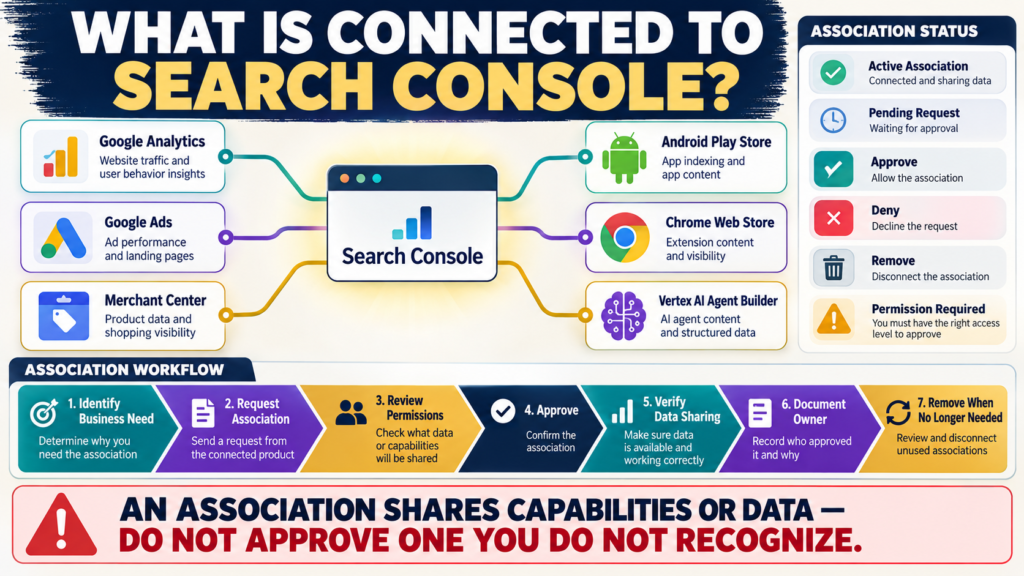
Search Console does more than report:
- Clicks.
- Impressions.
- Queries.
- Indexing.
It can also connect your verified website property with other Google services.
Google calls those connections:
Associations.
Google currently defines an association as a connection between a Search Console property and an entity or property in another Google service. The effects depend on the service being connected.
For example:
A Search Console–Google Analytics association can make Search Console performance data available in Analytics.
A Merchant Center association can support merchant information and shopping visibility workflows.
Useful?
Yes.
Something to approve blindly?
No.
Where Are Associations Managed?
Google currently places them under:
Search Console → Settings → Associations.
The page can show:
- Active associations.
- Pending requests.
Search Console does not maintain a visible history of every removed or rejected association.
That makes documentation useful.
Which Services Can Be Associated?
Google currently lists association support for services including:
- Google Analytics.
- Google Ads.
- Google Merchant Center.
- Android Play Store apps.
- Chrome Web Store accounts.
- Android/Play developer-related accounts.
- Vertex AI Agent Builder.
- Other supported Google entities.
Not every website needs all of these.
The correct question is:
What business function would this association enable?
Association 1: Google Analytics
This is probably the most relevant association for many small websites.
Google says associating Search Console with Google Analytics allows Search Console performance data to be available in the associated Analytics property.
This helps connect two perspectives:
Search Console
What happened on Google Search?
GA4
What happened after visitors reached the website?
They remain different measurement systems.
The association makes analysis easier.
Required Permissions for GA4 Association
Google currently says that to create a Search Console–Analytics association, you must be:
- An owner of the Search Console property.
- Have edit permission on the Google Analytics property.
If the association option fails:
Check permissions before assuming there is a technical bug.
One-to-One Analytics Association
Google currently states:
A Google Analytics property can be associated with only one Search Console property at a time, and a Search Console property can be associated with only one Google Analytics property at a time for this association type.
If a previous association suddenly disappears:
Another owner may have replaced or removed it.
Search Console Data Becomes Visible to Analytics Users
This is an important permission issue.
Google notes that once Search Console and Analytics are associated, people with access to that Analytics property may be able to see Search Console data for the site.
Before approving:
Know who has Analytics access.
Do not think only about the technical connection.
Think about the people who can see the resulting data.
Associations Do Not Make GA4 and Search Console Numbers Match
The systems still measure different things.
Search Console focuses on Google Search interactions.
GA4 measures activity on your website.
Your verified Why Google Search Console and GA4 Traffic Numbers Don’t Match guide explains why the metrics should not be expected to reconcile perfectly.
The association helps analysis.
It does not merge the measurement systems into one dataset.
Association 2: Merchant Center
Google says a Merchant Center account can be associated with Search Console to:
- Update merchant information.
- Monitor product status.
- Discover opportunities to improve Google visibility.
This can be useful for eligible ecommerce businesses.
Merchant Center Has Different Requirements
Google currently says that to associate Merchant Center through Search Console:
- You must be an owner of the Search Console property.
- You must be an admin of the Merchant Center account.
- The Search Console property must be a domain-level property.
Subpath Search Console properties are not supported for that association.
That is a practical reason domain properties are often useful.
Merchant Center Association Limits
Google currently says:
A Search Console property can be associated with only one Merchant Center account.
But one Merchant Center account can be associated with multiple Search Console properties.
If you operate several sites:
Plan the structure before clicking buttons.
Google Ads
Google Ads can also be associated with Search Console.
Google notes that association requests for products other than Analytics generally originate from the other product and are then approved in Search Console.
That means you may see a pending request without having created it inside Search Console.
Do Not Automatically Approve Pending Requests
If a pending association appears:
Ask:
- Do I recognize the account?
- Who requested it?
- What does it enable?
- Does the business need it?
- Who will gain access to data or functionality?
Then approve or deny.
Pending Requests Can Remain Until Addressed
Google says pending association requests remain active until approved or denied.
Do not leave an unfamiliar request sitting indefinitely.
Investigate and make a decision.
Search Console Property Ownership Matters
Only authorized property owners can manage many association actions.
This is one reason account ownership should be documented clearly.
If a former contractor is the only verified owner:
That can become a business-continuity problem.
Association Is Not the Same as Verification
Verifying a Search Console property proves control or authorized access to the website.
Associating another service says:
This Search Console property and this other Google entity should work together in a defined way.
Those are different concepts.
Associations Can Be Removed
Google says Search Console property owners can remove active associations through:
Settings → Associations → More → Remove Association.
The associated service may also provide its own management route.
Removing an Association Can Affect Reporting or Features
Before removing:
Ask:
What depends on this connection?
For example:
If Search Console data is used inside Analytics reporting:
Removing the association changes that workflow.
Document the reason.
Use an Association Register
A small business can record:
Search Console Property
Associated Service
Account/Property Name
Business Purpose
Owner
Date Approved
Who Has Access
Still Needed?
This prevents forgotten connections.
Review Google Analytics Access Too
Because Search Console data may become visible to Analytics users after association, periodically review:
GA4 Property Access Management
If someone no longer needs access:
Remove or reduce it.
The security of the association depends partly on the permissions of both services.
Use Domain Properties Where Appropriate
Google’s Search Console guidance generally recommends a Domain property when you can verify one because it combines:
- HTTP.
- HTTPS.
- Subdomains.
into one property.
This can also simplify some association scenarios.
Association With Merchant Center Should Match the Business Model
Do not connect Merchant Center simply because the option exists.
If your website does not operate as an eligible merchant:
The connection may provide little value.
Use the association when it supports:
- Product visibility.
- Merchant management.
- Shopping reporting.
Keep Search Console Lean
A small website may need only:
Search Console + GA4
That is fine.
More connections are not automatically better.
Each connection should have:
Purpose + Owner + Permission Awareness
Example Association Review
Google Analytics
Purpose:
Combine Search performance context with website analytics.
Status:
Active.
Owner:
Business owner.
Keep?
Yes.
Old Google Ads Account
Purpose:
Historical advertising account no longer used.
Status:
Active.
Keep?
Probably not—verify first, then remove if genuinely obsolete.
This is more useful than leaving associations untouched forever.
A Simple Association Audit
Open:
Settings → Associations
For each row record:
Service
Account
Recognized?: Yes / No
Business Purpose:
Owner:
Who Can See Data?:
Still Needed?:
Anything you do not recognize deserves investigation.
Conclusion
Search Console associations allow your website property to work with other Google services.
Current supported examples include:
- Google Analytics.
- Google Ads.
- Merchant Center.
- App and developer products.
- Other supported Google services.
An association should answer a real business need.
Before approving one, understand:
What is being connected → What data or capabilities are shared → Who has access → Who owns the connection
More associations do not automatically improve SEO.
Correct associations improve workflow.
Your Next Action
Open:
Search Console → Settings → Associations
Write down every:
Active Association
and:
Pending Request
For each one answer:
Do I recognize this service/account?
What business purpose does it serve?
Who has access to the connected service?
If you have Search Console and GA4 but they are not associated:
Review whether connecting them would help your reporting workflow.
If you find an association you no longer recognize or use:
Do not remove it immediately.
First determine what reporting or business process depends on it.
Then remove only connections that are genuinely unnecessary.