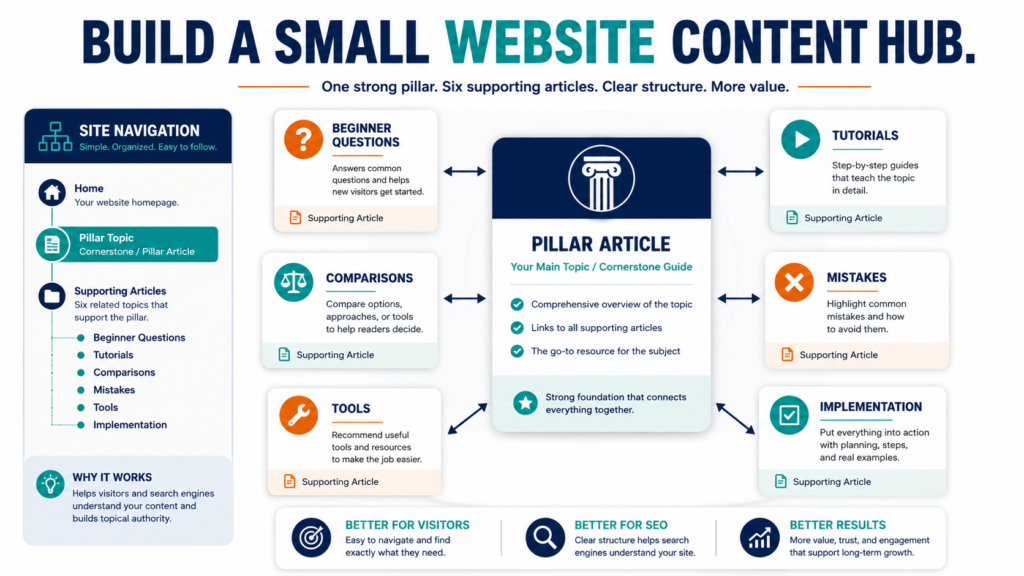
A content hub is an organized group of articles covering one important subject from several useful angles.
The hub usually contains:
- One central overview or pillar article
- Several supporting articles
- Clear internal links between related pages
- A logical path for the visitor
A small website does not need hundreds of articles to build a useful hub.
One strong central page and six to twelve focused supporting articles can create a clear resource for readers.
The goal is not to produce a large number of posts quickly. The goal is to answer the main questions people have about one subject.
Key Takeaways
- Choose a topic closely connected to the website’s purpose.
- Create one central article that explains the complete subject.
- Develop supporting articles around specific reader questions.
- Connect related pages with descriptive internal links.
- Review the hub regularly for gaps, outdated information, and repeated content.
What a Content Hub Does
A content hub helps readers understand how related articles fit together.
Suppose a website teaches email marketing.
A visitor may need answers about:
- Choosing an email service
- Creating a lead magnet
- Writing a signup page
- Building a welcome sequence
- Sending newsletters
- Segmenting subscribers
- Measuring results
- Avoiding mistakes
A hub organizes those answers around one main subject.
Without a clear structure, the articles may exist as isolated posts that are difficult to discover.
Step 1: Choose a Hub Topic
The topic should be:
- Important to the audience
- Closely connected to the website
- Broad enough to support several articles
- Specific enough to remain useful
- Based on a real group of reader questions
Examples include:
- Email list building for beginners
- Blog content repurposing
- Local business content marketing
- Affiliate content planning
- Lead magnet creation
- Website content improvement
- Beginner search-engine optimization
Avoid selecting a topic merely because it appears popular.
The hub should support the business and the reader.
Step 2: Define the Central Question
Write one question that the hub should answer.
For example:
How can a small online business build an email list from the beginning?
Every supporting article should answer one part of that question.
A hub becomes unfocused when it combines unrelated subjects.
For example, a hub about email-list building should not suddenly contain detailed articles about video editing unless video is directly connected to the email strategy.
Step 3: Create the Pillar Article
The pillar article provides the broad overview.
It should:
- Define the subject
- Give the central answer
- Explain the major stages
- Identify important decisions
- Include a practical workflow
- Warn about common mistakes
- Direct readers toward focused supporting articles
A pillar article should be complete enough to help a beginner understand the entire process.
It should not attempt to provide every detail that belongs in the supporting pages.
Step 4: List Supporting Questions
Create a list of questions a beginner may ask.
For an email-list hub, the questions might be:
- Which email-marketing service should I use?
- What should my lead magnet include?
- How do I create a signup page?
- What should I send new subscribers?
- How often should I email my list?
- How do I promote the lead magnet?
- What email metrics should I review?
- What mistakes should I avoid?
Each question can become one focused article.
Step 5: Assign a Distinct Search Purpose
Supporting articles should not compete with the pillar article or with each other.
Give each page a distinct purpose.
For example:
Pillar article:
How to Build an Email List for a Small Online Business
Supporting article 1:
How to Choose an Email-Marketing Service
Supporting article 2:
How to Create a Lead Magnet
Supporting article 3:
How to Write a Three-Email Welcome Sequence
Supporting article 4:
How to Promote a Signup Page
Supporting article 5:
Email-List Mistakes Beginners Should Avoid
The pages are related, but each answers a different question.
Step 6: Plan the Internal Links
Google states that links help it discover pages and understand relevance. Its guidance also recommends descriptive anchor text that helps people and search engines understand the destination.
Internal links should help the reader continue learning.
Use anchor text such as:
- Learn how to create a beginner lead magnet
- Review the welcome-email planning process
- Compare email-marketing tools
- See the signup-page checklist
Avoid vague wording such as:
- Click here
- Read this
- Go here
- More information
Do not force a link into every paragraph.
Add links where the reader is likely to need the related explanation.
Step 7: Create a Simple Hub Map
Use a spreadsheet or document with these columns:
| Page | Main Question | Content Type | Links To | Status |
|---|---|---|---|---|
| Pillar article | How does the complete process work? | Guide | All supporting pages | Planned |
| Email tool guide | Which platform fits? | Buying guide | Pillar, welcome emails | Drafted |
| Lead magnet article | What should I offer? | Tutorial | Pillar, signup page | Published |
| Welcome sequence | What should I send? | Tutorial | Pillar, email tool guide | Planned |
| Mistakes article | What should I avoid? | List guide | Pillar, related tutorials | Planned |
This map prevents duplicate articles and forgotten links.
Step 8: Publish in a Practical Order
You do not need to publish the entire hub at once.
A useful sequence is:
- Publish the pillar article.
- Publish the most important beginner question.
- Publish the second supporting article.
- Add links from the pillar page.
- Continue one article at a time.
- Update the hub map.
You can also publish several supporting articles first and create the pillar page after you understand the subject more completely.
The correct order depends on the material you already have.
Step 9: Make the Content People-First
Google’s current guidance says its systems aim to prioritize helpful, reliable content created primarily to benefit people rather than content designed mainly to manipulate search rankings.
A content hub should therefore provide:
- Direct answers
- Clear explanations
- Useful examples
- Original judgment
- Accurate information
- Practical steps
- Honest limitations
- Logical navigation
Do not create ten thin articles by dividing one complete answer into fragments merely to produce more pages.
Each supporting page should deserve to exist.
A Practical Small-Website Example
Imagine a small digital-marketing website that wants to build authority around content repurposing.
The central article is:
How to Repurpose One Blog Post Into Multiple Marketing Assets
Supporting pages might include:
- Turn a blog post into an email newsletter
- Turn an article into a short-video script
- Create LinkedIn posts from long-form content
- Create Facebook posts from blog content
- Design a content-repurposing schedule
- Avoid duplicate and repetitive content
- Choose articles worth repurposing
- Measure the results of repurposed content
The central article explains the complete system.
Each supporting page provides a deeper implementation guide.
Step 10: Add a Hub Navigation Section
A pillar article may include a section such as:
Explore the Complete Email-List Series
- Choose an email-marketing platform
- Create your first lead magnet
- Build a signup page
- Write your welcome emails
- Promote your subscriber offer
- Avoid beginner email mistakes
Only add links to pages that actually exist.
Do not invent URLs or create empty placeholders inside the published article.
Step 11: Review Existing Content Before Writing More
A small website may already have articles that belong in the hub.
Review existing posts and decide whether to:
- Keep them
- Update them
- Combine them
- Change their focus
- Link them to the hub
- Retire them
Do not create a new article when an existing page already answers the question well.
Updating a useful post may be faster and more effective than publishing a duplicate.
Step 12: Include Relevant Conversion Paths
A content hub should help the visitor, but it can also support a business objective.
Relevant actions may include:
- Join an email list
- Download a checklist
- Read a related tutorial
- Review a product
- Compare two tools
- Watch a video
- Purchase a guide
The action should match the reader’s stage.
A beginner reading an overview may be more interested in a free checklist than in purchasing an advanced product immediately.
Common Content-Hub Mistakes
Choosing a Topic That Is Too Broad
“Digital Marketing” may be too large for one useful hub.
“Blog Content Repurposing for Small Businesses” is more manageable.
Publishing Thin Supporting Articles
Each page should answer its assigned question completely.
Repeating the Same Introduction
Related pages should still have original openings, examples, headings, and conclusions.
Linking Every Keyword
Too many links reduce readability.
Link only when another page helps the reader continue.
Creating Pages Without a Map
A hub developed without planning may contain gaps and repeated search intent.
Never Updating the Pillar Page
Add new supporting links and revise outdated guidance when the hub grows.
A 12-Article Hub Plan
Central Guide
- Complete overview
Beginner Questions
- First step
- Essential tools
- Common terminology
Implementation
- Setup process
- Weekly workflow
- Quality-control checklist
Decisions
- Product comparison
- Free versus paid options
- Who needs the strategy
Improvement
- Common mistakes
- How to review results
This structure can be adjusted to the subject.
Conclusion
A content hub helps a small website organize related information around one important audience question.
Choose a focused topic, create a complete pillar article, develop distinct supporting pages, and connect them with descriptive links that help readers continue learning.
Map one central article and six supporting questions before publishing the next post in the series.