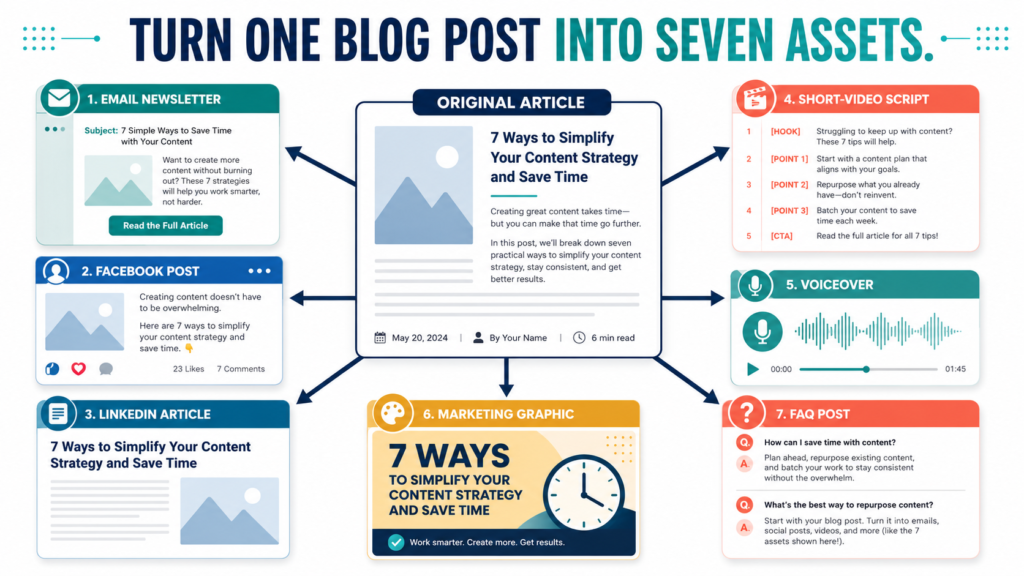
Content repurposing does not mean copying the same paragraph onto every platform.
It means identifying the strongest message in one useful article and adapting that message into formats suited to different audiences, platforms, and stages of the customer journey.
A complete blog post can become:
- An email newsletter
- A Facebook post
- A LinkedIn post
- A short-video script
- A voiceover
- A marketing graphic
- An FAQ article
The source article provides the research and central explanation. Each new asset should have its own purpose.
Key Takeaways
- Start with a complete, useful source article.
- Extract the central answer before creating new formats.
- Adapt the opening, length, tone, and call to action for each platform.
- Do not publish seven nearly identical pieces of content.
- Keep a repurposing record so the assets remain connected and organized.
Affiliate Disclosure: This article contains affiliate links. If you purchase through one of these links, I may earn a commission at no additional cost to you. Affiliate compensation does not determine the conclusions or recommendations presented in this article.
Choose the Right Source Article
Not every blog post is a strong repurposing candidate.
Choose an article that contains:
- One clear primary question
- A direct answer
- Several supporting points
- A useful example
- Action steps
- Common mistakes
- A conclusion
- A next action
A thin article containing only general observations will not provide enough material.
A detailed article about building a beginner email list, for example, could supply separate assets about:
- Choosing an audience
- Creating a lead magnet
- Writing a signup page
- Planning welcome emails
- Avoiding setup mistakes
One source article can support several focused conversations.
Step 1: Create a Repurposing Summary
Before creating the seven assets, summarize the source article in a planning document.
Record:
Primary audience:
Who needs this information?
Main problem:
What is the person struggling with?
Central answer:
What is the most useful recommendation?
Three supporting points:
Which ideas explain the answer?
Original example:
Which scenario makes the lesson understandable?
Primary next action:
What should the reader do?
This summary prevents the new assets from drifting away from the original purpose.
Step 2: Select a Different Job for Each Asset
Each asset should accomplish something specific.
For example:
- The email newsletter may teach the main lesson.
- The Facebook post may begin a conversation.
- The LinkedIn post may explain the professional application.
- The short video may present one quick takeaway.
- The voiceover may make the content accessible in an audio format.
- The graphic may summarize the workflow.
- The FAQ article may answer a narrower search question.
A platform change should also create a purpose change.
Asset 1: Email Newsletter
An email newsletter should feel like a direct message to the subscriber.
Use this structure:
- Short subject line
- One audience problem
- Main lesson
- Brief example
- Link or next action
Do not paste the complete article into the email.
Give subscribers enough information to benefit from the message while offering the article when they need the full explanation.
Example
Subject: Stop creating every post from scratch
Opening:
Creating a separate idea for every platform can turn content marketing into a full-time production job.
Lesson:
Begin with one useful article. Pull out the main answer, three supporting ideas, and one example. Then adapt those pieces for the platforms you actually use.
Next action:
Choose one published article and write a five-sentence email teaching its central lesson.
Asset 2: Facebook Post
A Facebook post can use a conversational problem-and-solution structure.
A useful format is:
- Relatable opening
- Short explanation
- Three practical points
- Question or next action
The post should be understandable without requiring the reader to leave Facebook.
Avoid placing several unrelated links in the post. Keep the message focused.
Asset 3: LinkedIn Post
A LinkedIn post should connect the article’s lesson to professional work, business decisions, productivity, leadership, marketing, or customer service.
For an article about content repurposing, the LinkedIn angle could focus on operational consistency.
Example opening:
A content problem is often a workflow problem. When every platform begins with a separate blank page, publishing becomes harder to sustain.
The remainder of the post could explain how a source article creates a central message that teams or solo creators can adapt.
Asset 4: Short-Video Script
A short-video script should communicate one main idea.
Use:
- Hook
- Problem
- Explanation
- Takeaway
- Next action
Do not attempt to summarize every section of the article.
A short script based on this article might say:
Creating separate content for every platform wastes time. Start with one complete blog post. Pull out the main answer, three supporting ideas, and one practical example. Turn each piece into a different email, social post, graphic, or video. Repurposing works when each asset has a new purpose—not when you copy and paste the same paragraph everywhere.
Asset 5: Voiceover
A voiceover can be used for:
- Faceless videos
- Article summaries
- Tutorials
- Slide presentations
- Short educational clips
- Audio versions of written content
Prepare the script for listening rather than reading.
Remove:
- Long lists
- Complicated sentences
- Visual references that are not explained
- Unnecessary headings
- URLs that sound awkward when spoken
Add natural pauses and transitions.
People who need AI-generated narration for videos, audiobooks, podcasts, or other audio projects can learn about ElevenLabs voice-generation options.
An AI voice tool can reduce the need to record every narration manually, but the script still needs human review. Pronunciation, pacing, emphasis, licensing, and the suitability of the selected voice should be checked before publication.
Asset 6: Marketing Graphic
A graphic should communicate one idea visually.
Useful formats include:
- Five-step workflow
- Before-and-after process
- Checklist
- Decision chart
- Mistake-and-solution comparison
- Three key takeaways
Do not place the entire article on the image.
For this topic, the graphic could show:
Article → Email → Social Posts → Video → Graphic → FAQ
A design tool such as ClickDesigns may be useful for creating marketing graphics, ebook covers, lead-magnet visuals, product images, and social-media designs.
Keep the text readable and avoid exaggerated claims about traffic, engagement, or sales.
Asset 7: FAQ Article
An FAQ article should answer a narrower question related to the main topic.
Possible questions include:
- Is content repurposing duplicate content?
- How many social posts can come from one blog article?
- Should the same caption be used on Facebook and LinkedIn?
- How do you turn an article into a short video?
- Which blog posts are best for repurposing?
Choose one question and answer it completely.
Do not copy the original article and change the title.
A Practical Repurposing Example
Suppose the source article is:
How to Start an Email List Before You Have a Product
The seven assets could be:
Email Newsletter
Topic: Why audience feedback should come before product creation
Facebook Post
Topic: What prevents beginners from starting an email list?
LinkedIn Post
Topic: Using subscriber questions as informal market research
Short Video
Topic: The four elements of a basic email-list system
Voiceover
Topic: A one-minute explanation of lead magnets
Marketing Graphic
Topic: Audience Problem → Lead Magnet → Signup Page → Welcome Emails
FAQ Article
Topic: Do you need a product before building an email list?
All seven assets come from the same source, but each serves a different purpose.
Create a Repurposing Matrix
Use a simple planning document with these fields:
Source article:
[Article title]
Asset type:
Email, Facebook, LinkedIn, video, voiceover, graphic, or FAQ
Specific angle:
[One focused message]
Audience:
[Who should receive it]
Primary action:
[What the person should do]
Status:
Planned, drafted, reviewed, scheduled, or published
Publication date:
[Date]
This prevents you from publishing repeated messages too close together.
A Two-Hour Sample Workflow
The time required will vary based on the article and the creator’s experience, but this structure provides a starting point.
First 20 Minutes
Review the source article and create the repurposing summary.
Next 25 Minutes
Draft the email newsletter and Facebook post.
Next 25 Minutes
Draft the LinkedIn post and short-video script.
Next 20 Minutes
Adapt the video script into a voiceover.
Next 20 Minutes
Plan the graphic and FAQ article.
Final 10 Minutes
Review the seven assets for repetition, accuracy, links, and calls to action.
This is a planning example, not a guarantee that every batch can be completed in two hours.
Adapt the Call to Action
Do not use the same action on every platform.
Possible actions include:
- Read the complete article.
- Reply with a question.
- Download a checklist.
- Try one step.
- Compare two options.
- Watch the related video.
- Join the email list.
- Review a recommended tool.
The action should fit the asset’s purpose.
Common Content-Repurposing Mistakes
Copying and Pasting the Same Text
Different platforms create different reader expectations.
Adapt the message instead of duplicating it.
Repurposing Weak Source Material
A thin or inaccurate article produces weak supporting content.
Improve the source before expanding it.
Trying to Include Every Point
One short video or social post does not need the entire article.
Select one useful idea.
Changing the Meaning
Shortening content can remove important cautions or limitations.
Make sure the new asset remains accurate.
Publishing Everything at Once
Seven assets published on the same day may feel repetitive.
Use a schedule that allows each message to serve a purpose.
Forgetting to Track the Source
Record which article produced each asset so future updates remain consistent.
A Simple Seven-Day Publishing Sequence
Day 1
Publish the source article.
Day 2
Send the email newsletter.
Day 3
Publish the Facebook post.
Day 4
Publish the LinkedIn post.
Day 5
Publish the short video or voiceover.
Day 6
Publish the marketing graphic.
Day 7
Publish or outline the FAQ article.
Adjust the sequence for your audience and publishing capacity.
Conclusion
Content repurposing allows one complete blog article to supply the research, central message, and examples for several marketing assets.
The process works best when each asset has its own audience, angle, format, and next action.
Choose one strong article, write its repurposing summary, and create the email newsletter before moving to the other six assets.