A sudden Google traffic decline can cause a website owner to imagine the worst:
Google penalized my site.
Sometimes that phrase gets used for almost every ranking decline.
But a real manual action has a specific meaning.
Google says it issues a manual action when a human reviewer determines that pages on a site do not comply with Google’s spam policies. Depending on the action, affected pages—or sometimes the entire site—can rank lower or be omitted from Search.
That is different from:
- Normal ranking changes.
- Algorithmic systems.
- Seasonality.
- Indexing problems.
- Technical errors.
- Security issues.
The first step is therefore simple:
Open the Manual Actions report and check whether a manual action actually exists.
Google Search Console Manual Actions documentation
If You See a Green Check, You Do Not Have a Reported Manual Action
Google’s current documentation says that if no manual actions exist, the report shows a green check with an appropriate message.
If your traffic dropped but the report is clean, investigate other causes.
Do not keep searching for a hidden manual penalty that Search Console says is not there.
Manual Action Does Not Mean Every Traffic Drop
Google’s own traffic-drop troubleshooting guidance tells site owners to check Manual Actions and Security Issues when a site is missing or experiencing serious visibility problems—but it also lists many other causes, including site moves, seasonality, crawling, and technical problems.
Use a broader diagnostic process:
How to Diagnose a Drop in Google Search Traffic Before You Change Your Website
Manual Action vs. Algorithmic Ranking Change
This distinction matters.
Manual Action
A Google human reviewer determined that the site or pages violate a policy.
It appears in the Manual Actions report.
Algorithmic Change
Google’s automated ranking systems change how pages are evaluated or ranked.
You normally do not receive a Manual Actions report simply because rankings changed algorithmically.
Do not use:
penalty
as a generic synonym for:
traffic went down.
Manual Action vs. Security Issue
Google maintains a separate Security Issues report.
The difference, according to Google:
Manual Actions
Mostly involve attempts to manipulate Search or other policy violations.
Security Issues
Indicate hacking or behavior that may harm visitors—for example phishing, malware, or unwanted software.
A website can theoretically face one, the other, or both.
Use the correct report.
Search Console Usually Notifies You
Google says site owners affected by manual actions receive information through the Manual Actions report and Search Console message center.
That means the report—not rumors, third-party “penalty checkers,” or a sudden red SEO chart—is your primary source.
Step 1: Read the Exact Action
Do not begin changing pages before understanding the issue.
Expand the action.
Record:
Action type
Scope
Example affected URLs or patterns
Google’s explanation
Policy reference
The exact violation determines the fix.
Step 2: Understand the Scope
Google may indicate:
Specific page pattern
or:
Entire site
For example, documentation can show patterns such as:
example.com/directory/*
to represent an affected section.
Do not assume that one example URL means only one page is affected.
Step 3: Review the Relevant Policy
Google’s Manual Actions documentation includes action types covering issues such as:
- Unnatural links.
- Spam.
- Structured data violations.
- Cloaking.
- Sneaky redirects.
- Site reputation abuse.
- Other manipulative practices.
Read the policy connected to the action.
Do not try to fix a link-spam action using advice written for structured data.
Step 4: Fix the Pattern, Not Just the Example
Google explicitly says fixing only some affected pages is not enough for reconsideration. You should address the issue across all affected pages or patterns.
Example:
Google shows three sample thin affiliate pages.
Do not improve only those three while leaving 200 similar pages unchanged.
The samples help identify the problem.
The remediation should address the full pattern.
Do Not Delete Everything in Panic
Suppose the issue involves low-value pages.
The answer is not automatically:
Delete half the website.
Review:
- Which pages violate the stated issue?
- Which pages can be substantially improved?
- Which pages should be removed?
- Which pages are useful and compliant?
A structured audit is safer:
How to Audit Old Blog Content Without Deleting Useful Pages
If the Issue Is Unnatural Links to Your Site
Google’s documentation recommends reviewing backlink information, identifying links that violate link-spam policies, and making a good-faith effort to remove or neutralize those problematic links before requesting reconsideration.
Do not assume every unfamiliar backlink is toxic.
Focus on the violation Google actually reported.
If the Issue Is Unnatural Links From Your Site
Review:
- Paid links.
- Link exchanges.
- Manipulative outbound links.
- Affiliate or sponsored link treatment where appropriate.
Remove or qualify links as required by Google’s policies.
Again, this is not a generic instruction to remove all external links.
If the Issue Is Structured Data
Google may issue a manual action when structured data is misleading, irrelevant, manipulative, or otherwise outside its guidelines.
Fix:
- Invalid implementation.
- Invisible markup.
- Misleading markup.
- Content/markup mismatch.
Then request review.
If the Issue Is Site Reputation Abuse
Google’s current manual-action documentation includes site reputation abuse as a reportable issue and instructs affected sites to identify third-party content that violates the policy and address it before requesting review.
This is especially relevant to sites that allow third-party content to use an established domain’s reputation for unrelated ranking purposes.
Make Sure Google Can Review the Fixed Pages
This step is easy to miss.
Google says affected pages should remain accessible for review and should not be hidden behind login, robots.txt, or a noindex directive when Google needs to verify the correction.
Do not “fix” a policy issue by hiding everything from Google’s reviewer if the reconsideration process requires inspection.
Use URL Inspection to Confirm Access
After remediation, use URL Inspection on examples.
Check:
- Crawl allowed.
- Page fetch.
- Live content.
- Relevant canonical.
Your page-level guide:
How to Use the Search Console URL Inspection Tool to Troubleshoot One Page
Step 5: Document What You Changed
Before requesting review, create a record.
For example:
Problem
30 pages contained copied vendor descriptions with little original value.
Actions
- Removed 12 unnecessary pages.
- Rewrote 18 with original comparison/testing methodology.
- Added clear editorial standards.
- Changed content-production process.
Verification
Reviewed every page in affected directory.
This documentation makes the reconsideration request easier to write.
Step 6: Submit the Reconsideration Request
Google says a good request should:
- Explain the exact quality issue.
- Describe the steps taken to fix it.
- Document the outcome of the work.
Do not write:
I don’t know what happened. Please give my rankings back.
Give concrete information.
Be Specific
Weak:
We fixed everything.
Better:
We audited 84 pages in the affected directory, removed 31 pages that did not meet our editorial standards, rewrote 53 pages with original analysis and source verification, and changed our publishing process so vendor-provided descriptions are no longer published without independent value.
Specific evidence is easier to evaluate.
Do Not Promise Things You Did Not Do
Do not say:
All unnatural links were removed.
if you contacted only one site.
Be accurate.
The purpose is to show genuine remediation.
Review Can Take Time
Google currently says reconsideration reviews often take several days or weeks, with some cases taking longer. Google also says not to submit another request while one remains pending.
Do not submit daily reconsideration requests.
Wait for the decision.
What If the Request Is Rejected?
Read the response.
Then:
- Recheck the problem.
- Recheck the full affected pattern.
- Look for incomplete remediation.
- Improve the site/process further.
- Document additional work.
Do not simply submit the same request again unchanged.
What If You Recently Bought the Domain?
Google’s documentation specifically addresses situations where a new owner inherits a site with an existing violation.
Fix the reported problems, then explain the ownership change in the reconsideration request.
Buying a domain does not automatically erase its history.
Manual Actions Should Change Business Processes
If a manual action resulted from:
- Scaled low-value content.
- Paid links.
- Third-party spam.
- Misleading structured data.
do not merely clean the visible examples.
Change the process that produced them.
Otherwise the same problem can return.
AI Content Needs the Same Policy Discipline
Using AI does not exempt content from Google’s spam policies.
If AI allows you to create hundreds of pages, the important question remains:
Do these pages provide real value, or are they scaled primarily to manipulate Search?
Quality-control systems become more important as production becomes easier.
Do Not Confuse a Manual Action With Indexing Problems
If Search Console says:
Crawled — Currently Not Indexed
that is not automatically a manual action.
Check the Manual Actions report.
Then use the Page Indexing report for indexing-specific diagnosis:
How to Use the Search Console Page Indexing Report Without Trying to Index Every URL
Create a Monthly Search Console Health Check
You do not need to stare at Manual Actions every day.
Search Console normally surfaces warnings and messages.
A periodic review can include:
- Manual Actions.
- Security Issues.
- Page Indexing.
- Performance.
- Core Web Vitals.
If Manual Actions shows a green check:
Move on.
What Not to Do
Avoid:
- Assuming every traffic decline is a penalty.
- Deleting large sections without diagnosis.
- Fixing only sample URLs.
- Hiding affected pages from Google’s reviewer.
- Sending vague reconsideration requests.
- Resubmitting before the first review is complete.
- Using third-party penalty tools as your final source of truth.
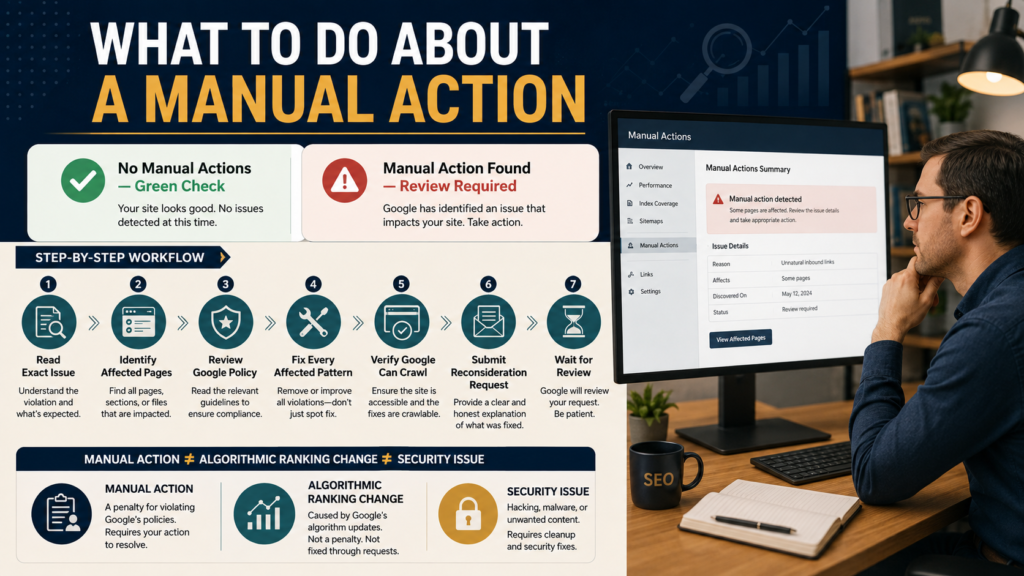
A Simple Manual-Action Recovery Workflow
1. Confirm the action exists.
2. Read the exact issue.
3. Identify the full affected pattern.
4. Read the relevant Google policy.
5. Fix every affected area.
6. Test accessibility.
7. Document the work.
8. Submit one clear reconsideration request.
9. Wait for Google’s decision.
That is the process.
Conclusion
A Google manual action is serious.
It is not a reason to panic.
The Manual Actions report tells you whether a human reviewer identified a policy violation and gives you information about the type and scope of the issue.
Read the exact action.
Understand the policy.
Fix the entire pattern—not just example pages.
Make sure Google can inspect the corrected site.
Document what changed.
Then submit a clear reconsideration request and allow the review process to run.
Most importantly, do not call every ranking decline a manual penalty.
Check the report first.
Evidence should come before reaction.