Google Search results are no longer made up of identical blue links.
Depending on the query and page, users may see different result features.
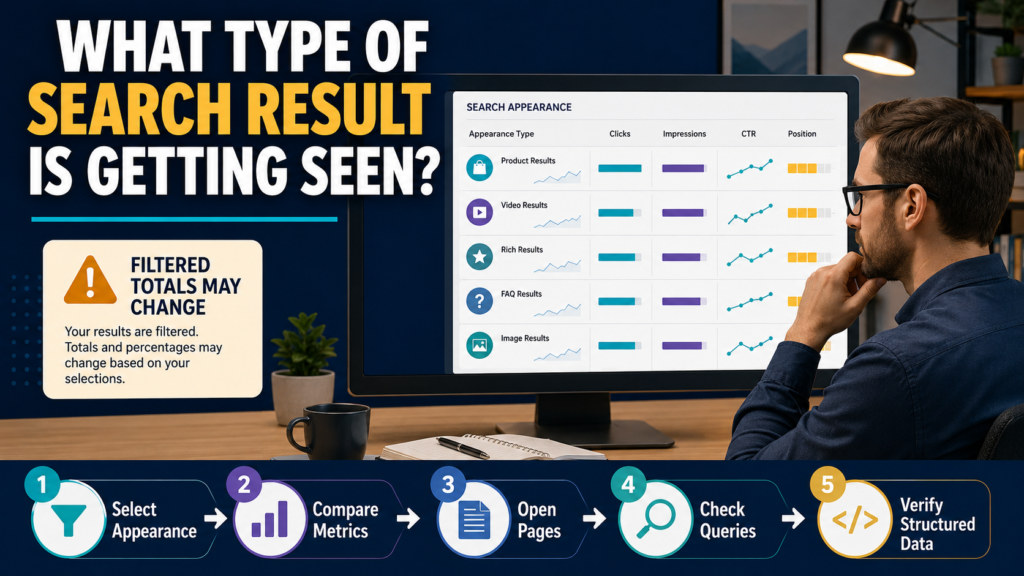
Google Search Console’s Performance report includes a Search Appearance dimension that helps you analyze supported types of search-result presentation separately.
Google’s current documentation explains that Search Appearance groups Performance data by a specific result type or feature. The available choices depend on what has actually generated impressions for your property.
This makes the report useful for questions such as:
- Are product results receiving impressions?
- Is video-oriented search visibility growing?
- Are supported rich-result appearances receiving clicks?
- Which pages participate in a particular appearance?
- Is CTR different for that appearance?
But there is an important warning:
Search Appearance data is not simply another normal filter.
Aggregation can change when you use it, so totals may behave differently from the unfiltered Performance report.
What Search Appearance Means
The dimension is not:
“How pretty did my search result look?”
It is Google’s reporting classification for supported result types or features.
The exact options can change and are property-dependent.
Google’s current documentation lists examples such as product results and other supported enhancements, but Search Console only shows appearance types for which your property has recorded impressions.
So if you do not see a particular option, that does not automatically mean Search Console is broken.
Your site may simply have no reported impressions for that appearance.
Search Appearance Is Different From Search Type
Do not confuse:
Search Type
- Web.
- Image.
- Video.
- News.
with:
Search Appearance
The specific presentation or supported feature within Search reporting.
Google’s Performance report supports Web, Image, Video, and News through the Search Type filter.
Search Appearance answers a different question.
Start With the Unfiltered Performance Report
Before applying the appearance filter, record the general trend.
Look at:
- Clicks.
- Impressions.
- CTR.
- Average position.
- Date range.
This creates context.
Then select the Search Appearance dimension or filter.
Do not begin with an isolated filtered number and assume it represents the whole website.
Why Totals Can Change
Google warns that grouping or filtering by Search Appearance can change aggregation.
Search Console normally aggregates some Performance metrics at the property level.
When grouping by Search Appearance, table data can instead be aggregated by page.
That can cause totals to look different.
It does not necessarily mean impressions or clicks were duplicated incorrectly.
You changed how the data is being organized.
Search Appearance Can Be Used as a Filter or Dimension
You can:
- Group the table by Search Appearance.
- Filter to one appearance type.
- Compare appearance values where supported.
Google’s advanced-filtering documentation notes that comparisons can be made using dimensions such as Search Appearance, although metric calculation can differ when comparing by page or appearance.
Use comparisons carefully.
Example: Product Results
Suppose an ecommerce or product-related website sees:
Product Results
inside Search Appearance.
You can filter to that appearance and investigate:
- Click trend.
- Impression trend.
- Pages receiving visibility.
- Queries associated with those pages.
- CTR.
- Position context.
Do not assume:
Product Result impression = sale.
Search Console measures search visibility and clicks.
Website analytics and ecommerce reporting are needed for customer actions after the click.
Example: Video Search Appearance
If a supported video-oriented appearance is present, ask:
- Which pages are showing?
- Which queries are involved?
- Is the video central to the page?
- Is traffic increasing?
- Does the page perform differently with and without the appearance?
Search Appearance is most useful when it leads to a page-level investigation.
Connect Search Appearance to Structured Data
Some appearance types are connected with structured data.
Google’s rich-result reports show whether supported structured-data items are valid or contain critical or non-critical issues. Google notes these reports are samples and are not necessarily a complete inventory of every item detected.
This creates two separate jobs:
Performance Report
Did this search appearance receive visibility or clicks?
Rich Result Report
Is Google detecting valid structured data and are there implementation issues?
Do not use one as a replacement for the other.
Valid Structured Data Does Not Guarantee Rich Results
This distinction matters.
A technically valid structured-data implementation can make content eligible for a supported rich result.
It does not guarantee Google will display that result for every query.
Google’s rich-result documentation describes valid structured data in terms of eligibility—not guaranteed display.
Avoid telling a client or business owner:
“Schema is valid, so Google must show the rich result.”
That is not the correct expectation.
Check the Pages Tab
Once an appearance is selected, review Pages.
Ask:
- Which pages receive most impressions?
- Are the pages expected?
- Is one URL responsible for most clicks?
- Did appearance traffic disappear after a page change?
- Is a group of similar pages behaving differently?
This helps separate sitewide assumptions from page-level reality.
Then Check Queries
For important pages, review queries.
A search feature may appear more often for certain types of searches.
Ask:
- What intent do the queries represent?
- Are searchers looking for products, instructions, reviews, or videos?
- Is the page aligned with that intent?
- Are impressions concentrated around a narrow topic?
Use the query information as evidence.
Do not rewrite the page merely because one filtered CTR looks low.
Watch CTR Carefully
Search-result features can change how users interact.
A visually enhanced result might increase clicks in one context.
Another feature may answer enough information directly in the results that the click behavior differs.
Use CTR for comparison.
Do not assume there is one “correct” CTR for every appearance.
Compare Equivalent Periods
If you want to know whether a result type is gaining visibility:
Compare:
Last 28 days
with:
Previous 28 days
using the same Search Appearance filter.
The previous guide on comparing Search Console date ranges correctly is particularly relevant here because inconsistent periods can make normal fluctuations appear meaningful.
Search Appearance Reporting Can Change
Google periodically changes Search features and reporting.
For example, Google’s Search Console data-anomalies documentation currently notes that FAQ rich results stopped appearing in Google Search as of May 7, 2026, and reporting impressions for that feature consequently declined.
This is a good example of why a falling Search Appearance line does not always mean:
“My SEO broke.”
The search feature itself may have changed.
FAQ Content Can Still Be Useful Without the Rich Result
An FAQ section can still help readers even when a specific rich-result feature is unavailable.
The verified LeeOneMedia article Do FAQ Sections Still Help SEO After Google Removed FAQ Rich Results? explores that distinction.
Do not delete helpful content solely because one visual Search feature changes.
Check Data Anomalies Before Panicking
When a Search Appearance metric suddenly collapses, check Google’s Search Console Data Anomalies page.
Google documents known reporting problems and changes affecting specific reports or appearance types.
A data-logging problem is not the same thing as a ranking loss.
Use URL Inspection for Representative Pages
If one appearance suddenly disappears from an important page, inspect the URL.
Check:
- Is it indexed?
- Is Google using the expected canonical?
- Can Google crawl the page?
- Is structured data detected?
- Is the current page version available?
Do not repeatedly request indexing if the page has a different underlying problem.
Search Appearance Is Not an SEO Score
Avoid creating rules such as:
“More rich-result impressions always means better SEO.”
The correct question is:
Does the feature help the page satisfy the right search intent and attract appropriate visitors?
A page can perform very well in standard search results without a special appearance.
A Simple Search Appearance Workflow
Step 1
Open Search Console Performance.
Step 2
Select a useful date range.
Step 3
Review the unfiltered baseline.
Step 4
Open Search Appearance.
Step 5
Select a reported appearance type.
Step 6
Compare clicks and impressions.
Step 7
Review Pages.
Step 8
Review Queries.
Step 9
Check the appropriate rich-result or structured-data report if relevant.
Step 10
Investigate only meaningful changes.
Questions to Ask
For each important appearance:
- Does this feature have enough data to matter?
- Is visibility rising or falling?
- Which pages are responsible?
- Which queries are involved?
- Did Google change the feature?
- Are structured-data errors present?
- Did the page itself change?
- Is the traffic valuable after the click?
These questions make Search Appearance a diagnostic tool rather than another dashboard number.
Conclusion
Search Console Search Appearance helps you understand how supported Google Search-result features contribute to your site’s visibility.
Use it to isolate specific appearances, examine clicks and impressions, identify pages and queries, and connect performance changes with relevant structured-data reports.
But interpret the numbers carefully.
Filtering or grouping by Search Appearance can change aggregation, valid structured data does not guarantee a rich result, and Google can change or retire search features over time.
The goal is not to collect every possible appearance.
It is to understand whether the search features your pages actually receive are helping the right content reach the right audience.