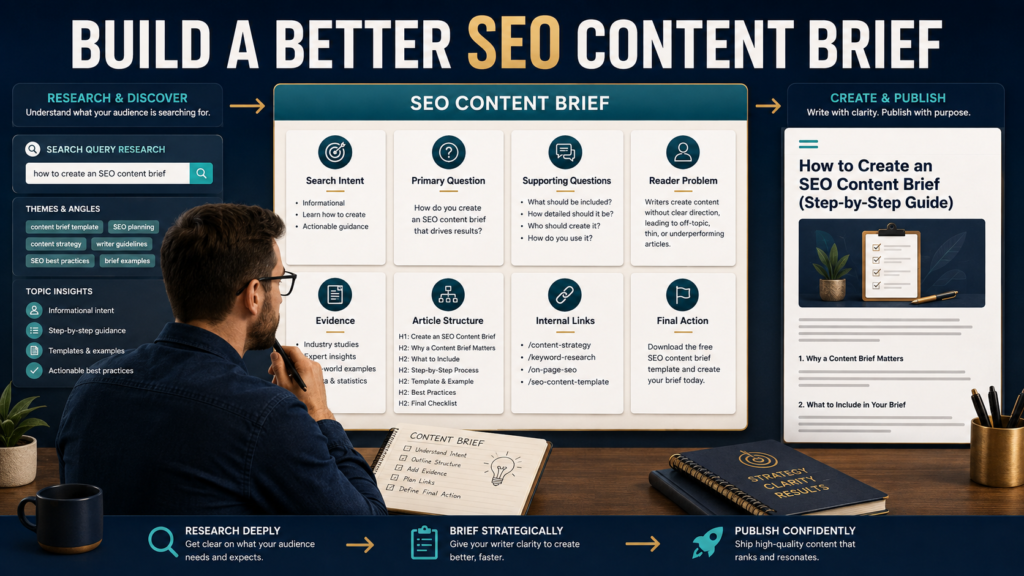
A good SEO content brief is not a list of keywords for a writer to repeat.
It is a research document that explains:
- Who the article is for.
- What the reader is searching for.
- What question must be answered.
- Which supporting questions matter.
- What evidence is needed.
- Which existing pages should be linked.
- What information competing pages may be missing.
- What action should make sense after the reader gets the answer.
Creating this brief before drafting can reduce unfocused articles, duplicated search intent, missing explanations, and unnecessary rewriting.
Google continues to emphasize creating helpful, reliable, people-first content rather than material produced primarily to manipulate rankings. Google’s people-first content guidance is therefore a better foundation for a content brief than simply counting how many times a keyword appears.
Step 1: Write the Primary Search Question
Start with a question, not a keyword list.
Suppose your keyword is:
email welcome sequence
What does the reader actually want?
Possible questions include:
- How do I create an email welcome sequence?
- How many welcome emails should I send?
- What should each welcome email contain?
- When should I promote a product?
- Which email platform can automate the sequence?
Those questions do not all have identical intent.
Choose the primary one.
Example:
How does a beginner create a short welcome sequence that introduces the business and leads naturally to an appropriate next step?
Now the article has a job.
Step 2: Identify Search Intent
Ask what the person expects after making the search.
Common intent categories include:
Informational
The reader wants an explanation.
How-To
The reader wants instructions.
Comparison
The reader is deciding between alternatives.
Commercial Investigation
The reader is researching a product or category before buying.
Troubleshooting
Something is not working and the reader wants to diagnose it.
Decision Support
The reader understands the subject but needs criteria for choosing what to do.
Your article structure should match the intent.
A person searching “how to set up Google Search Console” needs a procedure.
Someone searching “Google Search Console vs GA4” needs a comparison.
Someone searching “why did my Google traffic drop?” needs diagnosis.
Do not force all three into the same article.
Step 3: Define the Reader’s Starting Point
A useful content brief explains what the reader probably already knows.
For example:
Intended reader: Small-business website owner who has Search Console connected but has limited SEO experience.
That tells the writer not to begin with a ten-paragraph history of Google.
It also prevents the article from assuming advanced knowledge the reader may not have.
Include:
Reader:
Who is this for?
Experience Level:
Beginner, intermediate, advanced, or mixed?
Current Situation:
What has already happened before the search?
Desired Result:
What should the reader understand or be able to do afterward?
Step 4: Collect Supporting Questions
One article usually has one primary question and several supporting questions.
You can collect these from:
- Search results.
- Related searches.
- Customer emails.
- Search Console queries.
- Sales conversations.
- Comments.
- Forums.
- Reviews.
- Existing website data.
- People Also Ask results when relevant.
Your own audience questions can be particularly valuable because they reveal the language your real readers use.
LeeOneMedia’s guide on turning customer questions into better blog content provides a practical process for turning those recurring questions into content opportunities.
Step 5: Decide What Evidence the Article Needs
Before drafting, identify statements that require verification.
Examples include:
- Software pricing.
- Feature availability.
- Search-engine policies.
- Platform rules.
- Statistics.
- Technical specifications.
- Legal requirements.
- Product limits.
- Subscription terms.
- Current integrations.
Add a section to the brief:
Claims Requiring Verification
Then list them.
Beside each claim, record a preferred source.
For Google Search topics, official Google Search Central or Search Console documentation is generally a stronger primary source than a random blog repeating the same information.
For software, begin with official documentation and current pricing or feature pages.
This prevents the writer from reaching the middle of the article and guessing.
Step 6: Study Competing Results Without Copying Them
Search-result analysis can be useful.
Copying competitors is not.
Review several pages and ask:
- Which questions do most pages answer?
- What information appears necessary because readers expect it?
- Which explanations are confusing?
- Are important limitations missing?
- Are examples weak?
- Is the information outdated?
- Are all articles using the same angle?
- Can you make the subject easier to understand?
Your brief might record:
Common coverage: definition, benefits, setup steps.
Weak coverage: how beginners should decide whether the tactic is appropriate.
That gives your article an opportunity to add value.
Do not copy competitors’ heading structures and rewrite them with synonyms.
Step 7: Build the Article Around Decisions
A useful outline might follow this sequence:
Introduction
Explain the problem and provide the direct answer.
What the Reader Needs to Know First
Explain essential context.
Step-by-Step Process
Show how to perform the task.
Example
Demonstrate the process.
Mistakes
Explain what can go wrong.
Limitations
Clarify when the method is inappropriate or incomplete.
Conclusion
Summarize the answer and give the next action.
This structure is only an example.
The search intent determines the structure.
Step 8: Plan Internal Links Before Drafting
Internal links work best when they connect related questions naturally.
Suppose you are preparing an article about Search Console content opportunities.
Existing articles might already explain:
- Regex filters.
- Traffic diagnosis.
- Updating old content.
- Internal linking.
- Click-through rate.
Do not rewrite every supporting subject.
Link to the detailed page where it genuinely helps.
For example, LeeOneMedia already has separate guides explaining how to use internal links for SEO without stuffing links into every paragraph and how to use Regex in Google Search Console to find better content opportunities.
Your brief can identify likely internal-link opportunities before writing.
The final writer still decides whether each link fits naturally.
Step 9: Define the Article’s Useful Difference
Before approving the brief, complete this sentence:
This article will be more useful because __________.
Examples:
- It shows beginners exactly where to click.
- It explains what the metric does not mean.
- It gives a worked example.
- It separates facts from assumptions.
- It compares several reasonable options.
- It includes a decision checklist.
- It explains limitations other articles ignore.
- It connects the technique to a practical workflow.
If you cannot complete that sentence, the topic may need additional research.
Step 10: Include SEO Without Turning the Brief Into a Keyword Quota
The brief can contain:
Primary Search Phrase
One realistic phrase representing the central question.
Supporting Search Phrases
A small group of related terms.
Important Concepts
Terms necessary to explain the subject accurately.
Potential Title
A useful title containing the primary topic naturally.
Potential Headings
Only when they help organize the answer.
Google’s Search Essentials recommends using words people would use to find the content in prominent locations such as titles, headings, alt text, and link text while maintaining helpful content and crawlable links. Google Search Essentials provides the current official guidance.
That does not require repeating the same exact phrase in every section.
Step 11: Add a “Do Not Do” Section
This can dramatically improve an AI-assisted writing workflow.
Example:
Do Not:
- Invent search volume.
- Guarantee rankings.
- Copy competing articles.
- Make up product features.
- Quote statistics without verifying them.
- Stuff the primary keyword.
- Add unrelated sections for length.
- Mention internal resources without linking them.
- Produce unsupported claims about Google’s algorithm.
A short restriction list removes ambiguity.
Step 12: Give AI the Brief Instead of a One-Sentence Prompt
Compare these two requests.
Weak
Write a 1,500-word SEO article about Google Search Console.
Stronger
Write the article using the attached content brief. The intended reader is a beginner running a small website. Answer the primary question within the introduction. Follow the approved sources for current claims. Explain each step in plain language. Use the supplied same-site links only where contextually relevant. Do not guarantee rankings, invent search volume, or copy competitor structures. Include one original worked example and a conclusion with one practical next action.
The second prompt gives AI boundaries.
AI still requires review, but the draft has a clearer target.
A Simple SEO Content Brief Template
Use the following fields:
Working Title:
[Title]
Primary Search Phrase:
[Phrase]
Primary Search Question:
[Question]
Search Intent:
[Intent]
Intended Reader:
[Reader]
Experience Level:
[Level]
Underlying Problem:
[Problem]
Desired Result:
[Result]
Supporting Questions:
[Questions]
Required Facts to Verify:
[Facts]
Approved Sources:
[Sources]
Article’s Useful Difference:
[Difference]
Proposed Structure:
[Outline]
Internal-Link Opportunities:
[Relevant existing pages]
Important Limitations:
[Limitations]
Final Reader Action:
[Action]
Do Not:
[Restrictions]
That is enough structure for many articles.
Run a Brief Quality Check
Before drafting, ask:
- Is there one clear main question?
- Does the search intent make sense?
- Is the intended reader specific?
- Is the desired result clear?
- Have supporting questions been separated from unrelated topics?
- Are changing facts marked for verification?
- Are authoritative sources identified?
- Does the article have a useful difference?
- Are internal links relevant?
- Is the outline based on reader needs?
- Are unnecessary sections removed?
- Does the brief prohibit unsupported claims?
If several answers are no, improve the brief first.
Conclusion
A strong SEO content brief reduces uncertainty before writing begins.
It tells the writer or AI system what question must be answered, who needs the answer, what search intent should guide the article, which facts require verification, what supporting questions matter, how the article should differ from existing results, and which internal resources may help.
SEO then becomes part of the planning process rather than something added after the article is finished.
Before writing your next blog post, spend the first part of your work session creating the brief. A clearer brief often prevents far more work than it creates.