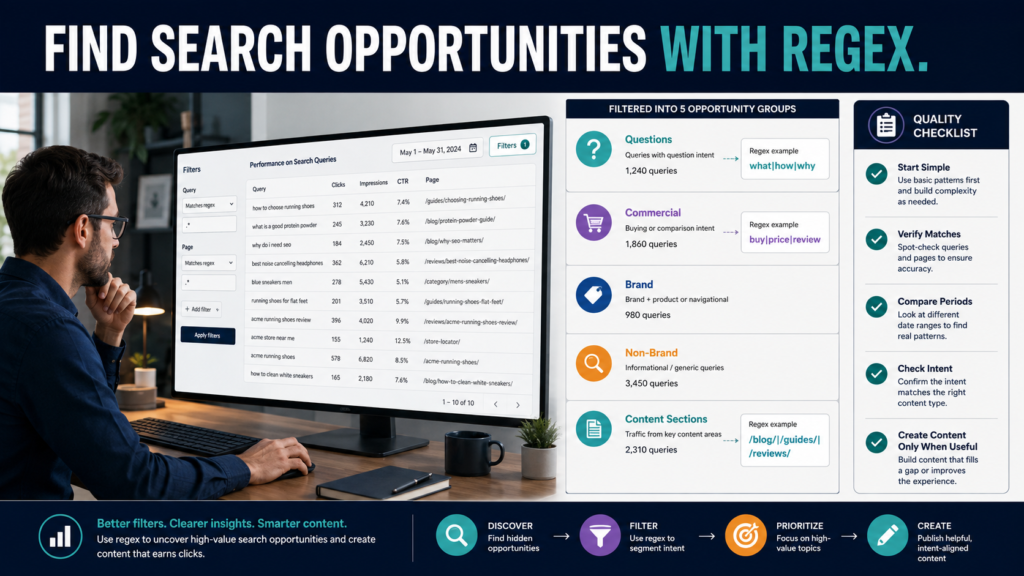
Google Search Console can tell you which queries are producing impressions and clicks for your website.
The challenge appears when hundreds or thousands of queries describe similar intentions using different words.
Regular expressions—usually called regex—can help group those queries.
Google’s current Search Console help documentation says the Search results Performance report supports regex filtering for Queries and Pages. Search Console uses RE2 syntax, allows matching or excluding patterns, and treats regex as a partial match unless you use anchors such as ^ or $.
For a content marketer, that makes regex useful for questions such as:
- Which searches begin with question words?
- Which queries show buying intent?
- Which URLs belong to one content section?
- Which searches contain several possible product names?
- Which query patterns deserve deeper investigation?
You do not need to become a programmer.
A few basic patterns can already be useful.
Key Takeaways
- Search Console supports regex on Query and Page filters.
- Search Console uses RE2 regex syntax.
- The
|character works as an OR operator. - Regex matching is partial by default.
- Use
^when you want a pattern at the beginning. - Use
$when you want a pattern at the end. - Google now has a built-in branded-query filter for eligible sites, so you may not need a custom brand regex for that purpose.
- Regex finds patterns; human review determines whether those patterns represent worthwhile content.
What Is Regex?
Regex is a pattern language used to match text.
Suppose you want queries containing:
- how
- what
- why
- when
Instead of filtering each word separately, you can use:
how|what|why|when
The vertical bar means:
OR
Google itself uses this type of example in its Search Console regex guidance.
Where to Add the Filter
In Search Console:
- Open the Search results Performance report.
- Select + Add filter.
- Choose Queries or Pages.
- Choose Custom (regex).
- Enter the pattern.
- Choose whether results should match or not match the regex.
- Apply the filter.
Google’s current help center documents those steps and notes that multiple values can be separated with |.
Start With Simple OR Patterns
A beginner does not need complicated code.
Suppose you review a website teaching blogging.
You want queries related to:
- traffic
- visitors
- clicks
Use:
traffic|visitors|clicks
Now examine:
- Impressions.
- Clicks.
- CTR.
- Position.
- Pages receiving those queries.
You have converted several related terms into one analysis group.
Find Question Queries
Google’s own regex guidance gives question-word analysis as a practical Search Console use case.
A simple starting pattern:
what|how|when|why
That will match those words anywhere in a query because Search Console regex matching is partial by default.
If you specifically want queries beginning with those words, use an anchor.
For example:
^(what|how|when|why)
The ^ tells Search Console to match from the beginning.
Expand the Question Pattern
You might use:
^(what|how|why|when|where|which|who|can|does|do|is|are|should)
Do not assume every result deserves a new FAQ or article.
Review the actual query intent.
Examples:
how to create a lead magnet
Strong how-to topic.
what is getresponse login
Probably navigational.
Both contain question-style wording.
They need different responses.
Find Commercial Queries
Google also gives transactional terms such as buy|purchase|order as an example of intent analysis.
For a software-review site, you might investigate:
price|pricing|review|cost|vs|alternative
This may surface people comparing products or preparing to buy.
Possible content types:
- Review.
- Comparison.
- Pricing guide.
- Buying guide.
Do not turn every commercial query into an affiliate page.
Answer the decision honestly.
Find Troubleshooting Queries
For a technology website:
error|problem|not working|fix|issue|failed
These terms may reveal visitors struggling with implementation.
Suppose an article receives impressions for:
“welcome email not sending”
but your article only explains how to write a welcome email.
That may reveal a mismatch.
Possible actions:
- Add troubleshooting if it belongs.
- Create a separate troubleshooting guide.
- Leave the article alone if the intent is outside scope.
Find Beginner Queries
Try terms such as:
beginner|first|start|simple|easy
This can show whether your site attracts newer users.
Then examine which pages Google associates with those queries.
If your audience is beginner-focused, this can help confirm whether content matches that positioning.
Find Comparison Queries
For a review site:
vs|versus|compare|comparison|alternative
Now inspect actual query combinations.
Examples:
- GetResponse vs AWeber.
- Canva alternative.
- ProductDyno comparison.
Do not create a comparison until you can provide enough distinct information to justify a separate page.
Use Regex for URL Sections
Regex can filter Pages as well as Queries.
Google gives directory filtering as a practical example.
Suppose your URLs include:
example.com/reviews/...
You can isolate URLs containing /reviews/.
For more variable patterns, regex can become more sophisticated.
This is useful when comparing:
- Blog.
- Reviews.
- Resources.
- Product pages.
Understand Partial Matching
This is an important beginner detail.
Search Console says regex is a partial match by default.
Pattern:
ai
could match text containing those characters inside a longer string.
That may produce unexpected results.
When exact boundaries matter, review matches carefully and use anchors or more specific expressions.
Do not assume the pattern did what you intended.
Use ^ for Starts With
Example:
^how
This limits matches to strings beginning with “how.”
Useful for:
- How-to queries.
- Specific URL prefixes.
- Known naming structures.
Use $ for Ends With
Example:
review$
This targets strings ending with “review.”
Google’s documentation confirms $ can limit matching to the end of the target string.
Again, test the results.
Use “Doesn’t Match Regex”
Search Console allows both matching and not-matching regex filters.
This is useful when removing a known group.
For example:
- Exclude one product family.
- Exclude a directory.
- Exclude question searches.
Do not build extremely complicated exclusion patterns when a normal filter would be easier.
Branded Queries Have Changed in 2026
Historically, a common regex use case was separating branded and non-branded searches.
Google introduced a dedicated branded-query filter in Search Console and said in March 2026 that the feature had become available to all eligible sites. It uses an AI-assisted classification system rather than regex and can account for brand variations, misspellings, and associated products.
If that built-in filter appears in your property, use it.
It may be more convenient than maintaining your own brand expression.
Not Every Site Gets the Branded Filter
Google says eligibility currently depends on factors including using a top-level property and having sufficient query and impression volume.
If the filter is unavailable, a custom regex may still be useful.
Example:
yourbrand|your brand|commonmisspelling
Review the results manually.
Combine Filters
Search Console can filter on more than one dimension at once.
Google gives the example of combining query-grouping with filters such as country and device.
You could investigate:
Question queries + Mobile + United States
or:
Commercial queries + one URL section
This can reveal behavior hidden by site-wide averages.
Compare Time Periods
Regex becomes more useful when combined with date comparison.
Example:
Question-query impressions:
- Last 3 months.
- Previous 3 months.
Ask:
- Are question searches increasing?
- Which pages gained?
- Which terms disappeared?
Google recommends weekly or monthly granularity when date comparisons would otherwise be distorted by day-of-week differences.
Remember Search Console Data Limitations
Filtering query or URL data can affect report totals because Search Console omits anonymized queries and applies data limitations. Google explicitly notes this in its filtering documentation.
Therefore:
Do not expect the sum of every custom segment to reproduce the entire site total perfectly.
Use regex for analysis.
Do not treat it as a complete census of every search.
Build a Content Opportunity Workflow
Step 1
Choose one question.
Example:
“What problems are beginners searching for?”
Step 2
Create a simple regex.
beginner|start|first|simple
Step 3
Review impressions.
Which queries already trigger your pages?
Step 4
Review pages.
Which existing page receives those impressions?
Step 5
Check intent.
What is the searcher actually trying to do?
Step 6
Choose an action.
- Update existing page.
- Add missing section.
- Create separate article.
- Ignore.
Regex should lead to decisions, not automatically to more content.
Practical Example
Imagine a blog receives queries including:
- how to choose a lead magnet
- lead magnet ideas
- how long should a lead magnet be
- best lead magnet for beginners
- lead magnet software review
Use:
lead magnet
Then:
^(how|what|which|can|should)
to isolate question-style searches.
You discover:
how long should a lead magnet be
receives regular impressions.
Your existing article never answers length.
The best action may be adding a short section.
You do not necessarily need a new article.
Use a Regex Research Log
Record:
Research question:
Regex used:
Date range:
Additional filters:
Interesting queries:
Affected pages:
Search intent:
Action:
Follow-up date:
This prevents endless experimentation.
Common Regex Mistakes
Starting too complicated
Use simple expressions first.
Forgetting partial matching
Search Console matches anywhere unless anchored.
Assuming every match is relevant
Read the queries.
Creating articles directly from filtered terms
Search intent comes first.
Ignoring Search Console data limitations
Query totals can be affected by anonymization and truncation.
Rebuilding a brand regex when the new branded filter already works
Use the built-in option when eligible.
Conclusion
Regex can turn Google Search Console from a long list of queries into a much more useful research tool.
You can group questions, commercial searches, troubleshooting terms, page sections, or other meaningful patterns without exporting every row into a spreadsheet.
Start simply.
Use | for OR. Use ^ and $ when position matters. Remember that Search Console uses RE2 syntax and partial matching by default.
Then let human judgment determine what the data means.
Open one Search Console property and use a question-word regex to identify five real questions your existing pages are already appearing for.