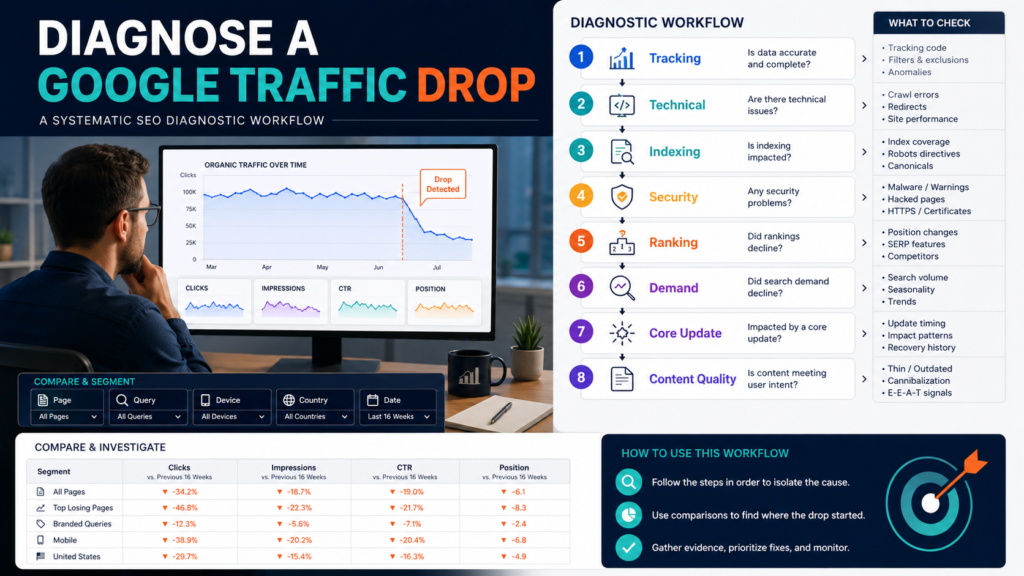
A sudden decline in Google Search traffic can be alarming, but immediately rewriting dozens of articles is usually the wrong first response.
Google’s own troubleshooting guidance lists several possible causes for organic Search declines, including algorithmic changes, ranking movements, technical issues, security problems, changing search interest, and reporting anomalies. Google recommends using Search Console and other evidence to determine which pattern you are seeing before deciding what to change.
The correct process is:
Confirm the decline → identify when it began → determine which pages and queries were affected → rule out reporting and technical problems → evaluate ranking and demand changes → review relevant Google updates → assess content only after the evidence points there.
Key Takeaways
- Confirm that the drop is real.
- Identify the exact date it began.
- Determine whether the decline affects the whole site or a small group of pages.
- Compare clicks, impressions, and position.
- Check technical, indexing, manual-action, and security issues.
- Check Google’s documented data anomalies.
- Compare search demand over time.
- Avoid making radical changes to pages that are still performing well.
- Evaluate affected content against people-first quality questions when necessary.
Step 1: Confirm the Traffic Drop
Do not rely on memory.
Open Search Console.
Choose a meaningful period.
Compare:
- Last 28 days with previous 28 days.
- Last 3 months with previous 3 months.
- Same period year over year for seasonal sites.
Google’s Search Console Performance report provides click, impression, query, page, country, and other search-performance data for this kind of analysis.
Ask:
Did clicks actually decline?
If yes:
By how much, and when?
Step 2: Find the Starting Date
Look for:
- Gradual decline.
- One-day cliff.
- Sudden drop followed by recovery.
- Weekly pattern.
- Seasonal decline.
The graph shape can suggest different causes.
A one-day collapse may point toward:
- Technical problem.
- Tracking/reporting anomaly.
- Indexing issue.
- Security problem.
A slow decline may reflect:
- Ranking changes.
- Competition.
- Search-demand changes.
- Content aging.
Do not assume all declines are algorithm penalties.
Step 3: Check Search Console Data Anomalies
Before diagnosing your website, make sure the reporting system itself did not have a known issue.
Google maintains a Search Console data-anomalies page documenting events that can affect reported information.
For example, Google documented a May 21, 2026 Discover logging error that lowered reported clicks and impressions for that date. It also documented reporting changes associated with the May 7, 2026 removal of FAQ rich results.
If your decline lines up exactly with a documented reporting anomaly, changing your website will not solve it.
Step 4: Compare Clicks and Impressions
Different patterns tell different stories.
Clicks Down, Impressions Stable
Possible causes:
- Lower position.
- Lower CTR.
- Different search-result layout.
- Query mix changed.
Clicks and Impressions Both Down
Possible causes:
- Rankings dropped substantially.
- Search demand declined.
- Pages stopped being indexed.
- Technical problem.
- Search visibility declined across many queries.
Impressions Up, Clicks Flat
Possible causes:
- Site is appearing for broader queries.
- Lower average positions.
- More low-intent impressions.
Do not diagnose from one metric.
Step 5: Identify the Affected Pages
Go to Pages.
Compare periods.
Ask:
- Are all pages down?
- One category?
- One product type?
- Only old articles?
- Only reviews?
- Only one website section?
Suppose:
80% of the decline comes from three articles.
That is a page-level problem, not necessarily a site-wide problem.
Focus your investigation.
Step 6: Examine the Queries
For affected pages, review queries.
Ask:
- Which queries lost clicks?
- Did impressions decline?
- Did position decline?
- Did branded traffic decline?
- Did non-branded traffic decline?
- Did the page begin ranking for unrelated terms?
Google has added more ways to analyze query patterns over time, including query-group capabilities in Search Console Insights.
The important goal is understanding what search behavior changed.
Step 7: Check Ranking Movement
Google’s own traffic-drop guidance distinguishes small position changes from large drops.
A move from position 2 to 4 can cause a meaningful click decline without indicating that the page is fundamentally broken.
A move from top positions to far lower results across many queries deserves deeper investigation.
Do not rewrite a page aggressively because its average position moved slightly for a week.
Google specifically recommends avoiding radical changes when a page is already performing well and experiencing normal position fluctuations.
Step 8: Check Indexing
Use:
- Page Indexing.
- URL Inspection.
- Sitemap reports.
Questions:
- Is the page indexed?
- Can Google crawl it?
- Was
noindexadded? - Is robots.txt blocking it?
- Was the canonical changed?
- Did the URL redirect?
- Did a WordPress setting change?
A perfect article cannot receive normal Google Search traffic if Google cannot index the intended URL.
Step 9: Check Manual Actions and Security
Search Console includes reports for:
- Manual Actions.
- Security Issues.
Google recommends reviewing these as part of ongoing Search Console monitoring.
If there is a manual action, follow the instructions associated with it.
Do not try random SEO fixes.
Step 10: Review Recent Website Changes
Ask:
- Did the theme change?
- Did URLs change?
- Did hosting move?
- Did an SEO plugin change?
- Were canonical settings modified?
- Was site navigation changed?
- Did you remove content?
- Did you change internal links?
- Did a developer deploy new code?
Document the date.
Compare it with the decline.
Correlation does not prove causation, but timing is useful evidence.
Step 11: Check Google Ranking Updates
Google publishes notable ranking updates.
Its core-update documentation explains that broad core updates are not designed to target individual sites or specific pages. They reassess how systems identify helpful and reliable results as content on the web changes.
If your decline aligns with a documented core update:
- Do not assume penalty.
- Compare affected pages.
- Review content quality.
- Look for patterns across the site.
Google recommends self-assessing the site as a whole when a large ranking drop occurs.
Step 12: Check Search Demand
People may simply be searching less.
Google’s traffic-drop guidance recommends using Google Trends when investigating whether changing search interest contributed to a decline.
Examples:
- Seasonal product.
- Outdated technology.
- News event ended.
- New terminology replaced old wording.
If searches fall 40%, maintaining the same traffic may be unrealistic.
Step 13: Compare Search Console With GA4
Search Console measures what happens before the visitor reaches the site from Google Search.
Google Analytics measures on-site behavior and broader traffic channels.
Google specifically recommends combining the two when troubleshooting performance because the systems answer different questions and will not produce identical numbers.
Ask:
- Did Search clicks decline?
- Did GA4 organic sessions decline?
- Did all traffic decline?
- Did only Google organic decline?
If all traffic disappeared, the issue may be broader than SEO.
Step 14: Evaluate Content Quality
Only after technical and demand issues are investigated should you assume content itself requires significant revision.
Google’s people-first guidance recommends examining impacted pages and asking whether they provide:
- Original information.
- Complete coverage.
- Meaningful analysis.
- Value beyond rewriting other sources.
- Trustworthy presentation.
Review the pages that actually lost visibility.
Do not rewrite the entire website because five URLs declined.
Look for Outdated Content
A page may have lost usefulness because:
- Price is old.
- Product changed.
- Screenshots are outdated.
- Advice references a removed feature.
- Better competing resources exist.
- Search intent changed.
Update what needs updating.
Do not change information only to alter the “last updated” date.
Look for Commodity Content
Google’s newer guidance for generative AI search emphasizes unique, useful, non-commodity content rather than attempting special “AI search hacks.”
Ask:
- Does the article add a real workflow?
- Original example?
- Decision framework?
- Current verification?
- Practical experience?
- Useful comparison?
A page that merely repeats the same ten generic tips available everywhere may have less reason to stand out.
Do Not Delete Content in Panic
Suppose fifty articles declined.
Do not immediately delete fifty URLs.
Determine whether each article should be:
- Kept.
- Updated.
- Combined.
- Redirected.
- Removed.
Deleting pages can create additional problems when useful links, backlinks, or navigation depend on them.
A Practical Diagnostic Example
Imagine a blog loses 35% of Search clicks.
The owner discovers:
- Home page traffic stable.
- Reviews stable.
- Ten old tutorials lost most clicks.
- Impressions declined.
- Search positions declined sharply.
- No manual action.
- No indexing errors.
- Decline began during a documented broad ranking update.
Now the owner has a focused task:
Review the ten tutorials.
The correct response is not redesigning the home page.
Create a Traffic-Drop Investigation Log
Record:
Date decline began:
Clicks change:
Impressions change:
Main affected pages:
Main affected queries:
Position change:
Indexing issues:
Manual action:
Security issue:
Website changes:
Google update:
Demand change:
Content findings:
Action:
This prevents emotional decision-making.
Common Traffic-Drop Mistakes
Assuming every decline is an algorithm penalty
Many causes are possible.
Changing the whole site immediately
Find the affected pages first.
Ignoring reporting anomalies
Check Google’s anomaly documentation.
Looking only at average position
Review queries and pages.
Ignoring search demand
People may be searching less.
Publishing more content instead of fixing the problem
Diagnose before expanding.
Making radical changes to successful pages
Google advises caution with pages still performing well.
Conclusion
A Google traffic drop should be treated as a diagnosis problem before it becomes an editing problem.
Confirm the decline. Find the starting date. Check reporting anomalies, pages, queries, rankings, indexing, technical changes, security issues, Search updates, and search demand.
Only then decide whether content needs improvement.
Google’s own guidance stresses that traffic declines can have many causes and that broad ranking changes do not automatically mean your site has done something wrong.
Open Search Console and identify the five pages responsible for the largest portion of your decline before changing anything else.