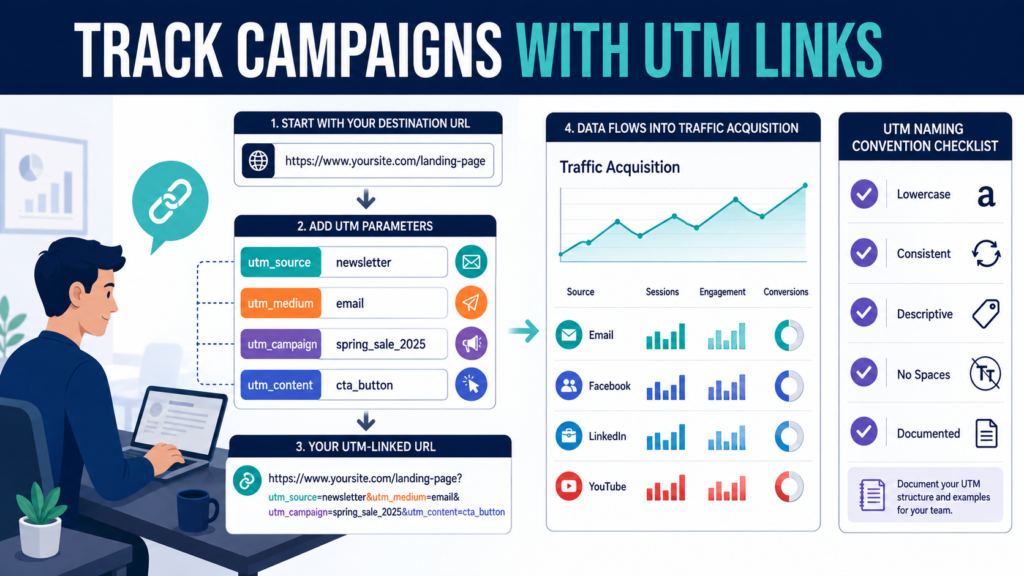
UTM parameters are small labels added to a destination URL so Google Analytics 4 can identify the campaign that sent a visitor.
Google’s current Analytics documentation says that UTM campaign parameters can be added to referral and advertising links and that the resulting values can appear in the Traffic Acquisition report after visitors click those URLs.
For a small business, the most commonly useful parameters are:
utm_sourceutm_mediumutm_campaignutm_content
The biggest challenge is not creating a tagged link.
It is using a consistent naming system so the same traffic source does not appear under five different labels.
Key Takeaways
- Use UTM parameters for campaign links you control.
- Keep source, medium, and campaign naming consistent.
utm_sourceidentifies where the traffic came from.utm_mediumidentifies the marketing type.utm_campaignidentifies the campaign.utm_contentcan distinguish different links or creative versions.- Document your naming rules before several people create links.
- Check the resulting data in GA4 Traffic Acquisition.
What Is a UTM Parameter?
A normal URL might be:
A tagged version might be:
The visitor still reaches the same page.
The additional information helps Analytics identify the campaign.
Google currently documents several available campaign parameters, including utm_id, utm_source, utm_medium, utm_campaign, utm_term, utm_content, and additional platform or creative fields.
Understand utm_source
Google describes utm_source as the referrer or source sending traffic.
Examples:
- newsletter
- youtube
- partner_site
Ask:
Where did this visitor come from?
That is usually the source.
Understand utm_medium
Google describes utm_medium as the marketing medium, with examples such as email or CPC.
Examples for your own naming convention might include:
- social
- video
- referral
- cpc
Ask:
What type of marketing delivered the visitor?
Understand utm_campaign
utm_campaign identifies the particular promotion or initiative.
Examples:
- august_ebook_launch
- ai_starter_kit
- welcome_series
- course_launch
- product_review_campaign
Ask:
What campaign is this traffic associated with?
Avoid:
- test
- new
- campaign1
Those names become meaningless later.
Understand utm_content
Google currently describes utm_content as a way to differentiate creative elements or multiple links within the same campaign.
Suppose an email contains:
- Button near the top.
- Text link near the bottom.
You could use:
utm_content=top_button
and:
utm_content=bottom_text
Now you can distinguish the two links.
Do not add it when there is nothing useful to compare.
Create a Naming Convention First
Decide:
Source Rules
Use platform names consistently.
Choose:
facebook
Do not alternate among:
- fb
- facebook.com
- FB
Medium Rules
Choose one term.
For example:
email
Do not use:
- newsletter
- emailmarketing
as four different mediums unless there is a specific reporting reason.
Campaign Rules
Use descriptive names:
august_ebook_launch
rather than:
campaign5
Use Lowercase
A simple practice is to use lowercase values consistently.
Even when analytics systems can process multiple forms, inconsistent capitalization can create unnecessary reporting fragmentation.
Use:
facebook
instead of mixing:
Consistency matters more than the specific naming philosophy.
Use Underscores or Hyphens Consistently
Campaign names containing spaces can become harder to read or encode.
Choose:
ebook_launch_august
or:
ebook-launch-august
Then follow the same rule every time.
Do not randomly alternate.
Create a Campaign Tracking Sheet
Record:
- Destination URL.
- Source.
- Medium.
- Campaign.
- Content.
- Date created.
- Channel.
- Owner.
- Final tagged URL.
- Notes.
This prevents mistakes.
A spreadsheet becomes especially valuable when several campaigns are active.
Example: Tracking a Newsletter
Suppose the email promotes a new article:
How to Price a Digital Product
You could use:
Source:
newsletter
Medium:
email
Campaign:
digital_product_pricing
Content:
main_button
The resulting URL identifies the traffic as coming from that email campaign.
Example: Tracking Facebook
For the same article:
Source:
facebook
Medium:
social
Campaign:
digital_product_pricing
Content:
organic_post
Now GA4 can distinguish email and Facebook sessions while grouping both under the same campaign.
Example: Tracking LinkedIn
Use:
Source:
linkedin
Medium:
social
Campaign:
digital_product_pricing
Content:
organic_post
Notice that the campaign remains consistent.
Only the source changes.
Example: Tracking YouTube
Suppose a video description links to the article.
Source:
youtube
Medium:
video
Campaign:
digital_product_pricing
Content:
description_link
The values reflect how you want to analyze the traffic.
Use Google’s Campaign URL Builder
Google provides a URL-builder workflow specifically for adding UTM campaign parameters to destination URLs.
A basic process is:
- Enter destination URL.
- Enter campaign source.
- Enter campaign medium.
- Enter campaign name.
- Add optional fields when useful.
- Copy generated URL.
- Save it in your tracking sheet.
- Test it.
Do not rely on memory.
Test Every Link
Before publishing:
- Open the tagged link.
- Confirm the page loads.
- Check parameters remain intact.
- Test mobile.
- Complete any important page action.
- Later confirm the traffic appears correctly in Analytics.
A tracking link that sends visitors to a broken page is worse than no tracking.
Where the Data Appears in GA4
Google states that campaign parameter values can be viewed in Traffic Acquisition reporting.
Useful dimensions can include:
- Session source.
- Session medium.
- Session source / medium.
- Session campaign.
You can then compare:
- Sessions.
- Engagement.
- Key events.
- Purchases where configured.
The campaign label becomes useful only when it is connected with business outcomes.
Do Not Tag Ordinary Internal Links
Avoid adding UTM campaign parameters to links from one page of your own site to another page of your own site.
Campaign parameters are designed to identify acquisition campaigns.
Using them internally can interfere with your understanding of how the visitor originally arrived.
For internal navigation, use normal internal links.
Be Careful With Affiliate Links
If an affiliate network already uses tracking parameters, do not modify the link unless its documentation allows it.
Your extra UTM parameters could:
- Break affiliate attribution.
- Be stripped.
- Interfere with redirects.
Read the affiliate program’s linking rules first.
Be Careful With Email Platforms
Some email services automatically add analytics or tracking parameters.
Before manually tagging every link, determine:
- What the platform already adds.
- Whether it integrates with GA4.
- Whether manual UTM values override anything.
- How links are redirected.
Avoid duplicate or conflicting tracking.
Avoid Putting Sensitive Information in URLs
UTM parameters are visible in the URL.
Do not include:
- Customer names.
- Email addresses.
- Account numbers.
- Private information.
- Passwords.
Use general campaign identifiers.
Create a Small Standard
For a small business, your rules can fit on one page.
Source: newsletter
Medium: email
Source: facebook
Medium: social
Source: linkedin
Medium: social
YouTube
Source: youtube
Medium: video
Then define campaign naming:
topic_month_year
The exact convention is less important than using it consistently.
Use utm_content Selectively
Do not create twenty content variations unless you will use the information.
Good use:
Two buttons in the same email.
Less useful:
Assigning unique utm_content values to every word in the message.
Tracking should answer a business question.
Audit Campaign Names Monthly
Open Traffic Acquisition.
Look for obvious duplicates:
- facebook / social
- Facebook / social
- fb / social
These may represent one platform labeled three ways.
Correct the naming process for future links.
Historical data will generally remain as collected, so prevention is easier than cleanup.
A Practical UTM Workflow
Step 1: Define the campaign
What are you promoting?
Step 2: Define the source
Where will the link appear?
Step 3: Define the medium
What type of marketing is it?
Step 4: Define campaign name
Use one consistent identifier.
Step 5: Add content when useful
Differentiate creative or placements.
Step 6: Generate the URL
Use the URL builder.
Step 7: Record it
Save the exact values.
Step 8: Test it
Confirm destination.
Step 9: Publish
Use the approved link.
Step 10: Review GA4
Evaluate sessions and outcomes.
Common UTM Mistakes
Inconsistent capitalization
Use a naming standard.
Random campaign names
A future report should still make sense.
Tagging internal links
Keep acquisition tracking separate from internal navigation.
Tracking everything
Use parameters only when they answer a question.
Forgetting the destination
Always test the final URL.
Including sensitive information
URL parameters are visible.
Ignoring existing platform tracking
Check what your email or advertising platform already does.
Conclusion
UTM parameters can make Google Analytics 4 far more useful when you promote the same website through email, social media, videos, partners, and other channels.
Google currently supports campaign parameters such as source, medium, campaign, term, and content and reports campaign data through Analytics acquisition reporting.
The difficult part is not generating the URL.
The difficult part is maintaining a clean naming convention.
Create your source, medium, and campaign naming rules before you build your next batch of marketing links.