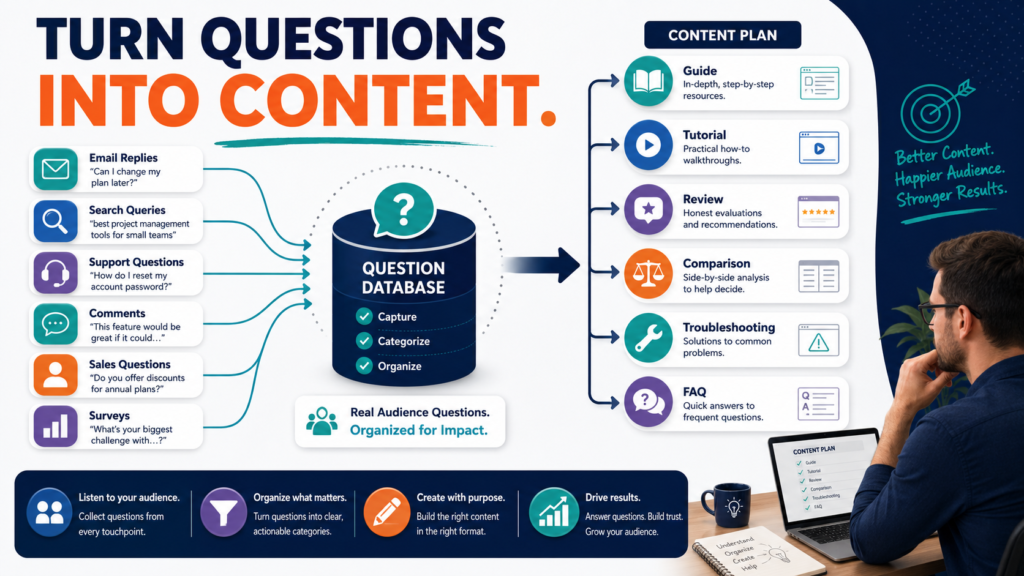
The people you are trying to reach can often tell you what to publish next.
Their questions reveal:
- What they do not understand.
- Which decisions feel difficult.
- What they have already tried.
- What they are afraid of getting wrong.
- Which tools they are comparing.
- What information your existing content is missing.
Instead of starting every content calendar with a keyword tool, begin by collecting questions from your actual audience.
Google’s current people-first content guidance asks creators whether they have an existing or intended audience, whether content helps readers achieve their goals, and whether it provides substantial original value rather than simply summarizing other sources.
Audience questions can help you meet those goals because they are evidence of real confusion and need.
Key Takeaways
- Collect questions from several audience sources.
- Preserve the language people actually use.
- Group similar questions by intent.
- Do not create one article for every wording variation.
- Decide whether a question requires an update or a new page.
- Prioritize recurring and important problems.
- Use AI to organize questions, not invent audience demand.
- Protect private customer information.
- Feed new questions back into existing content.
Build a Question Collection System
Create a spreadsheet with columns:
- Date.
- Source.
- Exact question.
- Topic.
- Audience.
- Search intent.
- Frequency.
- Existing content.
- Recommended action.
- Notes.
Sources may include:
- Email replies.
- Contact forms.
- Customer support.
- Search Console.
- Blog comments.
- YouTube comments.
- Social-media comments.
- Surveys.
- Sales questions.
- Webinar questions.
Do not rely on memory.
Write them down.
Preserve the Original Wording
Suppose someone asks:
“Do I need to buy email software before I have a lead magnet?”
Do not immediately rewrite it as:
“Email infrastructure sequencing strategy.”
The original language tells you how the beginner thinks.
That can influence:
- Article title.
- Introduction.
- Examples.
- FAQ.
- Supporting search phrases.
Google Search Essentials recommends using words people would use to look for content in prominent locations when those words accurately describe the page.
Natural audience language is therefore valuable both editorially and for search relevance.
Remove Private Information
Do not publish:
- Names.
- Email addresses.
- Order numbers.
- Account information.
- Personal situations.
unless you have appropriate permission.
Convert:
“John Smith from 123 Example Street wrote…”
into:
“A reader recently asked…”
The question can be useful without exposing the person.
Group Similar Questions
You may collect:
- How do I make a lead magnet?
- What should my lead magnet include?
- How long should a lead magnet be?
- What is the easiest lead magnet for beginners?
- Should I make an ebook or checklist?
These may belong in one comprehensive article.
Do not create five thin pages merely because the wording differs.
Group according to the underlying problem.
Classify Search Intent
Informational
“What is an autoresponder?”
Tutorial
“How do I create an autoresponder?”
Comparison
“GetResponse or AWeber?”
Product Review
“Is ProductDyno good?”
Troubleshooting
“Why is my welcome email not sending?”
Decision Support
“Should I create an ebook or course first?”
Buying Question
“Which email plan do I need?”
The correct format depends on intent.
Count Frequency Carefully
Repeated questions deserve attention.
But frequency is not everything.
A question asked twice may matter more than one asked twenty times if:
- It involves a major purchasing decision.
- It prevents people from completing a process.
- Existing online information is poor.
- The answer supports a core business topic.
Use frequency as evidence, not an automatic ranking system.
Compare Questions With Existing Content
For each question, ask:
Do we already answer this?
Possible decisions:
Existing article answers it well
No new content needed.
Existing article partly answers it
Update the article.
Existing article uses the wrong format
Create a distinct resource.
No current content
Consider a new article.
Question is outside website focus
Do not pursue it.
This prevents unnecessary content duplication.
Use Search Console as a Question Source
Search Console can reveal phrases people searched before your site appeared.
Review:
- Queries with question wording.
- High impressions.
- Low clicks.
- New queries.
- Unexpected queries.
- Questions associated with a specific page.
A query may reveal that readers expect information the article does not contain.
For example:
Article:
How to Create an Ebook
Search query:
how much does it cost to create an ebook
If cost is an important part of the decision, the article might need a cost section.
Use Email Replies
Email can provide unusually valuable questions because subscribers have already chosen to hear from you.
End educational messages with a simple request:
“What part of this process is still unclear?”
or:
“What is the next question you need answered?”
Save useful responses.
Do not automatically turn private correspondence into public content without removing personal information.
Use Comments
Comments can reveal:
- Misunderstood steps.
- Missing definitions.
- Product confusion.
- Technical problems.
- Requests for examples.
A comment such as:
“I understand the idea, but what would this look like for someone who only has five hours a week?”
could inspire:
How to Run a Simple Content System in Five Hours a Week
The audience gives you the angle.
Use Sales Questions
Questions asked immediately before purchase are especially useful for:
- Reviews.
- Comparisons.
- FAQ sections.
- Buying guides.
Common sales questions include:
- Is there a monthly fee?
- Does this work with WordPress?
- Can I use this commercially?
- Is there a refund policy?
- Is this suitable for beginners?
- Do I need an upgrade?
Answering these clearly can improve trust even when the honest answer discourages a purchase.
Use Customer Support Questions
Support tickets reveal where a product or process breaks down.
Repeated questions may suggest a need for:
- Tutorial.
- Troubleshooting guide.
- Setup checklist.
- Video walkthrough.
- Improved onboarding.
Content should reduce confusion.
Do not publish proprietary customer account details.
Build a Question Library
Create categories.
AI
- Prompting.
- Accuracy.
- Repetition.
- Workflows.
Email Marketing
- Lead magnets.
- Forms.
- Welcome series.
- Automation.
Digital Products
- Ebook ideas.
- Validation.
- Delivery.
- Pricing.
Blogging
- Traffic.
- SEO.
- Updating.
- Content ideas.
Affiliate Marketing
- Product selection.
- Disclosures.
- Links.
- Reviews.
Over time, you have a content database.
Score Questions
Rate each from 1–5.
Audience relevance
How closely does it fit?
Problem importance
Does it block progress?
Frequency
How often is it asked?
Content gap
Is the existing answer weak?
Business relevance
Does it support an appropriate business goal?
Depth
Can it support substantial content?
Evergreen value
Will it remain useful?
Highest score does not automatically win, but the system helps prioritization.
Ask What the Reader Needs After the Answer
One question often leads to another.
Question:
“How do I choose an ebook topic?”
Next:
“How do I validate it?”
Then:
“How do I outline it?”
Then:
“How do I create it?”
This can create a useful content journey.
Do not deliberately withhold important answers to manufacture more pages.
Each article should still satisfy its primary question.
Create Original Examples
If a question is:
“Should I create an ebook or course?”
Create a hypothetical scenario comparing:
- Production time.
- Audience need.
- Demonstration.
- Support.
- Updates.
The example turns a generic answer into practical guidance.
Use AI to Organize Large Question Sets
AI can assist with:
- Grouping similar questions.
- Identifying repeated themes.
- Classifying intent.
- Suggesting categories.
- Detecting overlap.
- Creating a draft content map.
Do not ask AI:
“What questions are my customers asking?”
when you have actual customer data.
Give it the real anonymized questions.
Then review the grouping manually.
Avoid Mass-Producing Question Articles
Google warns creators against producing large amounts of content across many subjects primarily in hopes that some of it attracts search traffic, and it emphasizes content created to benefit an intended audience.
Do not turn 500 Search Console phrases into 500 posts.
Create fewer, more complete resources.
Create Question-Based Content Formats
Complete Guide
Use when several connected questions belong together.
FAQ
Use for short supporting questions inside a larger page.
Tutorial
Use when the person needs instructions.
Review
Use when the question concerns a named product.
Comparison
Use when choosing between options.
Troubleshooting Guide
Use when something is not working.
Checklist
Use when the user needs verification steps.
Choose the format that solves the problem.
Update Existing Articles
Suppose an article already ranks for:
How to Create a Lead Magnet
Audience questions reveal:
- What size should it be?
- Should it be PDF or video?
- How do I deliver it?
- Can I use AI?
- What should happen after signup?
Instead of creating five new posts, expand the original guide if the answers naturally belong there.
Google’s content guidance encourages substantial, complete treatment of a topic and added value rather than superficial rewriting.
A Monthly Audience-Question Workflow
Week 1
Collect questions.
Week 2
Group and categorize them.
Week 3
Compare them with existing content.
Week 4
Choose:
- One article to update.
- One new article.
- One FAQ improvement.
- One lead-magnet idea.
This produces a manageable editorial loop.
A Practical Example
Imagine a website receives these questions:
- “Should I use GetResponse or AWeber?”
- “Which email software is easiest?”
- “Do I need automation?”
- “How many emails should be in my welcome series?”
- “Can I start free?”
Possible content decisions:
Comparison: GetResponse vs. AWeber.
Buying Guide: What beginners actually need from email software.
Tutorial: Build a three-email welcome series.
Existing Article Update: Add free-plan considerations.
Four content decisions emerge from five genuine questions.
Common Mistakes
Creating content from keywords only
Keywords do not always explain the problem.
Treating every question as a new article
Combine overlapping intent.
Ignoring exact customer language
Readers often describe problems more clearly than marketers.
Publishing private information
Anonymize audience data.
Asking AI to invent demand
Use real questions when you have them.
Failing to update old content
New questions may reveal missing sections.
Choosing only commercial questions
Educational questions build trust.
Conclusion
Customer questions can become one of the most useful content-research systems available to a small website.
Collect them. Preserve the wording. Remove private information. Group them by underlying problem and search intent. Then compare those questions with the content you already have.
Sometimes the best answer will be a new article.
Sometimes it will be one paragraph added to an existing guide.
Sometimes the right decision is not to publish anything.
Create a simple question spreadsheet today and record the next ten genuine questions you receive before planning another content batch.