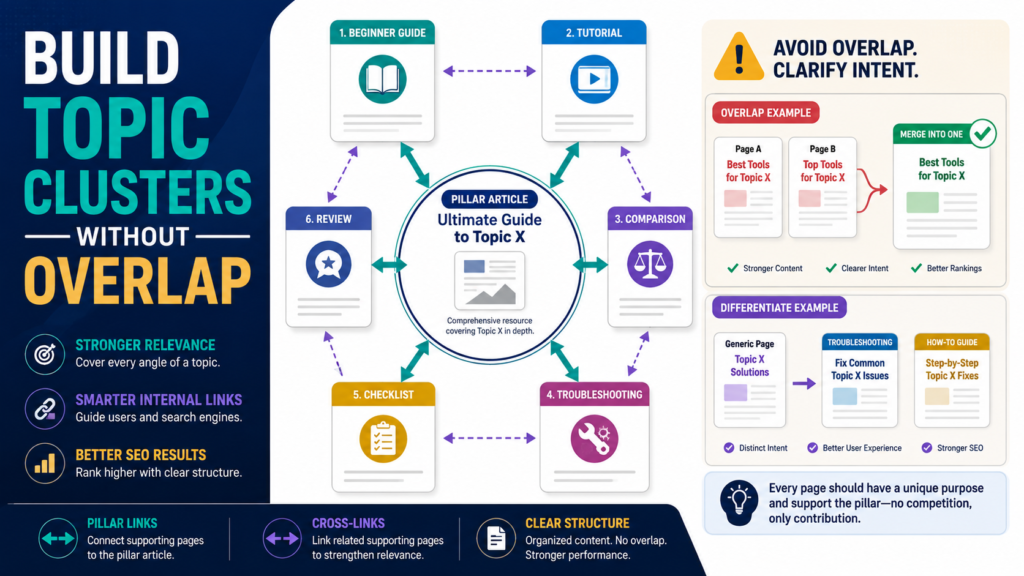
A topic cluster can help organize a growing website, but it can also create unnecessary duplication if every small keyword variation becomes a separate post.
The goal of a topic cluster is not to manufacture dozens of articles around the same phrase.
It is to build a useful collection of pages that answer different questions within one broader subject and connect them through a logical website structure.
Google recommends creating sites that are easy for users to navigate, linking important pages from other relevant pages, using concise and relevant anchor text, and avoiding repetitive content.
Those principles provide a stronger foundation than blindly following a fixed “pillar plus twenty posts” formula.
Key Takeaways
- Begin with a broad audience problem, not a keyword spreadsheet.
- Give every supporting article a distinct search intent.
- Do not create separate pages for minor wording variations.
- Use internal links when they genuinely help readers.
- Combine or differentiate overlapping articles.
- Create logical navigation around important subjects.
- Use Search Console to identify pages competing for similar queries.
- Remember that “topic cluster” is a planning method, not a special Google ranking requirement.
What Is a Topic Cluster?
A topic cluster is a group of related pages organized around a broader subject.
For example:
Broad Topic: Email List Building
Possible supporting content:
- How to choose a lead magnet.
- How to create a signup page.
- How to write a welcome series.
- GetResponse review.
- AWeber review.
- Why email subscribers are not confirming.
- Email-list compliance checklist.
- Email segmentation for beginners.
These pages are related without being identical.
Each solves a different problem.
What Is a Pillar Page?
A pillar page is a broad resource that introduces or organizes the larger subject.
For example:
Beginner’s Guide to Building an Email List
It may explain:
- Why permission matters.
- Lead magnets.
- Signup forms.
- Email software.
- Welcome sequences.
- Segmentation.
- Measurement.
The pillar does not need to reproduce every detailed tutorial.
Instead, it can introduce important subtopics and direct readers toward deeper pages when appropriate.
Do You Need a Pillar Page?
No.
Not every website needs a formal pillar-page system.
A small website may be easier to manage with:
- Clear categories.
- Related articles.
- Useful navigation.
- Descriptive internal links.
The important principle is logical organization.
Google’s current guidance says site structure should be easy for users to navigate and important pages should be linked from other relevant pages.
Do not create a 5,000-word pillar page merely because an SEO diagram told you to.
Start With the Audience Problem
Choose a broad subject.
For example:
Digital Product Creation
Then list the decisions a beginner must make:
- What should I create?
- Who is it for?
- How do I validate the idea?
- Should I create an ebook or course?
- How should I price it?
- How do I deliver it?
- How do I build an email funnel?
- Which software do I need?
- How do I improve the product later?
Each question may justify a separate page because the reader’s intent differs.
Group Questions by Intent
Before creating articles, classify the question.
Informational
“What is a digital product?”
Decision support
“Should I create an ebook or course?”
Tutorial
“How do I create an ebook?”
Commercial investigation
“Best digital-product delivery software.”
Review
“ProductDyno review.”
Troubleshooting
“Why can’t customers access my download?”
Comparison
“ProductDyno vs. another delivery platform.”
A topic cluster becomes stronger when these pages serve different purposes.
Avoid Keyword-Variation Pages
Do not automatically create separate pages for:
- How to start an email list.
- How to build an email list.
- How to create an email list.
- How to make an email list.
- Email-list setup for beginners.
Those phrases probably represent one central search intent.
One complete article can usually answer the question better.
Creating several similar pages makes maintenance harder and may leave readers unsure which page is the main resource.
Understand Duplicate and Very Similar Content
Google explains that duplicate content can exist normally on websites and is not automatically a spam violation. When Google discovers duplicate or very similar pages, it may group them and choose a canonical representative.
This does not mean every similar article will be treated as technically duplicate.
It does mean you should avoid creating substantially similar pages without a useful reason.
Ask:
Would the same reader be satisfied by either page?
If yes, consider combining them.
Build a Content Map Before Writing
Create a table.
| Page | Search Intent | Main Question | Unique Value |
|---|---|---|---|
| Beginner Email List Guide | Informational | How do I start? | Complete beginner workflow |
| Lead Magnet Guide | Tutorial | How do I create the free resource? | Creation process and checklist |
| GetResponse Review | Commercial | Is this platform suitable? | Balanced product evaluation |
| Welcome Series Guide | Tutorial | What emails should I send? | Message-by-message workflow |
| Email Troubleshooting | Troubleshooting | Why are subscribers not engaging? | Diagnostic process |
If two rows look nearly identical, investigate before writing.
Decide Whether to Update or Create
Create a new article when:
- The intent is different.
- The audience is different.
- The reader needs a different format.
- The existing page would become confusing if expanded.
- The subject can support a complete resource.
Update an existing article when:
- The question naturally belongs in the current page.
- The page already ranks or receives impressions for the query.
- The new material would complete the existing answer.
- A second page would overlap heavily.
This decision can prevent unnecessary content expansion.
Create the Central Resource
The central article should define the broader problem.
For example:
How to Start an Email List: Beginner Guide
It might cover:
- Define the subscriber.
- Choose a lead magnet.
- Select email software.
- Build the form.
- Create a welcome sequence.
- Promote the resource.
- Measure results.
The article can remain complete by itself.
Supporting pages provide deeper detail.
Create Supporting Pages Only When They Earn Their Place
Every supporting article should be able to answer:
- What specific question does this page answer?
- Why is the existing pillar insufficient?
- Who needs this deeper explanation?
- What original value can we add?
- What practical action will the reader take?
- What makes this page different from neighboring articles?
If you cannot answer these questions, do not create the page.
Use Internal Links Naturally
Google’s SEO guidance states that descriptive anchor text can help users and search engines understand what a linked page contains before visiting it.
Good:
“Follow this lead-magnet creation checklist before building your signup page.”
Less useful:
“Click here.”
Internal links should help the reader continue the task.
Do not insert fifteen internal links merely because the pages are part of the same cluster.
Link Supporting Pages Back to the Main Resource
A supporting page may link back when the broader guide provides useful context.
For example:
GetResponse Review
could link to:
Beginner Email List Guide
if someone needs the complete system.
Likewise, the beginner guide may link to the review for readers ready to choose software.
This creates a useful navigation relationship.
Create a Logical Website Structure
Google advises that important pages should be reachable from other findable pages and that links should use relevant text.
For WordPress, logical organization may include:
- Categories.
- Menus.
- Breadcrumbs.
- Related-content sections.
- Internal links.
- Hub pages.
Do not create dozens of deeply nested categories unless they improve navigation.
Review Existing Articles Before Adding New Ones
Search your own website.
Use:
- WordPress search.
- Google site search.
- Search Console.
- Spreadsheet content inventory.
Before creating:
How to Create an Ebook With AI
check whether you already have:
- AI Ebook Creation Guide.
- Write an Ebook With ChatGPT.
- AI-Assisted Ebook Workflow.
- Ebook Creation for Beginners.
If those pages serve the same reader, improve one strong article instead.
Use Search Console to Find Overlap
Review important pages and their queries.
Look for:
- Several pages receiving impressions for the same query.
- Pages swapping positions.
- Similar articles receiving similar query sets.
- One page attracting queries intended for another page.
This does not automatically prove “keyword cannibalization.”
It is evidence worth reviewing.
Sometimes two pages legitimately appear because they address different intentions.
Distinguish Content Overlap From URL Duplication
Two concepts are often confused.
Content overlap
Two articles discuss substantially similar subjects.
Technical duplicate URLs
The same or nearly identical page is accessible through multiple URLs.
Google uses canonicalization to select a representative URL among duplicates or very similar URLs.
Technical duplication may result from:
- HTTP and HTTPS variants.
- Tracking parameters.
- Sorting parameters.
- Device variants.
- CMS behavior.
That requires technical handling.
Editorial overlap requires content decisions.
Combine Weak Overlapping Pages
Suppose you have:
- 700-word article on choosing a lead magnet.
- 600-word article on lead-magnet ideas.
- 500-word article on lead-magnet types.
If the pages provide little distinct value, one complete guide may be stronger.
A consolidation process may include:
- Choose the strongest URL.
- Combine unique useful material.
- Remove repetition.
- Update facts.
- Redirect retired URLs appropriately.
- Update internal links.
- Submit the preferred page in the sitemap.
- Monitor Search Console.
When retiring duplicate pages, permanent redirects can be a strong canonicalization signal.
Differentiate Pages That Should Remain
Sometimes both pages deserve to exist.
Example:
How to Create a Lead Magnet
Intent: creation tutorial.
Best Lead-Magnet Software for Beginners
Intent: product evaluation.
Make the distinction obvious in:
- Title.
- Introduction.
- Headings.
- Examples.
- CTA.
- Internal links.
Do not let both pages gradually become general lead-magnet guides.
Build Topic Clusters Around Business Goals
A cluster should support the website’s mission.
For a digital-marketing site:
Cluster: Content Marketing
- Content calendar.
- Content repurposing.
- Search Console content gaps.
- Blog refresh process.
- Topic clusters.
- Google Trends research.
- Content measurement.
Cluster: Traffic Generation
- Organic search.
- Referral traffic.
- Social traffic.
- Email traffic.
- GA4 source analysis.
Cluster: Email Marketing
- Lead magnets.
- Landing pages.
- Welcome series.
- Segmentation.
- Email tools.
This makes the site easier to maintain than hundreds of disconnected topics.
Repurpose Without Creating Duplicate Articles
Affiliate Disclosure: This article contains affiliate links. If you purchase through one of these links, I may earn a commission at no additional cost to you. Affiliate compensation does not determine the conclusions or recommendations presented in this article.
When updating or repurposing material you originally created, you can review Spin Rewriter’s current rewriting tools.
Use rewriting software only for content you own or have permission to modify. A rewritten version still needs a different purpose if it will be published as a separate page.
Changing wording does not create a new search intent.
Create a Visual Cluster Map
A simple diagram can help you manage large content collections.
Place the central subject in the middle.
Around it, list:
- Beginner guide.
- Tutorial.
- Comparison.
- Review.
- Troubleshooting.
- Checklist.
- Case example.
Draw connections.
Then mark:
- Existing.
- Needs update.
- New opportunity.
- Duplicate candidate.
- Retire.
You can review ClickDesigns for creating content maps and website graphics if you want a visual-design tool for these supporting assets.
A Topic-Cluster Quality Checklist
For every planned page:
- Does it answer a distinct question?
- Is the search intent clear?
- Is another page already answering it?
- Can the article provide enough depth?
- Does it fit the website?
- Can it provide original value?
- Does it need to be a separate URL?
- Which related page should link to it?
- Which page should it link back to?
- Could two existing pages be merged instead?
Common Topic-Cluster Mistakes
Creating one page per keyword
Search intent matters more than wording variation.
Forcing a pillar page
Not every topic needs one.
Linking every page to every other page
Links should be useful.
Ignoring old content
A new cluster should account for existing pages.
Rewriting duplicate articles
Different wording does not create different value.
Using canonical tags to solve editorial overlap
Canonicalization is not a substitute for deciding whether two articles should exist.
Creating clusters only for search engines
The structure must help readers navigate the subject.
Conclusion
A useful SEO topic cluster is an organized collection of distinct resources, not a factory for producing minor keyword variations.
Start with one broad audience problem, map the questions people ask at different stages, and give every article a clear search intent and purpose.
Use internal links to help readers move between relevant pages. Merge articles that substantially duplicate one another. Differentiate pages that genuinely serve different purposes.
The strongest cluster is one that makes your website easier to understand for both readers and search systems.
Choose one major subject on your site and create a content map showing what should be kept, updated, created, merged, or removed before publishing another related article.