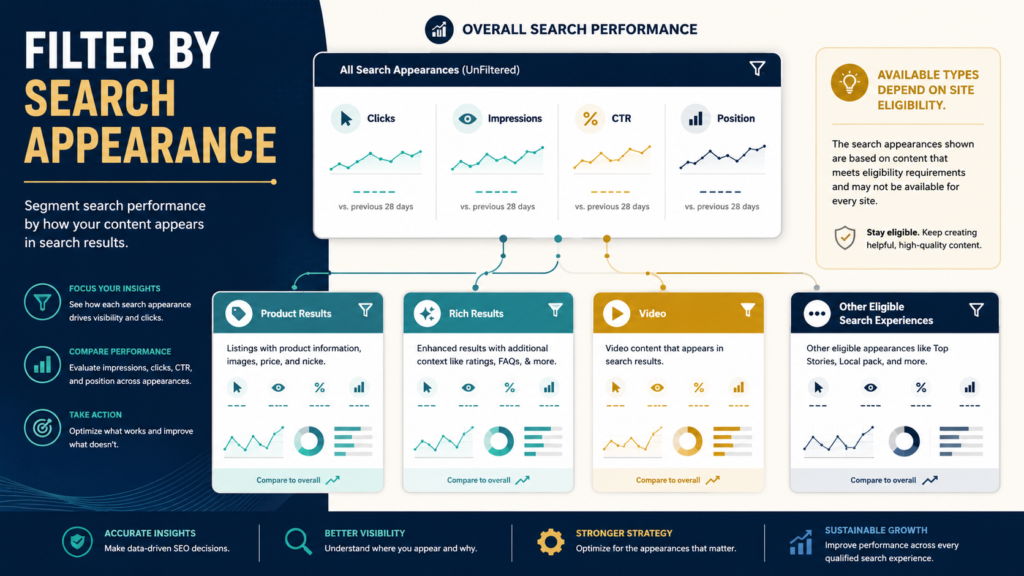
Google Search Console can tell you more than how many clicks your website receives.
Its Performance data can also be analyzed across dimensions such as:
- Queries.
- Pages.
- Countries.
- Devices.
- Search appearances.
Google’s own Search Console documentation explains that Search Performance metrics—including clicks, impressions, CTR, and average position—can be analyzed by these different dimensions.
The Search Appearance dimension is particularly useful when your site is eligible for special search-result experiences.
Instead of asking only:
How is the website performing?
you can sometimes ask:
How is this particular type of search appearance performing?
That distinction can be valuable for ecommerce pages, structured-data implementations, and other eligible Search features.
What Does “Search Appearance” Mean?
Search appearance refers to ways your pages may appear in Google Search beyond a generic standard result.
The exact options displayed depend on:
- Your site’s content.
- Eligibility.
- Structured data where relevant.
- Current Google Search features.
- The reporting types Google currently supports.
Google has historically added specific Search Appearance types for experiences such as Product results so site owners could segment traffic associated with those experiences.
Do not assume every Search Console property will show the same list.
Why the Available List Changes
Search features change.
Google removes some experiences.
Others are added.
For example, Google’s Search documentation updates noted that several structured-data types were phased out of Search and consequently removed from Search Console rich-result reporting and Search Appearance filters.
That means an old SEO tutorial showing a particular Search Appearance option may no longer match the interface you see today.
Use the current report.
Where to Find Search Appearance Data
In the Search Performance report, Search Console provides dimensions and filters for analyzing your traffic.
Google’s current documentation describes Search Performance as providing:
- Clicks.
- Impressions.
- CTR.
- Position.
with dimensions such as queries, pages, countries, devices, and search appearances.
Depending on the current interface and your site’s data, Search Appearance may appear as:
- A tab/dimension beneath the chart.
- A filter option.
- A comparison option.
The labels and available types can evolve.
Start With the Overall Baseline
Before filtering, record:
Clicks
Impressions
CTR
Average Position
Date Range
Then apply the Search Appearance filter.
Why?
Because you need context.
Suppose the entire site receives:
20,000 impressions
but the filtered appearance receives:
1,200 impressions.
Now you understand its proportion.
Example: Product Results
Google introduced Product-result Search Appearance reporting to help eligible sites understand performance associated with product-rich experiences containing details such as pricing or availability.
A merchant might ask:
- How many impressions came through Product results?
- Which queries generated them?
- Which pages appeared?
- Is CTR different from overall performance?
- Is visibility growing?
That is much more useful than saying:
We added structured data, therefore SEO improved.
Search Appearance Does Not Prove Structured Data Caused Rankings
This distinction is critical.
Suppose Product results show:
- 10% CTR.
Your overall site:
- 4% CTR.
You cannot automatically conclude:
Product structured data increased rankings and caused the 10% CTR.
Different queries and search contexts may be involved.
The Search Appearance filter gives you segmentation.
It does not conduct a controlled scientific experiment.
Use Page Filtering Together With Search Appearance
A useful workflow:
- Select a Search Appearance.
- Open Pages.
- Identify which URLs receive impressions.
- Compare those pages.
- Look for anomalies.
You may discover:
- Certain eligible pages are appearing.
- Similar pages are not.
- One page receives most visibility.
- An old page unexpectedly dominates.
Then investigate.
Use Query Filtering
Next look at Queries.
Ask:
- Which search problems trigger the appearance?
- Are queries commercial or informational?
- Are they branded?
- Are they product-specific?
- Do they align with page intent?
This helps separate:
Search-result enhancement
from
actual user demand.
Compare CTR Carefully
CTR can be useful.
But compare similar contexts.
Suppose Product-result CTR is higher than overall CTR.
That is interesting.
But overall CTR may contain:
- Informational queries.
- Branded searches.
- Low-ranking pages.
- Different countries.
- Different devices.
Do not treat two aggregated percentages as perfectly comparable unless you control the context.
Filter by Device
Search appearances can behave differently on:
- Mobile.
- Desktop.
- Tablet.
If a result type performs strongly on mobile but poorly on desktop, examine:
- SERP presentation.
- Query differences.
- Page experience.
- Sample size.
Again, do not jump immediately to cause.
Filter by Country
If your site serves multiple markets, Search Appearance performance can vary geographically.
Use country filters to determine whether:
- Visibility is concentrated in one market.
- Queries differ.
- CTR differs substantially.
Search Console’s general filtering system supports analysis by geography and other dimensions.
Do Not Expect Every Structured-Data Type to Produce a Search Appearance
Adding schema does not guarantee:
- Rich result.
- Search Appearance report.
- Higher rank.
- More clicks.
Google determines whether a page is eligible and whether enhanced presentation is appropriate.
The list of supported Search features changes over time. Google’s current Search appearance documentation provides the broader reference for features that can influence how pages appear in Search.
Use the Rich Results Test for Eligibility Questions
Search Appearance reporting answers:
What performance data exists?
If you are troubleshooting structured-data eligibility, Google’s Rich Results Test is a separate diagnostic tool.
Do not confuse reporting with validation.
Search Appearance Data Has the Same Broader Search Console Limitations
Google notes that Search Performance data is subject to privacy filtering and data-processing limits. Some anonymized queries will not be itemized even though their activity may contribute to totals.
Therefore, filtered tables do not necessarily reveal every underlying search query.
Example Analysis
Suppose an ecommerce site has:
All Search
- 100,000 impressions.
- 4,000 clicks.
- 4% CTR.
Product Results
- 20,000 impressions.
- 1,200 clicks.
- 6% CTR.
What can you say?
Reasonably:
Product-result appearances represent a meaningful portion of reported visibility and currently show a higher aggregate CTR than the site’s overall Search data.
What should you not say?
Product schema boosted rankings by 50%.
The data does not establish that.
Compare Over Time
Use:
Previous 28 days
vs.
Current 28 days
or another meaningful period.
Track:
- Impressions.
- Clicks.
- CTR.
- Pages appearing.
- Queries.
If the appearance disappears, investigate whether:
- Google changed the feature.
- The page changed.
- Structured data broke.
- Search demand changed.
- Eligibility changed.
Add Context With Search Console Annotations
If you make a major structured-data or template change, mark it with a custom annotation.
Then later you can connect the reporting period with the known implementation date.
That helps avoid relying on memory.
Search Appearance Is Useful During Content Audits
Suppose an old ecommerce article receives:
- Weak standard performance.
- Strong rich-result visibility.
Do not delete it simply because one aggregate traffic number appears modest.
Review all available evidence.
LeeOneMedia’s guide to auditing old blog content without deleting useful pages provides a broader decision framework.
Combine Search Appearance With Query Pattern Analysis
Once you know which Search Appearance matters, you may want to investigate groups of queries.
LeeOneMedia’s guide to using Regex in Google Search Console to find better content opportunities explains how query patterns can be grouped for broader analysis.
For example, Product-result queries might be grouped around:
- “best”
- “price”
- “review”
- brand names
- model numbers
That can reveal the search intent behind the appearance.
Do Not Chase Search Appearance Types Merely Because They Exist
A common SEO mistake is:
Google has this feature, so we need it.
Maybe not.
A recipe feature is useful to a recipe site.
A product feature matters to eligible commercial pages.
The correct Search Appearance depends on content.
Build pages for users first.
Use Search Appearance reporting to understand how eligible content is actually being surfaced.
Create a Search Appearance Review Sheet
Record:
Date Range
Appearance Type
Clicks
Impressions
CTR
Average Position
Top Pages
Top Queries
Device Pattern
Country Pattern
Important Change Since Last Review
Then write one conclusion.
Example:
Product-result visibility increased, primarily from three product pages. No action yet; monitor another 28 days.
That is far better than changing the site because one percentage looks different.
Avoid Overreacting to Small Samples
Suppose a Search Appearance shows:
10 impressions
2 clicks
CTR = 20%.
That does not prove exceptional performance.
Small samples create unstable percentages.
Wait for meaningful data.
What If Search Appearance Traffic Drops?
Use a diagnostic process.
Check:
- Overall Search.
- Specific pages.
- Queries.
- Structured-data validity.
- Search feature changes.
- Google Search Status.
- Seasonality.
Do not immediately rewrite the page.
The site also has a detailed guide on diagnosing a drop in Google Search traffic before changing your website.
Conclusion
The Search Console Search Appearance filter helps separate specific eligible Search experiences from overall Google Search performance.
Use it to answer:
- Which pages appear?
- Which queries trigger them?
- How many clicks and impressions are associated with them?
- How does performance change over time?
But keep the interpretation disciplined.
A Search Appearance is a reporting segment.
It is not proof that structured data caused rankings, and it is not a guarantee that a particular rich-result feature will continue indefinitely.
Use the data as evidence, then investigate the pages and queries behind it.