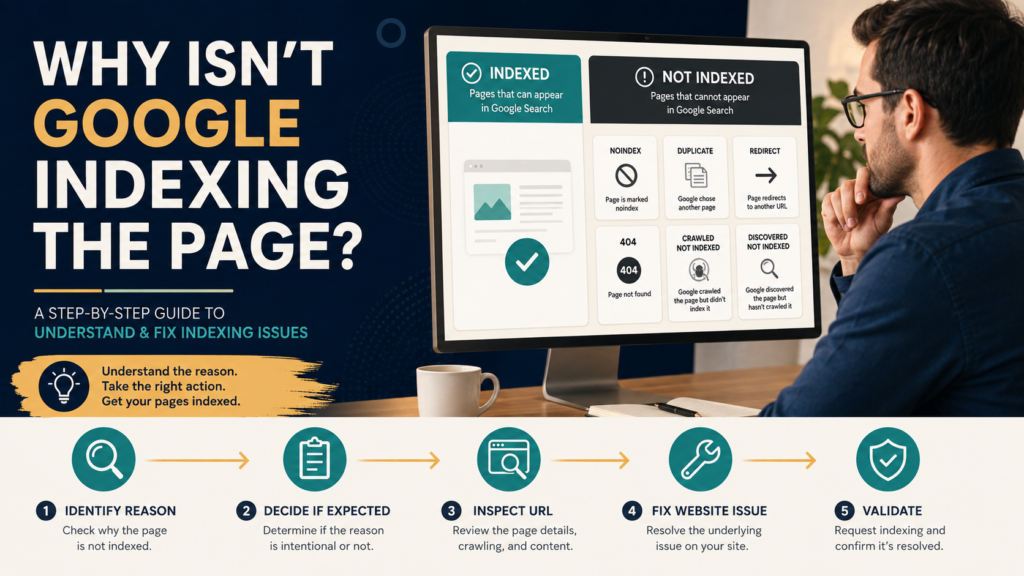
Google Search Console’s Page Indexing report can produce an alarming first impression.
You may open it and discover:
Indexed: 120
Not indexed: 260
The natural reaction is:
Something is terribly wrong. I need all 260 URLs indexed.
That is often the wrong conclusion.
Google’s official Search Console documentation specifically warns that Not indexed is not necessarily bad. Duplicate pages, deliberate noindex pages, redirects, removed pages returning 404, and other URLs may be excluded for perfectly legitimate reasons. The actual goal is to get the canonical version of each important page indexed.
The Page Indexing report is therefore best treated as a diagnostic tool.
Your workflow should be:
Find the reason → decide whether exclusion is expected → inspect examples → fix real problems → validate when appropriate.
What the Page Indexing Report Shows
Google says the report covers the indexing status of URLs it knows about for the Search Console property. Its summary separates indexed and non-indexed URLs and provides reasons pages were not indexed.
The report can help answer:
- Are important pages indexed?
- Are large groups excluded for legitimate reasons?
- Is Google discovering the pages you expect?
- Did an indexing problem begin after a website change?
Do Not Use This Report to Check One Specific URL
Google explicitly says the Page Indexing report is not the right tool for investigating the status of one particular URL.
For that job, use the URL Inspection tool.
This distinction matters.
Page Indexing Report
Sitewide patterns.
URL Inspection
Specific URL.
Use the right level.
Start With Your Important Pages
Before looking at every exclusion, make a short list:
- Homepage.
- Key service/product pages.
- Important articles.
- Major category/hub pages.
- Current landing pages.
Then confirm their indexing status.
Do not spend two hours investigating an old tag archive before checking whether your primary sales page is indexed.
Some URLs Should Not Be Indexed
Examples:
Duplicate URLs
If two URLs show essentially the same page, Google generally needs one canonical version.
Redirects
A URL that redirects elsewhere normally does not need to remain indexed itself.
Removed Pages
An intentional 404 can be correct.
Deliberately Noindexed Pages
Examples may include:
- Private utility pages.
- Internal search pages.
- Thank-you pages.
Google’s documentation emphasizes that exclusions need to be judged against the site’s indexing goal rather than treated as universally bad.
Learn the Difference Between Error and Expected Exclusion
Ask:
Did I want this URL in Google?
If no, exclusion may be correct.
If yes, investigate.
This single question eliminates a huge amount of unnecessary SEO work.
“URL Marked Noindex”
Google found a noindex directive.
If you intended to exclude the page:
No problem.
If the page should appear in Search:
Investigate why the directive exists and remove it appropriately.
Google’s documentation says noindex prevents indexing when Google can crawl the page and see the directive.
“Page With Redirect”
Google reports the URL as a redirect.
That generally means the redirecting URL itself is not the page Google should index.
Ask:
- Is the redirect intentional?
- Does it go to the correct replacement?
- Is there a redirect loop or chain?
If yes and the destination is correct, the exclusion may be expected.
“Not Found (404)”
A 404 is not automatically an SEO emergency.
Suppose you intentionally removed:
/old-event-2023/
and there is no appropriate replacement.
A 404 can be correct.
Google’s documentation specifically says 404 responses are not necessarily a problem when a page was removed without a replacement.
Do not redirect every deleted URL to the homepage.
“Alternate Page With Proper Canonical Tag”
This usually indicates that the URL is an alternate version and another canonical URL is indexed.
Google describes this as a normal condition where no action is required if the canonical selection is correct.
Do not try to force both duplicates into the index.
“Duplicate, Google Chose Different Canonical Than User”
This deserves more attention.
You told Google:
Page A is canonical.
Google decided:
We think Page B is the better canonical.
Inspect:
- User-declared canonical.
- Google-selected canonical.
- Page similarity.
- Internal linking.
- Sitemap entries.
You may have conflicting signals.
“Crawled — Currently Not Indexed”
This status can make website owners nervous.
Google says the page was crawled but is not currently indexed and may or may not be indexed later. Google also says there is no need to repeatedly resubmit that URL for crawling simply because it has this status.
Investigate the page itself.
Questions:
- Is it useful?
- Is it substantially different from other pages?
- Is it thin?
- Is it obsolete?
- Is it internally linked?
- Does Google have a stronger duplicate?
Do not assume the solution is “Request Indexing” 20 times.
“Discovered — Currently Not Indexed”
Google knows about the URL but has not crawled it yet.
Google’s current documentation says this can occur when crawling is postponed, including when Google estimates that crawling at that moment could overload the site.
For a few fresh pages, patience may be reasonable.
For thousands of important pages, investigate:
- Site architecture.
- Internal links.
- Sitemap.
- Server reliability.
- Duplicate URL generation.
“Blocked by Robots.txt”
A robots.txt rule is preventing crawling.
The critical question:
Is the block intentional?
If yes, understand the consequences.
If no, correct the rule.
Google’s technical requirements say Googlebot must be able to access a page for normal indexing, and Search Console’s Page Indexing and Crawl Stats reports can both help diagnose inaccessible URLs.
A Robots.txt Block Is Not the Same as Noindex
This is frequently misunderstood.
Google says robots.txt controls crawling; it is not the recommended mechanism for guaranteeing a URL will not appear in Search. A blocked URL can sometimes still be known from links without its content being crawled.
If you truly need a page excluded, use the appropriate mechanism for the situation.
“Server Error (5xx)”
This can be a genuine problem.
A server error means Google attempted to access the page and the server failed.
Investigate:
- Hosting.
- Firewall.
- Plugin.
- Server logs.
- Intermittent availability.
If many important pages suddenly show server errors, treat it seriously.
Look at the Trend, Not Only the Total
Suppose:
Not Indexed: 400
That number alone is not enough.
What happened over time?
If it has been roughly 400 for months and mostly consists of duplicates and redirects, it may be normal.
If it suddenly jumps from 80 to 400 after a site migration, investigate.
This connects directly with LeeOneMedia’s guide to diagnosing a drop in Google Search traffic before changing your website.
Use Example URLs
Click an issue.
Search Console will show example URLs.
Google notes that the example list is limited and is not guaranteed to contain every URL in a status.
Use examples to diagnose the pattern.
Do not treat the example list as a complete database.
Inspect a Representative URL
For a real problem:
- Open the indexing reason.
- Choose an example URL.
- Open URL Inspection.
- Review Google’s last crawl.
- Check indexing allowed.
- Check canonical information.
- Test the live URL when appropriate.
Now you are moving from aggregate pattern to specific evidence.
Fix the Pattern, Not One Example
Suppose 80 URLs are accidentally noindexed because of a WordPress template setting.
Do not manually fix one URL.
Fix the template or setting causing all 80.
The Page Indexing report is especially useful for identifying systemic problems.
Validate Fix Only After Fixing the Issue
Google provides a validation process for certain indexing issues.
The workflow is:
- Fix all affected instances you can identify.
- Open the issue.
- Request validation.
- Allow Google to recrawl.
Google says validation can fail when it finds remaining affected instances.
Do not click Validate Fix as a substitute for fixing anything.
Check the Sitemap
If important pages are missing from Google’s known URL inventory, inspect your sitemap.
Google says sitemaps can help communicate canonical URLs you want search engines to know about, although submitting a sitemap remains a hint, not a guarantee that every URL will be crawled or indexed.
Make sure important canonical pages are included where appropriate.
Internal Linking Helps Discovery
Important content should not exist in isolation.
Relevant internal links can help visitors and search engines discover related pages.
LeeOneMedia’s guide to using internal links for SEO without stuffing links into every paragraph explains how to add them naturally.
Do Not Delete Pages Just Because They Are Not Indexed
An unindexed page may still:
- Help users.
- Support a customer journey.
- Serve an email campaign.
- Provide support information.
- Be intentionally excluded.
Indexing is not the only measure of usefulness.
If you are considering removing old content, use a proper content review such as How to Audit Old Blog Content Without Deleting Useful Pages.
A Simple Page Indexing Review
Once per month:
Step 1
Check total indexed pages.
Step 2
Look for unusual changes.
Step 3
Review major non-indexed categories.
Step 4
Ask whether each category is expected.
Step 5
Inspect examples from unexpected categories.
Step 6
Fix systemic website issues.
Step 7
Validate where appropriate.
That is enough for many small websites.
What Should Concern You Most?
Prioritize:
- Important pages suddenly removed from index.
- Large unexplained decline in indexed URLs.
- Server errors.
- Accidental noindex.
- Important sections blocked.
- Canonical problems affecting valuable pages.
- Google not discovering major sections of the site.
Do not prioritize:
- Normal redirects.
- Intentional 404s.
- Expected duplicate URLs.
Conclusion
The Page Indexing report is not a scoreboard where the goal is:
100% indexed.
The real goal is:
Important canonical pages indexed, unnecessary or duplicate pages excluded for understandable reasons.
Start with your important URLs.
Investigate unexpected exclusions.
Use URL Inspection for individual pages.
Fix patterns rather than examples.
And remember Google’s own warning:
Not indexed does not automatically mean broken.