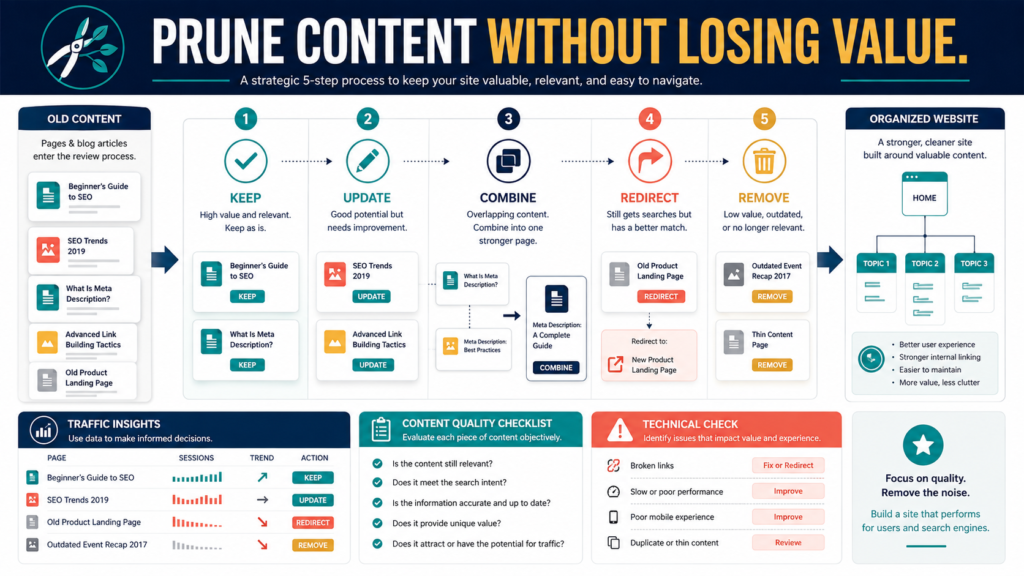
Content pruning is the process of reviewing existing website pages and deciding which should be:
- Kept
- Updated
- Combined
- Redirected
- Removed
Pruning does not mean deleting every article with low traffic.
A page may receive few visits while still serving an important purpose, such as:
- Answering a customer question
- Supporting a product
- Explaining a policy
- Helping a small but relevant audience
- Providing context for another article
The goal is to remove or improve content that no longer serves the website—not to make the page count smaller for its own sake.
Key Takeaways
- Review purpose, accuracy, usefulness, duplication, and traffic together.
- Do not delete a page solely because it has few visits.
- Combine articles when they answer the same primary question.
- Use redirects when a removed page has a useful replacement.
- Keep a record of every content-pruning decision.
Affiliate Disclosure: This article contains affiliate links. If you purchase through one of these links, I may earn a commission at no additional cost to you. Affiliate compensation does not determine the conclusions or recommendations presented in this article.
Begin With a Content Inventory
Do not prune from memory.
Create a spreadsheet containing:
- Page title
- URL
- Content type
- Main topic
- Intended audience
- Primary question
- Publication date
- Last update
- Traffic
- Links
- Affiliate products
- Current purpose
- Recommended action
Open each live page.
The title shown in WordPress may not reveal whether the actual content remains useful.
Decision 1: Keep the Page
Keep a page when it:
- Fits the website
- Answers a useful question
- Contains accurate information
- Serves a distinct purpose
- Supports the customer journey
- Receives relevant traffic
- Earns links
- Helps existing customers
- Requires only minor maintenance
A page does not need to be perfect to remain published.
Add small improvements to a future update list.
Example
An article titled:
How to Choose a Simple Digital-Product Format
may have modest traffic but supports:
- Product-planning articles
- An email sequence
- A lead magnet
- A digital-product course
Its business and reader value may justify keeping it.
Decision 2: Update the Page
Update a page when the topic remains useful but the presentation or information has weakened.
Common update needs include:
- Old prices
- Broken links
- Missing steps
- Weak examples
- Long introduction
- Unclear headings
- Outdated screenshots
- Repetitive sections
- Irrelevant recommendation
- Missing conclusion
Do not rewrite strong paragraphs merely to make the article different.
Keep what works.
Decision 3: Combine Similar Pages
Combine pages when they answer substantially the same question.
Suppose a website has:
- How to Start an Email List
- Email Marketing for Beginners
- Beginner Email-List Setup
- First Steps for Building an Email List
Review whether each page has a distinct purpose.
When they repeat the same definitions and steps, create one complete guide.
The process may include:
- Select the strongest page.
- Identify useful information from the others.
- Update the main page.
- Redirect the old URLs.
- Update internal links.
- Test the redirects.
Do not paste all the articles together without editing.
The combined page should have a logical structure.
Decision 4: Redirect the Page
A redirect sends visitors from an old URL to a relevant replacement.
Use a redirect when:
- A page is combined into another article.
- A product has a new page.
- A URL changes.
- An old guide is replaced.
- Two pages are consolidated.
The replacement should satisfy the same or closely related need.
Do not redirect every deleted article to the homepage.
A visitor expecting an email-marketing guide should not arrive at a generic homepage with no explanation.
Decision 5: Remove the Page
Removal may be appropriate when the page:
- No longer fits the website
- Contains information that cannot be repaired
- Promotes an unavailable product
- Has no useful replacement
- Duplicates another page completely
- Creates legal or customer risk
- Was published accidentally
- Contains thin material with no distinct value
- Serves an abandoned business direction
Before removal, check:
- Internal links
- External links
- Search traffic
- Customer references
- Email links
- Downloadable resources
- Social posts
- Product instructions
The page may still be connected to important materials.
Use More Than Traffic Data
Traffic is one factor.
Also review:
Reader Value
Does the page solve a real problem?
Business Value
Does it support a product, subscriber journey, or customer?
Accuracy
Can the information be trusted?
Distinct Purpose
Does another page already perform the same job?
Update Cost
Can the page be improved reasonably?
Link Value
Do other websites or pages reference it?
Conversion Value
Does it produce relevant signups, clicks, or sales?
A low-traffic support article may prevent customer confusion.
That value may not appear in a general traffic report.
A Practical Pruning Scorecard
Rate each category from one to five.
Audience Relevance
Does the intended reader still need it?
Accuracy
Is the information current?
Completeness
Does it answer the question?
Original Value
Does it contain useful examples or judgment?
Website Fit
Does it support the site’s purpose?
Traffic or Engagement
Do relevant visitors use it?
Business Support
Does it help a product, email list, or customer?
Then select the action.
Do not use the total score automatically.
A low score caused by serious inaccuracy deserves different treatment from a low score caused by limited traffic.
Refreshing Owned Content Responsibly
When updating articles you own or are licensed to modify, rewriting software may help generate alternative language.
You can review the current Spin Rewriter offer.
Use rewriting assistance to:
- Explore clearer wording
- Reduce repetition
- Adapt authorized material
- Prepare alternative drafts
Do not use it to:
- Copy a competitor
- Conceal plagiarism
- Create dozens of near-duplicate pages
- Replace independent research
- Change words without adding value
A meaningful update should improve the information and reader experience.
Improve Visuals Selectively
An older featured image may need replacement when it:
- Uses outdated screenshots
- Contains unreadable text
- No longer matches the title
- Represents an old product
- Displays poorly on mobile
A tool such as ClickDesigns may help create updated blog graphics, visual checklists, and product images.
Do not redesign every image while leaving broken links and incorrect information unchanged.
A Practical Small-Website Example
Imagine a website has 150 blog posts.
The owner discovers:
- 40 useful, current articles
- 35 articles needing updates
- 20 groups of overlapping posts
- 10 obsolete promotions
- 15 thin posts with no distinct answer
- 30 specialized pages serving small but relevant audiences
A poor pruning decision would remove every low-traffic page.
A better plan would:
- Keep the 40 strong articles.
- Update the 35 useful pages.
- Combine overlapping articles into stronger guides.
- Remove obsolete promotions.
- Evaluate thin pages individually.
- Keep specialized pages that still help the intended audience.
The result is a clearer website without sacrificing useful content.
Create a Pruning Priority List
High Priority
- Incorrect customer information
- Broken product links
- Outdated policies
- Duplicate product pages
- Security or privacy concerns
- Pages receiving traffic but giving weak answers
Medium Priority
- Repetitive articles
- Old screenshots
- Weak examples
- Unclear titles
- Missing conclusions
Lower Priority
- Minor wording changes
- Small formatting differences
- Older pages that remain accurate
Fix the highest-risk content first.
Redirect and Link Checklist
After combining or removing content:
- Create the redirect.
- Test the old URL.
- Update internal links.
- Update navigation.
- Review the sitemap.
- Check product documents.
- Update email sequences.
- Update saved social-media links.
- Review campaign URLs.
- Check downloadable PDFs.
A redirect does not correct every old reference automatically.
Keep a Decision Record
Record:
Page:
[Page]
Decision:
[Keep, update, combine, redirect, or remove]
Reason:
[Reason]
Replacement:
[When applicable]
Redirect Tested:
[Yes or no]
Internal Links Updated:
[Yes or no]
Completion Date:
[Date]
Next Review:
[Date]
This prevents a future editor from recreating a page that was removed for a clear reason.
Common Content-Pruning Mistakes
Deleting Based Only on Low Traffic
Consider customer and business value.
Removing a Page Without a Replacement Plan
Check how people currently reach it.
Combining Unrelated Questions
A large article should still have a focused purpose.
Keeping Every Page Because Work Was Invested
Past effort does not make content useful today.
Updating Only the Date
Complete a meaningful review.
Failing to Test Redirects
Open every old URL after the change.
Content-Pruning Checklist
Purpose
- Audience still relevant
- Main question clear
- Website fit confirmed
- Business role understood
Quality
- Answer complete
- Examples useful
- Information current
- Repetition controlled
Performance
- Traffic reviewed
- Conversions reviewed
- Links reviewed
- Customer value considered
Decision
- Keep
- Update
- Combine
- Redirect
- Remove
Completion
- Redirect tested
- Internal links updated
- Sitemap checked
- Decision recorded
Conclusion
Content pruning should protect useful pages while removing duplication, outdated information, and unnecessary website clutter.
Review the page’s purpose, accuracy, usefulness, traffic, links, and business role before choosing an action.
Begin with ten high-priority pages and assign each one a clear decision rather than deleting large groups at once.