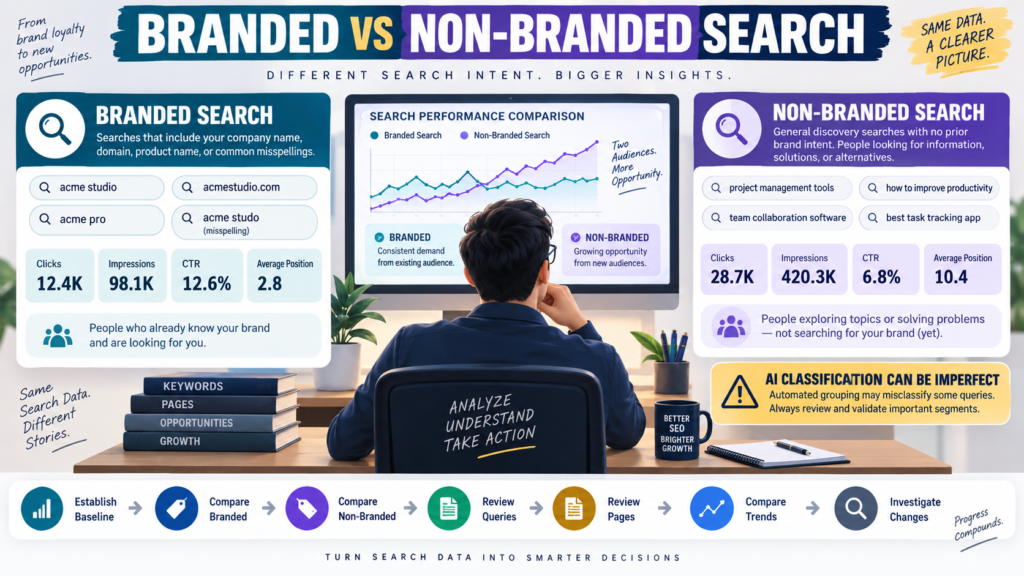
For years, SEO analysts often separated branded and non-branded search traffic manually.
They created query filters containing:
- Business name.
- Domain.
- Product names.
- Common misspellings.
Everything else was treated as non-branded.
Google Search Console now provides a native branded and non-branded query filter for eligible sites.
Google says the feature uses an AI-assisted classification system to identify branded searches, including brand names, variations, misspellings, and closely associated products or services. Google expanded the feature to eligible sites in March 2026.
Google Search Console branded query documentation
The filter can make SEO analysis easier.
But it should not become:
Branded = bad SEO
and:
Non-branded = good SEO.
Both can matter.
What Is a Branded Query?
Google describes branded queries as searches associated with your brand.
That can include:
- Brand name.
- Domain.
- Brand-specific product.
- Common variation.
- Misspelling.
For example, imagine a company called:
Example Media
Branded searches might include:
- Example Media.
- examplemedia.com.
- Example Media course.
- ExampleMedia.
- A uniquely named product belonging to that company.
Google’s classification is AI-assisted rather than being based only on a simple exact-match keyword list.
What Is a Non-Branded Query?
Non-branded searches do not intentionally reference the recognized brand.
Examples:
- best beginner email software.
- how to create a digital product.
- GA4 landing page report.
- WordPress membership plugin.
These searches often represent broader discovery.
The searcher may not know your business exists yet.
That makes non-branded visibility particularly useful for content-driven audience growth.
Where to Find the Filter
Google’s current instructions say to open the Search results Performance report and use the Query filter to select branded or non-branded queries. The filter applies to eligible sites and can be used across supported Search types including Web, Image, Video, and News.
If you cannot see the filter, do not assume something is broken.
Google notes that availability depends on eligibility and sufficient search data.
Why Branded Traffic Matters
Branded searches can indicate:
- Brand awareness.
- Existing customer interest.
- Word-of-mouth.
- Returning visitors.
- Marketing campaign impact.
- Product recognition.
Suppose searches for your brand increase after:
- YouTube promotion.
- Podcast appearance.
- Email campaign.
- Conference.
- Advertising.
The increase may tell you that more people are intentionally looking for the brand.
That is meaningful.
Why Non-Branded Traffic Matters
Non-branded search can show whether people discover your website before they know you.
For a content site, examples may include:
- how to fact check AI content.
- beginner digital product checklist.
- GA4 traffic acquisition report.
- email marketing comparison.
This traffic often reflects broader SEO visibility.
A site depending entirely on branded queries may have strong brand demand but limited discovery.
A site with non-branded traffic can reach new people.
Establish the Overall Baseline First
Before filtering, record:
- Clicks.
- Impressions.
- CTR.
- Average position.
Then apply:
Branded
and:
Non-branded
Now you can understand how each segment contributes.
Avoid looking at a single percentage without the underlying totals.
Example
Suppose total search clicks are:
1,000
Branded:
300
Non-branded:
700
That gives you a useful mix.
Now compare with the previous equivalent period.
Maybe branded clicks increased 50%.
Maybe non-branded clicks remained flat.
That could suggest stronger brand demand without equivalent discovery growth.
Another site may show the opposite.
Do Not Compare CTR Without Context
Branded queries often have strong CTR because the searcher is specifically looking for you.
Suppose:
Branded CTR:
28%
Non-branded CTR:
4%
Do not conclude:
“Our non-branded SEO is terrible.”
The search intent is completely different.
A person typing the exact business name is much more likely to choose that website.
Use CTR within the appropriate context.
Average Position Can Also Differ Naturally
Branded queries may rank very strongly.
You own the brand.
Non-branded queries may compete against:
- Large publishers.
- Software companies.
- Government sites.
- Established specialists.
- Other bloggers.
Therefore, branded average position and non-branded average position should not be expected to match.
Review Non-Branded Queries for Discovery Opportunities
Filter:
Non-branded
Then open:
Queries
Look for:
- High impressions.
- Relevant searches.
- Low or moderate clicks.
- New topics.
- Questions your content already partially answers.
This can reveal content opportunities.
Do not automatically create an article for every query.
First determine whether the search:
- Fits the website.
- Matches audience intent.
- Supports useful content.
- Is already covered.
Review Pages Too
After applying the non-branded filter, open:
Pages
Which pages attract people who did not explicitly search for the brand?
Those pages may be important discovery assets.
Examples:
- Tutorials.
- Reviews.
- Comparisons.
- Definitions.
- Troubleshooting guides.
Then ask:
What does this page do well?
Do not simply copy its format.
Use Branded Queries for Brand Monitoring
Filter to Branded.
Look for:
- Brand name variations.
- Product names.
- Common misspellings.
- Brand + review.
- Brand + login.
- Brand + pricing.
These can reveal what existing awareness looks like.
A sudden increase in:
Brand + review
may have a different meaning from:
Brand + login
The branded category is only the first layer.
AI Classification Is Not Perfect
Google explicitly cautions that some queries may be incorrectly classified as branded or non-branded. The classification is intended for analysis and has no effect on rankings.
Therefore:
Do not treat the categories as absolute truth.
If an important query looks misclassified, investigate it manually.
Manual Regex Still Has a Role
The native filter reduces the need to create complicated brand regex patterns.
But custom query filtering can still help when you want to analyze a specific set of searches.
For example:
- One product family.
- One topic.
- Question-style searches.
- Certain modifiers.
My guide to using regex in Google Search Console to find better content opportunities explains that more targeted approach.
The native branded filter and regex filters solve different problems.
Compare Equivalent Date Ranges
To measure growth, compare:
Last 28 Days
with:
Previous 28 Days
while keeping the same branded/non-branded filter active.
Do not compare:
Branded this month
with:
All traffic last month.
Keep the segment consistent.
My Search Console date-range comparison guide explains why this matters.
Example: Brand Growth Without SEO Growth
Suppose:
Branded clicks:
Up 40%.
Non-branded clicks:
Flat.
Possible interpretation:
Brand awareness increased, while general search discovery did not change much.
Potential causes could include:
- Offline exposure.
- Social media.
- Email.
- Advertising.
- YouTube.
Do not automatically credit SEO.
Example: Non-Branded Growth
Suppose:
Branded:
Stable.
Non-branded:
Up 30%.
Now investigate:
- Which queries grew?
- Which pages grew?
- Did new articles start ranking?
- Did impressions increase?
- Did CTR improve?
That may represent broader organic discovery.
Example: Both Decline
If both branded and non-branded clicks fall, the problem may be broader.
Check:
- Search demand.
- Website changes.
- Indexing.
- Search visibility.
- Seasonality.
The filter helps narrow the diagnosis.
Use Search Console Insights as a Second View
Google also incorporates branded/non-branded information into Search Console Insights for eligible sites.
My guide to using the Search Console Insights report without treating every trend as an SEO emergency explains how to use that higher-level report.
Think of:
Insights = pattern discovery
and:
Performance report = deeper investigation
A Simple Monthly Brand Search Review
Record:
Total Clicks:
Branded Clicks:
Non-Branded Clicks:
Branded Impressions:
Non-Branded Impressions:
Branded CTR:
Non-Branded CTR:
Top Branded Query:
Top Non-Branded Query:
Top Discovery Page:
Largest Change:
Action Needed?:
Do this monthly rather than checking every day.
Do Not Try to Eliminate Branded Traffic
A strange SEO goal would be:
“I want all traffic to become non-branded.”
Strong businesses often want both:
Brand Demand + New Discovery
Branded searches indicate awareness.
Non-branded searches can expand reach.
The best mix depends on the business.
Conclusion
Search Console’s branded and non-branded query filter makes it easier to separate two different types of search behavior.
Use branded queries to understand people intentionally looking for your company, domain, or recognized products.
Use non-branded queries to understand how people discover you through broader search needs.
Compare:
- Clicks.
- Impressions.
- CTR.
- Average position.
- Queries.
- Pages.
- Date trends.
But remember that Google’s classification can occasionally be wrong, and branded and non-branded searches naturally behave differently.
The goal is not to declare one type better.
It is to answer two separate questions:
Are more people actively searching for my brand?
and:
Are more people discovering me before they know my brand?
Those questions can tell you much more than total search clicks alone.