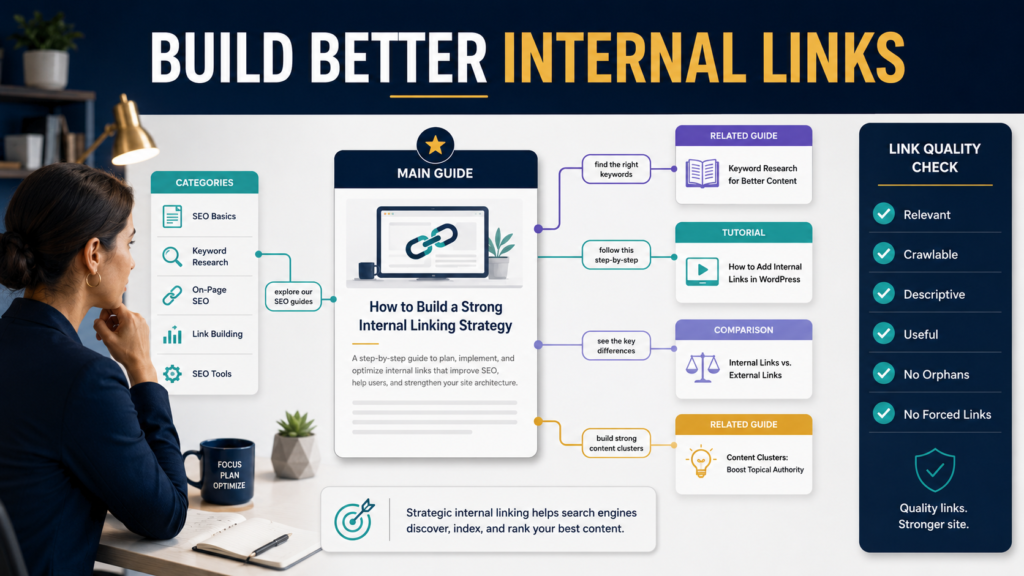
Internal links help people move between related pages on your website, and they also help Google discover pages and understand relationships between content.
Google’s current Search Central guidance says links are used to find new pages to crawl and as a signal for understanding page relevance. It also recommends making links crawlable and using anchor text that is descriptive, reasonably concise, and relevant to both pages.
That gives website owners a useful internal-linking principle:
Add a link when another page genuinely helps the reader continue the task. Use clear anchor text that explains where the link leads.
You do not need to force an arbitrary number of internal links into every article.
Key Takeaways
- Internal links should primarily help readers navigate.
- Use standard crawlable links with real destination URLs.
- Use descriptive anchor text instead of generic “click here” wording.
- Link to closely related pages.
- Make important pages reachable from other useful pages.
- Avoid linking every repeated keyword.
- Review older content for natural opportunities to link to newer articles.
What Is an Internal Link?
An internal link connects one page on your website to another page on the same website.
Examples:
A blog post about email-list building links to:
How to Create a Lead Magnet
A digital-product article links to:
Ebook vs. Online Course for Beginners
A product comparison links to:
Complete Email Marketing Buying Guide
These links help the visitor find deeper information without returning to the navigation menu.
Why Internal Links Matter
Google currently explains that links can help it discover pages and understand relevance.
For readers, internal links can:
- Explain a prerequisite.
- Provide deeper instruction.
- Answer a follow-up question.
- Offer a comparison.
- Connect to a review.
- Lead to a related resource.
The best internal links serve both navigation and content understanding.
Make Sure Links Are Crawlable
Google’s current documentation says a standard <a> element with an href attribute is the reliable crawlable link format and cautions that script-only or nonstandard link implementations may not be parsed reliably.
For most WordPress users, the normal editor’s link function creates the proper structure automatically.
The practical lesson is:
Use ordinary WordPress links rather than trying to build clever JavaScript navigation for simple article links.
Use Descriptive Anchor Text
Anchor text is the visible text the reader clicks.
Google specifically recommends descriptive, concise, relevant anchor text.
Weak:
“Click here.”
Better:
“Follow this beginner lead-magnet creation guide.”
Weak:
“Read more.”
Better:
“Compare ebook and online-course creation for beginners.”
The second version helps the reader know what will happen after the click.
Do Not Over-Optimize Anchor Text
Descriptive does not mean repeating the exact search phrase every time.
Suppose the destination article is:
How to Build an Email List for Beginners
Natural anchors may include:
- Beginner email-list guide.
- Start your first email list.
- Complete email-list setup.
- Build a permission-based subscriber list.
You do not need:
how to build an email list for beginners
every time.
Use natural language.
Link Where the Reader Needs the Information
Place the internal link close to the sentence or paragraph that creates the need.
For example:
“If you have not chosen the subscriber incentive yet, begin with this guide to creating a focused lead magnet.”
That is better than adding a large block at the end containing twenty unrelated links.
Context helps.
Link From Broad Articles to Detailed Articles
A broad article may briefly explain several subjects.
Example:
Beginner Guide to Email Marketing
Supporting pages might include:
- Create a lead magnet.
- Build a landing page.
- Write a welcome series.
- Compare email platforms.
- Segment subscribers.
The main article introduces each subject.
The supporting articles provide depth.
Link Detailed Articles Back to Useful Broader Resources
The relationship can work both ways.
A detailed article on:
How to Write a Welcome Sequence
might link back to:
How to Build an Email List for Beginners
for readers who need the entire system.
Do this only when the broader resource genuinely helps.
Avoid Linking Everything to the Home Page
Your home page is not automatically the most useful destination.
If the reader needs:
- A tutorial, link to the tutorial.
- A review, link to the review.
- A category, link to the category.
- A lead magnet, link to the lead magnet page.
Choose the destination according to reader need.
Find Orphan Pages
An orphan page has few or no useful internal links pointing to it.
Potential candidates include:
- Old articles.
- New articles never added to earlier content.
- Product reviews.
- Important resource pages.
Create a content inventory.
Record:
- Page.
- Topic.
- Category.
- Important inbound links.
- Important outbound links.
- Related pages.
Then identify strong pages that are difficult to reach.
Use Search Console to Find Relevant Pages
Search Console can show which pages receive impressions for related queries.
Suppose you want to strengthen an article about:
AI Ebook Creation
Search your site and Search Console for other pages about:
- Ebook topic selection.
- Product validation.
- AI prompting.
- Digital-product delivery.
- Cover creation.
Those are likely internal-link candidates.
Do not link simply because the phrase appears.
Read the destination first.
Use Google Site Search
A quick research method is:
site:yourdomain.com "lead magnet"
This can help find pages that mention the subject.
Review each result manually.
Potential action:
- Add a link from old article to new guide.
- Add link from broad guide to detailed tutorial.
- Remove link to obsolete content.
Review Older Articles When You Publish Something New
Every new article should trigger this question:
Which existing articles should naturally link to this?
Suppose you publish:
GetResponse vs. AWeber for Beginners
Potential older articles include:
- Build an email list.
- Create a welcome sequence.
- GetResponse review.
- AWeber review.
Update only the strongest relevant pages.
This builds connections gradually.
Do Not Add an Arbitrary Number
There is no useful universal rule such as:
- Exactly 3 internal links.
- Exactly 7 internal links.
- One link every 300 words.
A short article may require two.
A comprehensive guide may naturally require ten or more.
Relevance should determine the number.
Avoid Link Blocks That Look Automated
A section such as:
Related:
- Article 1
- Article 2
- Article 3
- Article 4
- Article 5
- Article 6
- Article 7
can be useful when intentionally curated.
But automatically adding dozens of links based on matching words can create clutter.
Choose the resources a person is most likely to need.
Maintain Link Quality
Periodically check for:
- Broken links.
- Redirected URLs.
- Deleted articles.
- Changed product names.
- Incorrect anchors.
- HTTP links when HTTPS versions exist.
- Links pointing to outdated posts instead of current resources.
Internal-link quality is a maintenance task.
Use Internal Links to Support Topic Structure
Imagine a content cluster around:
Digital Products
Main resource:
Beginner Guide to Digital Products
Supporting pages:
- Validate a product idea.
- Price a digital product.
- Ebook vs. course.
- Create a lead magnet.
- ProductDyno review.
- Create a digital product from blog content.
The internal links help a reader move through different questions.
They also communicate the relationship between those pages.
Link to Important Commercial Pages Carefully
Educational articles may naturally link to:
- Product page.
- Lead magnet.
- Review.
- Course.
Do not turn every paragraph into a sales link.
If the article explains product delivery, a link to a detailed ProductDyno review may be helpful.
If the paragraph discusses writing style, it probably is not.
Use WordPress Naturally
In the WordPress editor:
- Highlight relevant text.
- Choose the link function.
- Search for the destination page.
- Select it.
- Confirm the text makes sense.
- Preview the article.
Open internal links in the same tab unless there is a strong user-experience reason to do otherwise.
The reader should feel that the link is part of the website journey.
Conduct an Internal Linking Audit
Choose one important category.
Export or list all pages.
For each page ask:
- Is there at least one useful route to this page?
- Does it link to deeper relevant resources?
- Are any links obsolete?
- Are anchors descriptive?
- Are several links pointing to the same place unnecessarily?
- Are related articles isolated?
Fix the highest-value pages first.
A Practical Internal-Link Workflow
Step 1: Select one important article
Choose a page receiving traffic or supporting an important business subject.
Step 2: Identify the article’s main subtopics
List the questions it introduces.
Step 3: Search your website
Find pages that answer those questions in greater depth.
Step 4: Select only useful destinations
Remove weak or outdated pages.
Step 5: Write contextual anchor text
Explain the destination naturally.
Step 6: Review inbound opportunities
Find older articles that should link to the page.
Step 7: Test every link
Confirm destination and relevance.
Step 8: Repeat with the next important page
Build the structure gradually.
Common Internal-Linking Mistakes
Using “click here” everywhere
Descriptive anchor text gives more context.
Linking every keyword
Not every phrase needs a destination.
Forcing exact-match anchors
Write naturally.
Linking to weak pages
Only link when the destination improves the reader experience.
Ignoring old content
Older articles can provide strong internal-link opportunities.
Leaving pages isolated
Important pages should be discoverable.
Using nonstandard link code
Ordinary crawlable links are the safest approach for basic website navigation.
Conclusion
Internal linking for SEO works best when it begins with reader navigation.
Connect related pages when the second page helps the visitor understand, compare, implement, or continue the subject. Use normal crawlable links and concise descriptive anchor text. Google explicitly recommends those link and anchor-text practices.
Do not chase an arbitrary number of links.
Start with your ten most important articles and identify one or two genuinely useful internal-link improvements for each.